內容簡介
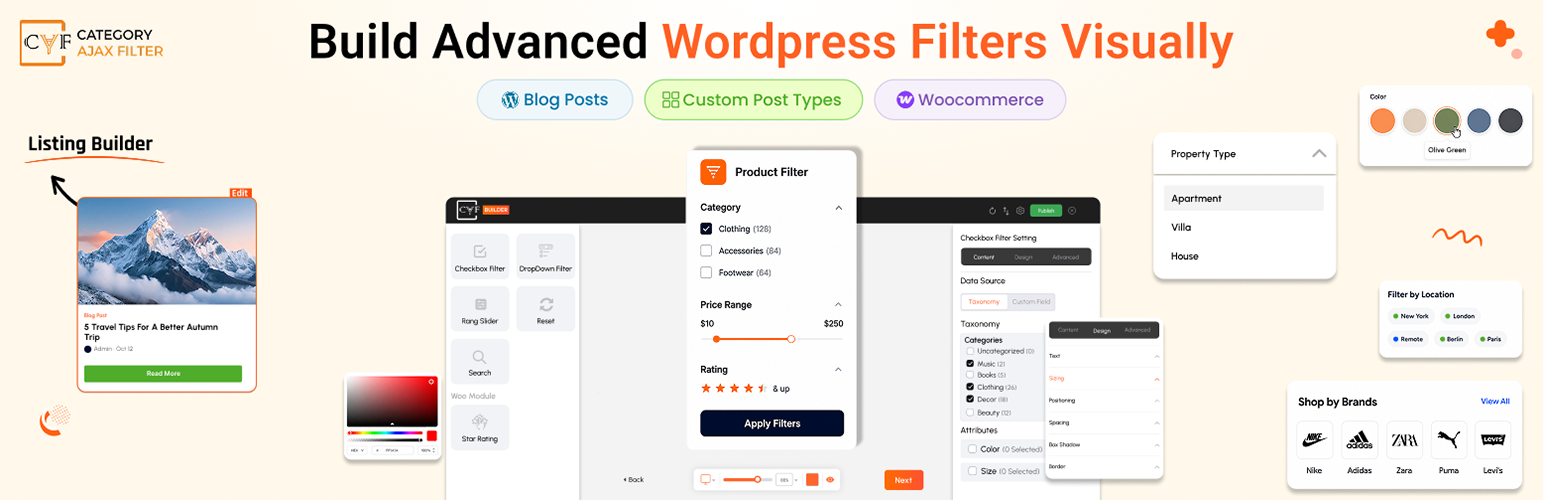
Category AJAX Filter 是一款免費的 WordPress 外掛,能夠讓訪客即時過濾文章、自訂文章類型及 WooCommerce 產品,無需重新載入頁面。透過直覺的拖放式建構器,使用者可以輕鬆設計過濾器,提升網站的使用體驗。
【主要功能】
• AJAX 即時過濾,無需重新載入頁面
• 拖放式三步驟建構器,簡化過濾器創建
• 支援所有文章類型,包括 WooCommerce 產品
• 提供預建模板庫,快速開始設計過濾器
• 自訂設計,無需編碼,適用於各種裝置
外掛標籤
開發者團隊
② 後台搜尋「Category AJAX Filter – Posts, Custom Post Types & Product Filter」→ 直接安裝(推薦)
📦 歷史版本下載
原文外掛簡介
THE COMPLETE FILTER SOLUTION: POSTS, CUSTOM POST TYPES & WOOCOMMERCE PRODUCTS. DRAG & DROP BUILDER INCLUDED.
Category AJAX Filter (CAF) is a free filter plugin for WordPress posts, custom post types and WooCommerce products. Visitors filter by category, tag, taxonomy, attribute or price instantly, with no page reload. Build it visually with the drag & drop CAF Builder, where every element is a module: search box, dropdown, checkbox, range slider and more, all styled and placed however you want, with no coding and separate settings for desktop, tablet and mobile. Add it anywhere with a shortcode. The filter works with your existing layout in Elementor, Divi, WooCommerce shop pages and all major themes or you can create your own listing with drag & drop. Category AJAX Filter Pro adds AI search, analytics, SEO controls, custom field filtering, attribute swatches, product badges and more.
⭐ Key Features
CAF includes the core features you need to create professional, fully customized post or woocommerce product filters. From instant AJAX filtering to pre-built templates, everything is designed for simplicity and power.
AJAX-Powered Instant Filtering: Filters use AJAX to update results instantly without page reload. Visitors see filtered posts and products in real-time as they select categories, tags or search anything across your content.
Drag & Drop 3-Step Builder: The visual CAF Builder simplifies filter creation into three steps: Query & Filters to set filtering logic, Post Item Template to design post and product cards, Layout Settings to control columns, posts per page, gaps, sort order, filter position and pagination.
Works with Any Post Type: Blog posts, any custom post type and WooCommerce products – one filter for all your content.
Pre-Built Template Library: Start with ready-made filter layouts and post item designs. Export your work as JSON to reuse across sites or import templates from other filters you’ve built.
🔗 Supported Post Types & Compatibility
Post types & taxonomies
Filter WordPress posts, any custom post type registered on your site or WooCommerce products – by category, tag, brand, attribute, price or any custom taxonomy you’ve created, using Search, Dropdown, Checkbox and Range Slider modules.
WooCommerce
Full support for simple, variable and grouped products. Connect the filter to your existing shop layout or build a complete product listing with Product Image, Product Price, Add to Cart, Badges modules and more.
Page builder & plugin compatibility
Works with all major page builders including Elementor, Divi and WP Bakery. Compatible with popular custom post type and custom field plugins like ACF, CPT UI and Meta Box. Elementor Loop Builder support is available.
🎬 Free Live Demos
Explore CAF in action across WordPress posts, custom post types and WooCommerce products — every demo runs the free version, filtering instantly with no page reload.
Products Top Bar Filter – WooCommerce
Products Sidebar Filter — WooCommerce
Full Width with Search Demo — WordPress Posts
Side Image & Description Demo — WordPress Posts
Glossy Look Demo — WordPress Posts
Simple Blogs Sidebar Demo — WordPress Posts
Boxed Title Layout — WordPress Posts
Top Dropdown Filter Demo — WordPress Posts
Job Board Filter Demo — Custom Post Type
Recipe Filter Demo — Custom Post Type
👑 Category AJAX Filter Pro
Take your filters to the next level with Category AJAX Filter Pro plugin. It adds advanced filtering, deeper customization and extra integrations. From AI-powered search to WooCommerce swatches and smart badges, Pro gives you the tools to build filtering experiences that match your exact vision.
AI Search: A visitor types “red shoes under 50” and gets the right products. AI Search understands what people mean, matching intent against your content, taxonomy terms, brands, attributes and price – not just exact keywords. Works on posts, custom post types and WooCommerce products. See the live AI Search demo.
Custom Fields in Filters: Extend filtering beyond taxonomies by letting visitors filter with custom fields, including all WooCommerce product custom fields, using Checkbox, Dropdown, Range Slider or Search modules, with the ability to target the search box to specific custom fields for more focused searching.
Sort Filter Terms: Manually reorder categories, taxonomies, brands, attributes or custom field terms in Checkbox and Dropdown filters using drag & drop, instead of relying on alphabetical or count-based ordering.
Icons & Images on Filters: Add an icon or image to any filter term alongside the label or in place of it. Use brand logos, colour swatches or category icons on checkbox and dropdown filters and on custom field terms.
Voice Search: Let visitors search hands-free using voice input, with a customizable microphone icon you can position left or right and control the listening state feedback they see while speaking, making filtering more accessible and convenient.
SEO Controls: Keep filtered pages crawlable and indexable with Filter With URL support and schema markup, so search engines understand your filtered content.
Advanced Layout Controls: Place advanced pagination options like Load More, sorting dropdowns, selected filters and result counts exactly where you want them across four flexible positions: above filters, below filters, above the post grid or below the post grid, with drag & drop control that lets you arrange them however you need, even stacking multiple modules in the same position.
Analytics: Get detailed insights into how visitors use your filters, including total filter clicks across categories, attributes, brands and selected price ranges, which filter combinations return zero results, clicks broken down by device type and a complete list of search keywords visitors used, all viewable across custom time periods to identify trends and gaps in your content and store.
Prefix and Suffix Options: In listing add custom text or icons before and after data throughout your layout in key modules like Post Title, Custom Field, Post Button, Product Price, Add to Cart and Badges, as well as result counts in your layout controls, so every piece of information displays exactly how you want it with complete customization over presentation.
Float Button: Take full control of how your filter appears on every device. Keep it inline or in a sidebar on desktop and show the same filter as a floating button on mobile and tablet, with full customization of the button text, icon, panel animation direction and overlay color.
Product Attribute Swatches: In listing show product attributes as selectable text, color or image swatches directly on product cards, each fully styleable. Shoppers pick their size or color and add the exact variation to cart without opening the product page, turning your filtered grid into a fast, one-stop shopping experience.
Smart Product Badges: In listing go beyond the standard Sale badge with New, Best Seller, stock status, stock quantity and discount badges. Each badge comes with its own conditional logic, set a Low Stock Threshold to trigger a badge when inventory runs low, show discounts as an exact value or a percentage off and combine these options to build flexible badges that appear exactly when they should.
More Pro features:
Dynamic Term Counts, Category / Term Page Mode, Extended revision history, Custom fonts upload, Global font settings, include/exclude posts/products, Icon library, Icons/images for terms & custom fields, Masonry layout, Loader styles, Elementor Loop Builder support, Quick backend navigation.
🎯 Pro Demos
Explore CAF Pro in action with our live demo sites, showcasing advanced features, custom fields, WooCommerce product filtering and Pro-exclusive functionality:
Sidebar Products Filter — WooCommerce
Right Sidebar Products Filter — WooCommerce
Employee Filter — Custom Post Type
Cars Filter — Custom Post Type
Multiple Taxonomy Filter — Custom Post Type
Multiple Taxonomy Horizontal Dropdown Filter (Modern) — Custom Post Type
Alphabetical Navigation Filter — WordPress Posts
Full Width Timeline — WordPress Posts
Gradient Border — WordPress Posts
Masonry With Description — WordPress Posts
Carousel Slider — Custom Post Type
Simple Timeline — WordPress Posts
📚 Quick Import Library
Skip the design process and import professional, ready-made filter layouts in seconds:
Create a new filter and select your post type or products.
Click the Import/Export icon at the top right of the builder and open the Import tab.
Click Import From Library and pick a category — Full Filter Layout, Filter, Single Post Item or Layout Settings. Under Filter you can also import a single type, like a checkbox or a dropdown.
Select any template and click Import — the complete design with all modules and styling loads instantly.
Source Code
This plugin ships minified JavaScript for the admin filter builder. Per WordPress plugin guideline #4, human-readable source code and build tools are publicly maintained here:
React builder source (admin UI): https://github.com/trustyplugins/category-ajax-filter/tree/3.0/react-builder/src
Build tools: https://github.com/trustyplugins/category-ajax-filter/tree/3.0/react-builder (package.json, webpack.config.js, scripts/) — see react-builder/BUILD.md
PHP plugin source: https://github.com/trustyplugins/category-ajax-filter/tree/3.0
To rebuild the admin builder JavaScript:
git clone -b 3.0 https://github.com/trustyplugins/category-ajax-filter.git
cd category-ajax-filter/react-builder
npm install
npx cross-env CAF_BUILD_FREE=1 npx wp-scripts build
The production plugin zip contains only the compiled files under react-builder/build/.