全新外掛
安裝啟用
—
尚無評分
3188 天前
最後更新
—
問題解決
WordPress 4.2+ v1.0.0 上架:2017-06-24
內容簡介
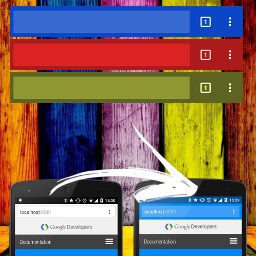
自從 Android Lollipop 版本中的 Chrome 39 版本,您現在可以使用 theme-color meta 標籤設定工具列的顏色,這意味著不再使用 Seattle 灰色的工具列!標籤的語法非常簡單:外掛將在頁面的 head 標籤中添加一個名為「theme-color」的 meta 標籤,並使用我們的顏色選擇器將內容設置為任何有效的 CSS 顏色!
例如,您可以將背景設置為您喜愛的顏色或 HTML5Rocks 橙色:
外掛標籤
開發者團隊
原文外掛簡介
Starting in version 39 of Chrome for Android on Lollipop, you’ll now be able to use the theme-color meta tag to set the toolbar color. This means no more Seattle gray toolbars! The syntax is pretty simple: the plugin will add a meta tag to your page’s with the name=”theme-color”, and set the content to any valid CSS color using our color picker!
For example, to set the background to your favourite color or HTML5Rocks orange: