
內容簡介
總結:
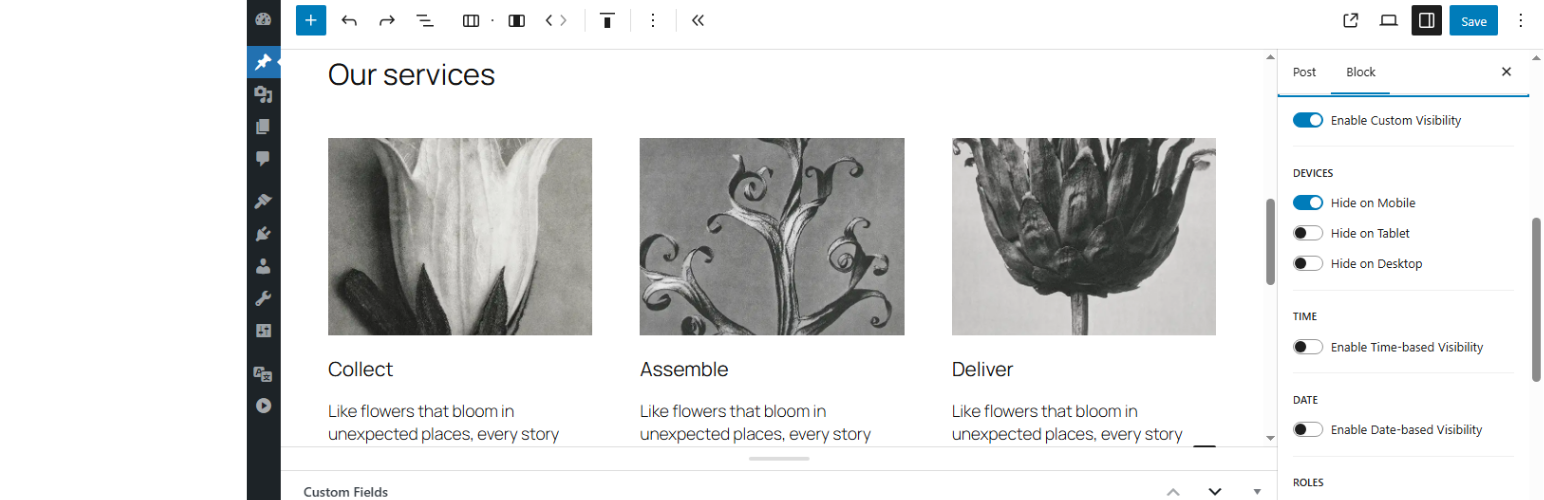
Block Visibility Manager 提供詳細控制,讓你可以在區塊編輯器中設定哪些區塊支援可見規則。
你可以基於時間、日期和時間、使用者角色(包括訪客)、設備類型(行動裝置、平板、桌面)條件性地顯示或隱藏單個區塊。
問與答:
1. 誰可以使用 Block Visibility Manager?
- 想要顯示具時間敏感性內容的內容創作者。
- 偏好本地、無臃腫解決方案的開發人員和網站建造者。
- 想要為客戶提供基於角色或排程的內容區塊的代理機構。
- 需要動態隱藏/顯示促銷或訊息的行銷人員。
2. 為什麼要使用這個外掛?
- 是否需要在有限的時間內顯示區塊(例如活動橫幅)?
- 想要從登出用戶隱藏訊息?
- 禁用不需要的區塊可見性選項?
- 避免第三方外掛增加額外區塊或腳本?
3. 這個外掛有哪些技術細節?
- 不添加任何新區塊,而是使用官方過濾器和本地化 UI 元件擴展現有的核心 WordPress 區塊。
- 針對行動裝置、平板或桌面的隱藏功能完全倚賴 CSS,不涉及 JavaScript。確保在不同佈景主題中輕巧且一致。
- 其他可見性條件(例如時間範圍、日期範圍或使用者角色)在伺服器端執行,如果區塊不符合定義的條件,將完全從呈現的 HTML 輸出中刪除。
- 可見性設定目前僅適用於前端。編輯器中的區塊完全可見,避免在創建內容時混淆。目前不會在區塊編輯器中預覽可見性條件。
- 這個外掛專為 WordPress 區塊編輯器(古鐵頁)設計,不支援其他頁面構建器,如 Elementor、Beaver Builder、WPBakery 等。如果你使用基於區塊的佈景主題或正在使用原生 WordPress 區塊編輯器編輯內容,這個外掛將無縫整合。對於其他構建器,可見性設定將不起作用。
外掛標籤
開發者團隊
原文外掛簡介
Block Visibility Manager gives you fine-grained control over which blocks support visibility rules in the block editor.
You can conditionally show or hide individual block based on:
Time
Date and time
User roles (including guests)
Device type (mobile, tablet, desktop)
Benefits
Show a block only during a limited time (e.g. event banners)
Hide a block for guests
Improve content relevance and scheduling without complex tools.
Keep the editor clean by enabling visibility only where needed.
No performance overhead or custom block lock-in.
100% native: works seamlessly with WordPress Core and Gutenberg.
Features
Time Scheduling – Show or hide blocks between specific times, everyday (based on server time).
Date & Time Scheduling – Show or hide blocks between specific dates with time for granular control, based on UTC+0 timezone. For example you can display a block only on Amazon Prime Days, from 00:00 of the first day to 23:59 of the last day.
User Role Targeting – Restrict visibility based on WP user roles, such as Administrator, Editor, Subscriber, and others — or hide/show blocks specifically for guests (non-logged-in users).
Device-Based Display – Conditionally hide blocks on mobile, tablet, or desktop. his is achieved using fixed CSS media queries, ensuring consistent behavior across themes without relying on JavaScript.
Selective Block Control – Choose which blocks support visibility settings.
Fully Native – Built using core WordPress components and filters only.
Who Is It For?
Content creators who want to show time-sensitive content.
Developers and site builders who prefer native, non-bloated solutions.
Agencies looking to offer clients role-based or scheduled content blocks.
Marketers who need to hide/show promotions or messages dynamically.
Why Use This Plugin?
Need to:
Show a block only during a limited time (e.g. event banners)?
Hide a message from logged-out users?
Disable visibility options on blocks that don’t need them.
Avoid third-party plugins that add extra blocks or scripts?
Block Visibility Manager solves these problems cleanly and natively.
Technical Notes
No Blocks Added
This plugin does not add any new blocks. Instead, it extends existing core WordPress blocks using official filters and native UI components, keeping your site fast, lean, and fully compatible with WordPress standards.
Device-Based Visibility
The hiding functionality for mobile, tablet, or desktop relies purely on CSS using display: none;. No JavaScript is involved. This ensures lightweight and consistent behavior across different themes.
Server-Side Visibility Filtering
Other visibility conditions (such as time range, date range, or user roles) are enforced server-side. If a block does not meet the defined conditions, it is entirely removed from the rendered HTML output.
Editor Behavior
Visibility settings currently apply only on the frontend. Blocks remain fully visible in the editor to avoid confusion during content creation. Visibility conditions are not previewed in the block editor at this time.
Block Visibility for WordPress Block Editor
This plugin is designed exclusively for the WordPress Block Editor (Gutenberg). It does not support other page builders such as Elementor, Beaver Builder, WPBakery, or others.
If you are using a block-based theme or editing content with the native WordPress block editor, this plugin will seamlessly integrate. For other builders, visibility settings will have no effect.














