前言介紹
- 這款 WordPress 外掛「BAAR MFA」是 2025-12-09 上架。
- 目前尚無安裝啟用數,是個很新的外掛。如有要安裝使用,建議多測試確保功能沒問題!
- 上一次更新是 2025-12-10,距離現在已有 78 天。
- 外掛最低要求 WordPress 5.5 以上版本才可以安裝。
- 外掛要求網站主機運作至少需要 PHP 版本 7.4 以上。
- 尚未有人給過這款外掛評分。
- 還沒有人在論壇上發問,可能目前使用數不多,還沒有什麼大問題。
外掛協作開發者
外掛標籤
MFA | otp | totp | Role-based MFA | push notification |
內容簡介
**總結:**
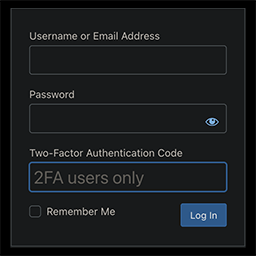
BAAR MFA是一個強大且易於使用的WordPress外掛程式,用於強制用戶進行多因素認證。無論您是在保護部落格、電子商務網站還是客戶入口網站,BAAR MFA都讓保護用戶和數據變得無憂無慮。
**問與答:**
1. BAAR MFA提供的多因素認證方式有哪些免費特色?
- 🔐 TOTP透過BAAR Authenticator App
- ❓ 安全問題(基於知識的認證)
- 🛟 恢復代碼(用於回溯訪問)
- ⚙️ 完全可自定義的設置和郵件模板
- 📊 用戶活動和MFA狀態的內建報告
2. BAAR MFA支援BAAR IGA Authenticator App進行哪種註冊?
- BAAR MFA支援使用BAAR IGA Authenticator App進行TOTP註冊,此App可在Google Play Store和Apple App Store中取得。這個版本允許使用者透過BAAR IGA App配置最多5個使用者。
3. 這個外掛連線到哪些外部服務提供哪些功能?
- 這個外掛連線到https://pushnotifications.baariga.com,用於QR碼生成、TOTP驗證和租戶創建管理。安裝後,外掛會將站點名稱和使用者電子郵件地址發送到該網址以註冊到BAAR Cloud。
4. BAAR MFA外掛如何處理隱私政策?
- BAAR MFA與BAAR Cloud服務溝通以生成MFA QR碼,註冊過程中,只會發送WordPress站名(作為租戶名稱)和管理員電子郵件地址到BAAR Cloud服務器。如果使用者同意註冊,這只是用於生成QR碼,並不收集或存儲其他個人資料。更多詳情請參閱他們的完整隱私政策: https://store.baar.ai/privacy-policy
5. 使用這個外掛及其相關雲服務時,您需要同意哪些條款和條件?
- 您需要同意以下條款和條件:
- 使用條款: https://store.baar.ai/terms-and-conditions
- 外掛商店-最佳外掛管理SaaS
原文外掛簡介
BAAR MFA is a powerful and easy-to-use WordPress plugin to enforce multi-factor authentication for users. Whether you are securing a blog, e-commerce site, or client portal — BAAR MFA makes it effortless to protect your users and data.
Key Features:
– 🔐 TOTP via BAAR Authenticator App (Free)
– ❓ Security Questions (Knowledge-Based Authentication)(Free)
– 🛟 Recovery Codes (For fallback access)(Free)
– ⚙️ Fully customizable settings and email templates(Free)
– 📊 Built-in Reports for user activity and MFA status (Free)
– 📩 OTP via Email (Requires SMTP) (Premium)
– 🔔 Push Notifications via BAAR App (Premium)
– 🎨 White Label Branding (Premium)
– 🧑💼 Role-based and user-specific enforcement(Premium)
The plugin supports TOTP registration with BAAR IGA Authenticator App available in Google Play Store and Apple App Store
In this version, users can configure up to 5 users through the BAAR IGA app.
External Services
This plugin connects to the following external services:
https://pushnotifications.baariga.com — Used for:
QR code generation for TOTP setup.
TOTP verification during login.
Tenant creation and management for handling MFA data.
Upon installation, the plugin sends the site name and user email address to pushnotifications.baariga.com for registration with BAAR Cloud. This is required to generate the QR Code for MFA setup.
Additionally, the plugin includes a support form accessible via the Support tab. This form connects to https://stage-store.baarconnect.com/contact-form-external to facilitate assistance and respond to user queries related to the plugin.
All API communication is performed securely over HTTPS. No sensitive user data beyond the required authentication-related data. These external services are essential for providing the MFA functionalities and licensing validation.
Privacy Policy
This plugin communicates with the BAAR Cloud service to generate MFA QR codes. As part of the registration process, it transmits the WordPress site name (used as tenant name) and the administrator’s email address to BAAR Cloud servers. This happens only if the users gives consent to register.
No other personal data is collected or stored by this plugin.
For more details, please review our full privacy policy:
https://store.baar.ai/privacy-policy
Terms and Conditions
By using this plugin and its associated cloud services, you agree to the following:
Terms of Use: https://store.baar.ai/terms-and-condition
Plugin Store – The Best Plugin Management SaaS

各版本下載點
- 方法一:點下方版本號的連結下載 ZIP 檔案後,登入網站後台左側選單「外掛」的「安裝外掛」,然後選擇上方的「上傳外掛」,把下載回去的 ZIP 外掛打包檔案上傳上去安裝與啟用。
- 方法二:透過「安裝外掛」的畫面右方搜尋功能,搜尋外掛名稱「BAAR MFA」來進行安裝。
(建議使用方法二,確保安裝的版本符合當前運作的 WordPress 環境。
延伸相關外掛(你可能也想知道)
OneSignal – Web Push Notifications 》OneSignal 是一種輕鬆提高使用者參與度的方式。使用 OneSignal 傳送針對訪客的推播通知,使他們保持回訪。安裝只需要幾分鐘。, OneSignal 是 WordPress VIP G...。
Push Notifications for WP – Self Hosted Web Push Notifications 》Push Notifications for WP & AMP 提供方便的方式免費向使用者發送 Web Push 通知,並且只需 2 分鐘設定。 此為使用說明文件。, 當文章發佈或更新時,自...。
Truepush – Most Affordable Web Push Notifications 》Truepush 是一款價格實惠的網站推播通知工具,全球超過 25,000 名開發者/營銷人員積極使用此工具來重新激勵使用者的參與。相較於取得新使用者,保留現有使用...。
Gravitec.net – Web Push Notifications 》Gravitec.net 是一個智能網頁推播服務,讓你可以在幾個點擊內完全自動化推送廣告活動。安裝這個外掛只需要少於 5 分鐘。一旦安裝完成,所有功能都可以直接使...。Notix – Web Push Notifications 》在過去幾年中,推播通知在市場上取得了巨大的成功。這些通知會顯示在潛在用戶的設備上,有助於增加他們對產品的參與度。一個即時的呼籲行動可以提供快速和高...。
Push notification for Mobile and Web app 》支援行動裝置和 Web 應用程式的推播通知外掛。, Demo app, 如何運作, 推播通知外掛包含五個部分:, , 觸發事件 ─ 當 WordPress 執行某些動作時(如文章儲存、...。
Push Notification for Post and BuddyPress 》p>此外掛使用 Firebase Cloud Messaging (FCM) 從網站、Android/iOS 行動應用程式中傳送推播通知。此外掛具有 REST API 功能,可與原生/混合 Android/iOS 行...。
Web2application Convert your website to android and IOS apps with push notifications , web push , free ajax products search for woocommerce and many more advanced features 》關於 Web2application, Web2application 可將具有響應式設計的 WordPress 網站轉換為 iOS 和 Android 應用程式,並啟用高級功能,例如推播通知、原生索引條、...。
Push Notifications for WordPress by PushAssist 》PushAssist是一個全面的WordPress網誌及網站推播通知外掛,受到全球上千名開發人員、WordPress&WooCommerce網站擁有者及行銷人員的信賴。它可以讓您的網站透...。
Gravity Forms Pushover Add-On 》Gravity Pushover 外掛可以讓你在 Gravity Forms 建立新提交時即時推送通知到你的智慧型手機。使用此功能需要:, , Gravity Forms 外掛, Pushover 帳戶, Grav...。Zestpush – Web Push Notifications 》總結:Zestpush 是最終極推播通知平台,提供快速、預算友善和開發者友善的解決方案,適用於各種網站。透過我們的 WordPress 外掛,您可以將推播通知無縫整合...。
Push7 Subscribe button 》這個外掛是設置 Push7 訂閱按鈕的最佳方式之一。, 當你在 WordPress 網站上使用Push7時,, 你必須註冊並安裝官方外掛。, 這個外掛只提供訂閱按鈕介面。, 功能...。WP Firebase Push Notification 》此外掛可以輕鬆管理,藉由使用裝置 token,向使用者的裝置發送快訊提醒訊息。, 功能包括:, , 可為每篇部落格文章發送通知。, 可發送通知給新註冊的使用者。,...。
webtonative 》WordPress Social Login 外掛可讓使用者使用廣泛應用程式,如 Facebook、Google 和 Apple 進行社交登入,與 webtonative app 整合。這樣,訪客就不需要浪費時...。
Shoutworks 》不要再被你的受眾忽略了, 在你的訊息上獲得超過 90% 的開啟率。透過簡單的方式在 Alexa 裝置上發送訂閱者的通知,結果比電子郵件有效率 4 倍。, 當你希望吸引...。