內容簡介
AS Flex Language Switcher 是一款可為您的網站添加語言切換器的外掛,能夠根據訪客選擇的語言即時翻譯頁面內容,提升多語言使用者的體驗。
【主要功能】
• 即時翻譯頁面內容
• 支援多種翻譯提供者
• 自訂語言切換器外觀
• 記住訪客選擇的語言
• 快速模式無需 API 金鑰
外掛標籤
開發者團隊
原文外掛簡介
AS Flex Language Switcher adds a language switcher to your site and translates the visible page content on the fly when a visitor picks a language. There is no translation editor, no per-language URLs, and no database of translated posts — the page is translated in the visitor’s browser, on demand, and the result is cached so the same text is never sent to the translation provider twice.
Bring your own API key. You choose one of the translation providers below and enter your own API key for it. Because you use your own account, AS Flex Language Switcher itself never charges you and never routes your content through a service run by the plugin developer.
Quick mode. Want to try the plugin before setting up an API key? Enable quick mode instead and it translates immediately, using the free (but unofficial, unsupported) Google Website Translator widget entirely in the visitor’s browser. No sign-up, no credit card, no server round-trip — but also no availability guarantee, since it’s not an official Google API and can stop working at any time. For a permanent, reliable setup, switch to one of the API providers below. See the Privacy notice in Settings before enabling it, and the External Services section below.
Supported providers
DeepL — Free or Pro API key (Free keys end in “:fx” and are automatically routed to DeepL’s free API host).
Anthropic (Messages API)
Display
Automatic placement as a top bar or a small sticky corner widget, or place it yourself anywhere with the [lswitch] shortcode.
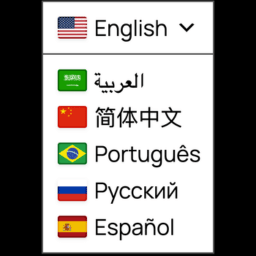
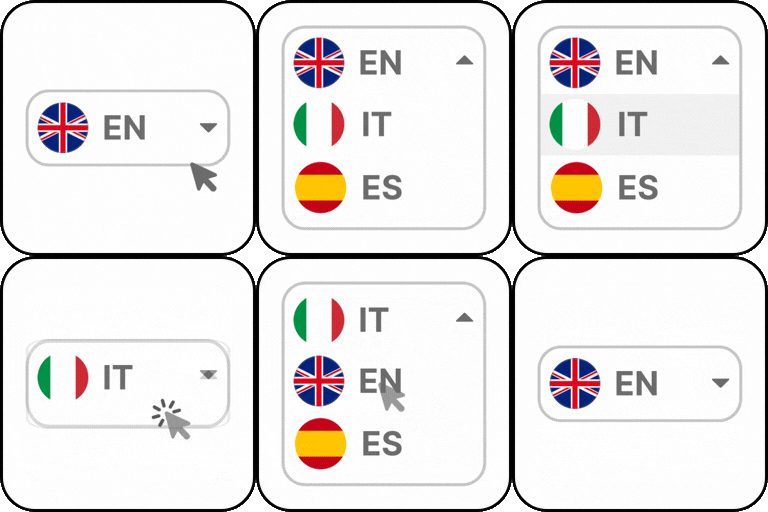
Four designs: flag row, language codes only, an accessible custom dropdown, or a horizontal text list. Flags and codes can be combined.
For languages with more than one common flag (English, Spanish, Portuguese, Arabic), the flag is configurable per language.
Visitor experience
The visitor’s chosen language is remembered (cookie + local storage) and reapplied automatically on the next page.
Optional, off-by-default automatic detection of the visitor’s browser language.
What this plugin deliberately does not do
It does not create indexable per-language URLs (no /en/, no XML sitemap entries per language) and does not set hreflang tags, because a client-side translation is not a separate, crawlable page. If you need indexable translated pages for SEO, a plugin like WPML or Weglot is a better fit. See the FAQ for details.
It does not provide a translation editor for manual corrections.
It does not translate emails, feeds, or the WordPress admin area.
External services
This plugin connects your site to a third-party translation service only if you configure it — either by selecting an API provider and entering your own key, or by enabling quick mode, both in Settings → Language Switcher. With neither configured, no data is sent anywhere and the switcher shows an admin-only notice instead of translating.
API providers. When a visitor picks a language that isn’t already cached, the plugin sends the visible text of the current page from your server to the provider you selected, together with the source and target language codes, and stores the returned translation in a WordPress transient (cache) for the duration configured in Settings so the same text isn’t sent again. No content is sent for pages the visitor doesn’t request in another language, and nothing is sent while the switcher sits unused.
Quick mode. Instead of going through your server, the plugin loads Google’s own Website Translator widget script (translate.google.com) directly in the visitor’s browser and lets it translate the page content client-side. This means page content is sent from the visitor’s browser straight to Google whenever quick mode is on and a visitor selects a language — your server is not involved, and this happens independently of and in addition to any API provider you may also have configured (only one of the two is active for translation at a time, controlled by the quick mode setting, but the widget script itself loads whenever quick mode is enabled). As the site owner, you must disclose this in your privacy policy if you enable quick mode. This is not an official, versioned Google API — it can change or stop working without notice.
Depending on which provider you configure, this plugin sends data to one of the following services:
Google Website Translator widget (quick mode only) — https://translate.google.com/. Terms of Service: https://policies.google.com/terms — Privacy Policy: https://policies.google.com/privacy
DeepL API — https://api.deepl.com/ (Pro keys) or https://api-free.deepl.com/ (Free keys, ending in “:fx” — chosen automatically). Terms: https://www.deepl.com/pro-license — Privacy Policy: https://www.deepl.com/privacy
Anthropic API — https://api.anthropic.com/. Terms: https://www.anthropic.com/legal/commercial-terms — Privacy Policy: https://www.anthropic.com/legal/privacy
Only the API provider you have selected in Settings is ever contacted; any other provider listed above is never contacted unless you switch to it. Your API key is stored in this site’s options table and is never sent anywhere except directly to the provider it belongs to. Google’s widget script is contacted only while quick mode is enabled, independently of whichever API provider is also configured.