內容簡介
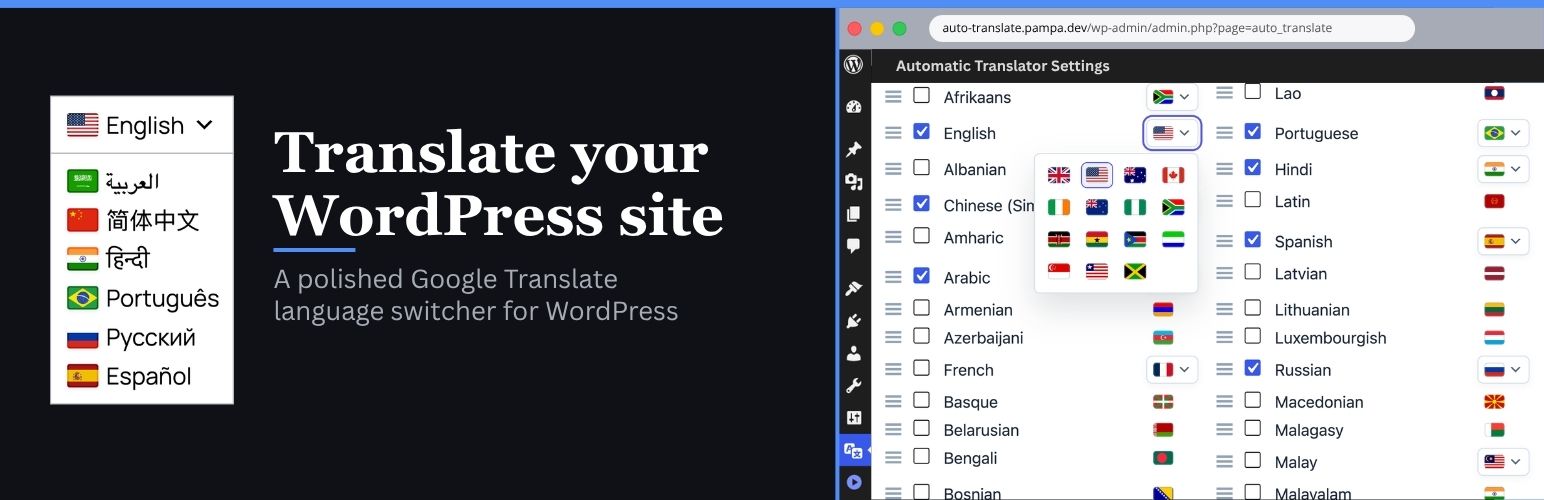
Automatic Translator with Google Translate 是一款輕量級的 WordPress 外掛,幫助網站訪客透過 Google Translate 進行內容翻譯。它提供多種語言切換選項,讓使用者能夠輕鬆選擇所需語言,提升網站的可訪問性和使用體驗。
【主要功能】
• 免費的客戶端翻譯,使用 Google Translate 小工具
• 自訂語言切換器,提供精緻的使用者介面
• 支援翻譯文章、頁面、選單及 WooCommerce 文字
• 可配置的浮動語言選擇器,方便放置
• 多種放置選項,包括小工具和短碼
• 自動偵測訪客瀏覽器語言
外掛標籤
開發者團隊
② 後台搜尋「Automatic Translator with Google Translate」→ 直接安裝(推薦)
📦 歷史版本下載
原文外掛簡介
Automatic Translator with Google Translate by Pampa Dev helps you translate WordPress content for visitors with a lightweight Google Translate language switcher. Add a floating selector, place it in a menu, publish it in a widget area, insert it with a shortcode, or use the selector block.
Version 2 makes the language switcher easier to use, easier to place, and easier to style. Visitors get a cleaner translation experience, and site owners get better controls for where the selector appears, which languages are shown, and what content should stay untranslated.
Automatic Translator is a free visitor translation plugin. It changes what visitors see in their browser after they choose a language. It does not create translated URLs, translated posts, hreflang tags, sitemap entries, translated metadata, or SEO-indexable translated pages.
Plugin interface translations are included for Spanish, German, French, Italian, Portuguese (Brazil), Japanese and English (UK).
Features
Free client-side translation powered by the Google Translate website widget
Custom language switcher for a polished visitor-facing selector
Translate posts, pages, menus, widgets, theme text, plugin text, and WooCommerce storefront text that appears in the page HTML
Floating language selector with configurable corner and offset controls
Menu, widget, shortcode, and selector block placement options
Language search, selection, ordering, and optional all-languages mode
Country flags with broad regional flag choices for languages spoken in multiple places
Styling controls for colors, borders, typography, shadows, icons, and dropdown appearance
Auto-detect option based on the visitor browser language
Multiple selectors on the same page with shared translation state
Advanced exclusion selectors for brand names, code samples, checkout fragments, or other content that should not be translated
Dedicated shadow-scoped CSS for the isolated minimalist selector and detached dropdown overlay
Loads translation tools only when visitors need them
Hardens translated content and selector styling against aggressive theme CSS
Uses a more isolated custom selector shell so theme CSS is less likely to break translated labels or icon alignment
Renders the open language list in a detached shadow-isolated overlay layer so theme stacking, local containers, and theme CSS are less likely to break or block it
No paid SaaS account or translation API key required
Free mode and multilingual SEO
Automatic Translator is built for instant visitor translation, not multilingual SEO indexing.
Free client-side translation is useful when visitors need to read your existing site in another language without creating and maintaining translated content. Search engines generally see the original page, because translated versions are not stored on separate URLs.
If you need multilingual SEO, you need a server-rendered translation system with stable language URLs, canonical handling, hreflang, sitemap integration, translated metadata, and translated slugs. Automatic Translator does not claim those features in free mode.
Placement options
You can place the language switcher in several ways:
Floating selector in the Placement tab (enabled by default).
Add the selector block in the block editor.
Add the selector to a classic menu or Navigation block menu.
Add the Automatic Translator widget to a widget area.
Insert a shortcode in content or a template.
Supported languages
Automatic Translator supports the languages available through the Google Translate website widget:
Afrikaans
Albanian
Amharic
Arabic
Armenian
Azerbaijani
Basque
Belarusian
Bengali
Bosnian
Bulgarian
Catalan
Cebuano
Chichewa
Chinese (Simplified)
Chinese (Traditional)
Corsican
Croatian
Czech
Danish
Dutch
English
Esperanto
Estonian
Filipino
Finnish
French
Frisian
Galician
Georgian
German
Greek
Gujarati
Haitian Creole
Hausa
Hawaiian
Hebrew
Hindi
Hmong
Hungarian
Icelandic
Igbo
Indonesian
Irish
Italian
Japanese
Javanese
Kannada
Kazakh
Khmer
Korean
Kurdish (Kurmanji)
Kyrgyz
Lao
Latin
Latvian
Lithuanian
Luxembourgish
Macedonian
Malagasy
Malay
Malayalam
Maltese
Maori
Marathi
Mongolian
Myanmar (Burmese)
Nepali
Norwegian
Pashto
Persian
Polish
Portuguese
Punjabi
Romanian
Russian
Samoan
Scots Gaelic
Serbian
Sesotho
Shona
Sindhi
Sinhala
Slovak
Slovenian
Somali
Spanish
Sundanese
Swahili
Swedish
Tajik
Tamil
Telugu
Thai
Turkish
Ukrainian
Urdu
Uzbek
Vietnamese
Welsh
Xhosa
Yiddish
Yoruba
Zulu
Privacy Policy
Automatic Translator with Google Translate uses Appsero SDK to collect some telemetry data upon user’s confirmation. This helps us troubleshoot problems faster and make product improvements.
Appsero SDK does not gather any data by default. The SDK only starts gathering basic telemetry data when a user allows it via the admin notice.
Integrating Appsero SDK does not immediately start gathering data without confirmation from users in any case.
Learn more about how Appsero collects and uses this data.