內容簡介
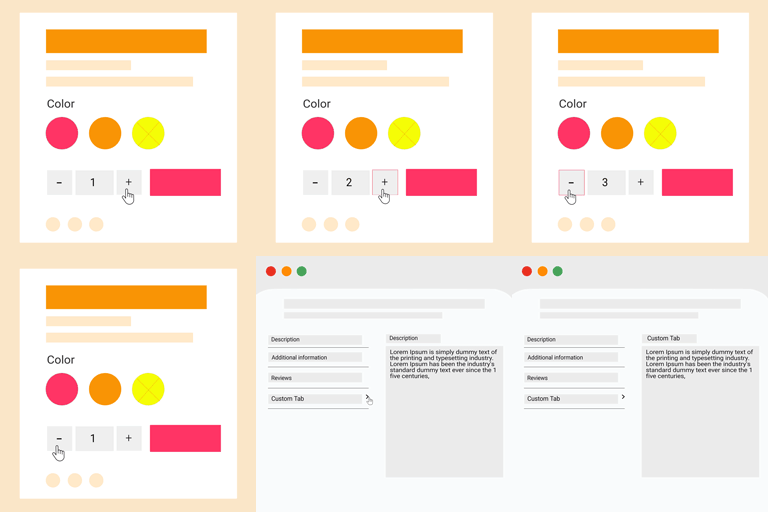
Arik Product Fields 是一款專為 WooCommerce 產品頁面設計的完整工具包,允許用戶透過拖放式視覺編輯器建立自訂產品欄位,並增強購物體驗,提升轉換率與數據收集效率。
【主要功能】
• 拖放式欄位建立器,輕鬆添加自訂欄位
• 快速購買按鈕,跳過購物車直接結帳
• 美觀的詢問表單,支援電子郵件通知
• 產品頁面顯示優惠券碼,提升促銷效果
• 支援多種欄位類型,滿足不同需求
• 兼容 WooCommerce 自訂訂單表格,提升性能
外掛標籤
開發者團隊
② 後台搜尋「Arik Product Fields — WooCommerce Custom Fields, Buy Now, Enquiry Form & Coupon」→ 直接安裝(推薦)
原文外掛簡介
Arik Product Fields is a complete toolkit for WooCommerce product pages. Build custom product fields with a drag-and-drop visual builder, add a Buy Now button that skips the cart, accept enquiries through a polished modal form, show coupon codes directly on the product page, and clean up the single product layout all without writing a single line of code.
Designed for store owners who want more conversions, better data collection, and a faster checkout experience.
Why store owners pick Arik Product Fields
One plugin, five jobs. Custom fields, Buy Now, Enquiry form, coupon box, and checkout tweaks no need to stack five separate plugins.
Beautiful frontend. Theme-aware styling that inherits your color tokens and looks native in Storefront, Astra, Flatsome, OceanWP, and Blocksy.
HPOS compatible. Declared compatibility with WooCommerce Custom Order Tables and the new cart/checkout blocks.
Built for developers. 11+ public actions and filters, a Support & Docs page with copy-paste examples, and translation-ready strings.
No bloat. Assets load only on the screens that need them. Admin styles never leak into unrelated pages.
20 field types
Input fields (collect data from customers):
Text
Textarea
Number
E-mail
URL
Checkbox (multi-option)
Select / Dropdown
Radio
Radio with images (WP Media Library picker)
Radio with colors (WordPress color picker)
Time
Color
Date
Display / Content fields (admin enters content, frontend shows it):
Heading
Paragraph
HTML
Image (Media Library picker + URL fallback)
Product Video (YouTube, Vimeo, or direct MP4/WebM/OGG)
Dynamic fields (populated from the current product):
Categories rendered as checkboxes built from the product’s own categories
Tags rendered as checkboxes built from the product’s own tags
Feature highlights
Drag-and-drop field builder powered by jQuery UI Sortable. Click any field type in the palette to add it. Drag rows by the handle to reorder. Inline editor with per-type controls.
Per-product field assignment through a dedicated Product Data tab. Pick which fields appear on which products. Leave it empty to use global-scope fields.
Buy Now button that skips the cart and lands the customer on checkout (or cart your choice).
Enquiry form in an accessible modal. Sends email to admin, stores submissions as a custom post type, and recommends Contact Form 7 as a more robust alternative.
Coupon code box on the single product page with four position options.
Checkout modifications add an optional Order Reference field, make phone optional, soften default placeholders.
Hide SKU and Categories/Tags on single product pages globally or per-product.
Tri-state per-product overrides for Buy Now and Enquiry: “Use global setting”, “Show”, or “Hide”.
Configurable field position render fields before/after price, before/after Add to Cart, or before/after Buy Now.
Design tab style the frontend fields without writing CSS: container background, border, radius, padding and spacing, one- or two-column layout, label typography, input colours and sizing, radio/checkbox pill shape and selected state, button colours, plus an Additional CSS box. Four presets and a live preview that renders with your storefront’s own stylesheet. Ships switched off, so upgrading never changes how your product pages look.
Support & Docs admin page with the full developer hook reference and code examples.
Translation-ready with wp_set_script_translations() for the builder UI.
Security
WordPress nonces on every form and AJAX endpoint.
Capability checks on every admin action (manage_woocommerce, edit_product).
Honeypot field plus per-IP rate limiting on the enquiry form.
Type-aware sanitization with a strict allowlist per field type.
Output escaped per WordPress.org guidelines (esc_html, esc_attr, esc_url, wp_kses_post).
Developer-friendly
The plugin exposes 11+ public hooks for theme and plugin developers:
Filters: arikapf_render_field_definitions, arikapf_cart_item_field_values, arikapf_buy_now_button_label, arikapf_enquiry_button_label, arikapf_buy_now_enabled_for_product, arikapf_enquiry_enabled_for_product, arikapf_hide_sku, arikapf_hide_categories, arikapf_fields_render_hook, arikapf_support_marketing_links, arikapf_checkout_fields.
Actions: arikapf_before_render_fields, arikapf_after_render_fields, arikapf_before_buy_now_button, arikapf_after_buy_now_button, arikapf_before_enquiry_button, arikapf_after_enquiry_button, arikapf_enquiry_submitted, arikapf_after_save_product_meta, arikapf_after_cart_item_meta_added.
Each hook is documented inside the plugin under Arik Fields → Support & Docs, with copy-paste code examples.
Compatible with
WordPress 6.0+
WooCommerce 6.0+ (tested through 9.4)
PHP 7.4+
HPOS (Custom Order Tables)
WooCommerce Cart & Checkout Blocks
Contact Form 7 (for the enquiry form)
Storefront, Astra, Flatsome, OceanWP, Blocksy, and any properly built block theme
Additional Information
Support & Connect
Email Support: [email protected]
Website: https://gernx.com/
Support Forum: WordPress.org Support
LinkedIn: Tanmoy Biswas