內容簡介
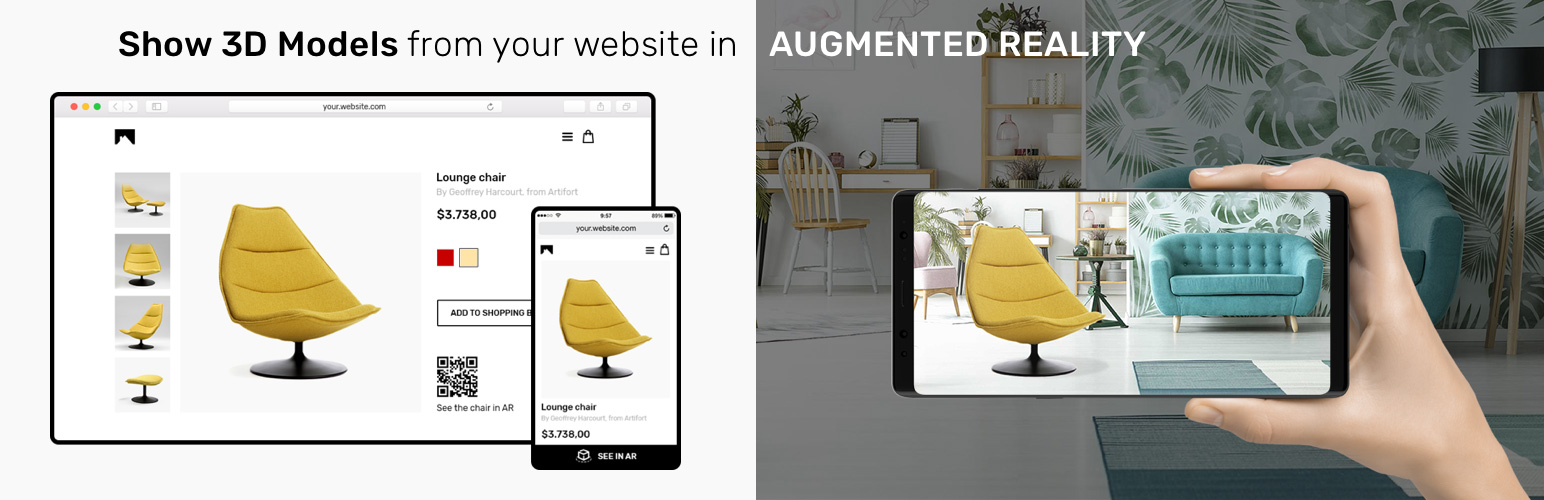
AR Play WordPress 外掛是 AR Play 平台和您的 WordPress 網站之間的連接通道。AR Play 允許您透過我們的 Android 和 iOS 應用程式以擴增實境(AR)方式顯示任何 3D 模型。
這使得產品展示可以不用實際物品,這對任何電子商務店或外務銷售代理人來說都是一個令人驚嘆的功能。用戶可以通過我們預先上傳的模型來測試應用程式,或者添加自己的 3D 模型。要添加自己的 3D 模型,您可以通過 arplay.app 註冊並在首個月免費使用該平台。首個月後,訂閱費用為每月 10 美元,可無限量添加產品。
用戶一旦註冊,還將為其每個產品生成 QR 碼和連結。
QR 碼和連結可在 AR Play 應用程式中打開特定模型。這使電子商務店集成了擴增實境功能。
功能
通過短代碼添加 QR 碼和連結以任何地方啟動 AR 檢視
在 WooCommerce 產品頁面上選擇 12 個放置 QR 碼或連結的點之一
自定義 QR 碼大小和位置
自定義連結文字和 AR 圖標
批量添加產品的 AR 功能
使用方法
安裝 AR Play 外掛。
從 arplay.app 中的您的帳戶中獲取 UUID。
從 WP 儀表板中導航到 AR Play>設置並添加您的 UUID 編號。
啟用 / 停用 AR Play Shortcode 和/或 AR Play for WooCommerce 模塊。停用模塊不會刪除您創建的代碼,它們只是暫時禁用。
要創建 SHORTCODE,從 WP 儀表板中導航到 AR Play> Shortcode> 生成。在任何頁面或帖子中放置生成的 SHORTCODE。
要在產品中添加 AR Play AR 檢視選項,請導航到特定產品頁面並添加模型的路徑(在頁面右上方找到)。導航到 AR Play> For WooCommerce 以選擇在產品頁面上顯示 AR Play 鏈接的位置。
使用外部服務
該插件使用來自 httsp://arplay.app 的外部(API)服務,以實現以下功能:
驗證您的 Arplay 帳戶 UUID
深度鏈接創建
這對於插件正常運行是必要的。
這些服務由開發此外掛的 Arty 開發。
AR Play 隱私政策鏈接:
https://cdn.arplay.app/arplay-privacy-policy.pdf
外掛標籤
開發者團隊
原文外掛簡介
AR Play WordPress plugin serves as a connection between AR Play platform and your WordPress website. AR Play allows you to show any 3D Model in augmented reality (AR) trough our Android and iOS app.
This enables product demonstration without having the physical product next to you, which is an amazing feature for any e-commerce store or for in-field sales agents. Users can test the app with our pre-uploaded models or add their own 3D models. To add your own 3D models, you can sign up through arplay.app, and use the platform first month for free. After the first month, subscription fee is $10/month for unlimited amount of products.
Once user signs up, they will also get a QR code and link generated for each of their products.
QR Codes and Links open specific model in AR Play app. This enables Augmented Reality integration for e-commerce stores.
Features
Add QR Code and link that prompt AR view anywhere, trough shortcodes
Choose one of the 12 spots to place your QR code or link on the woocommerce product page
Customize QR code size and location
Customize link text and AR icon
Add AR Capability to products in bulk
How to use
Install AR Play plugin.
Get UUID from your account on arplay.app
Navigate to AR Play > Settings from WP Dashboard and add your UUID number.
Activate/Deactivate modules AR Play Shortcode and/or AR Play for WooCommerce. Deactivating module WILL NOT DELETE the codes you created, they will just be temporary disabled.
To create a SHORTCODE, from WP dashboard navigate to AR Play > Shortcode > Generate. Put your generated shortcode in any page or post.
To add AR Play AR View option to your product, navigate to specific product page and add path to model (found at the top right part of the page). Navigate to AR Play > For WooCommerce to choose where to display AR Play link on your product page.)
Use of an external service
The plugin use the external (API) services from url httsp://arplay.app for the following reasons:
Validation of your Arplay Account UUID
Deep link creation
This is necessary for the plugin to work properly.
These services are developed by Arty which also developed this plugin.
Link to AR Play Privacy Policy:
https://cdn.arplay.app/arplay-privacy-policy.pdf