內容簡介
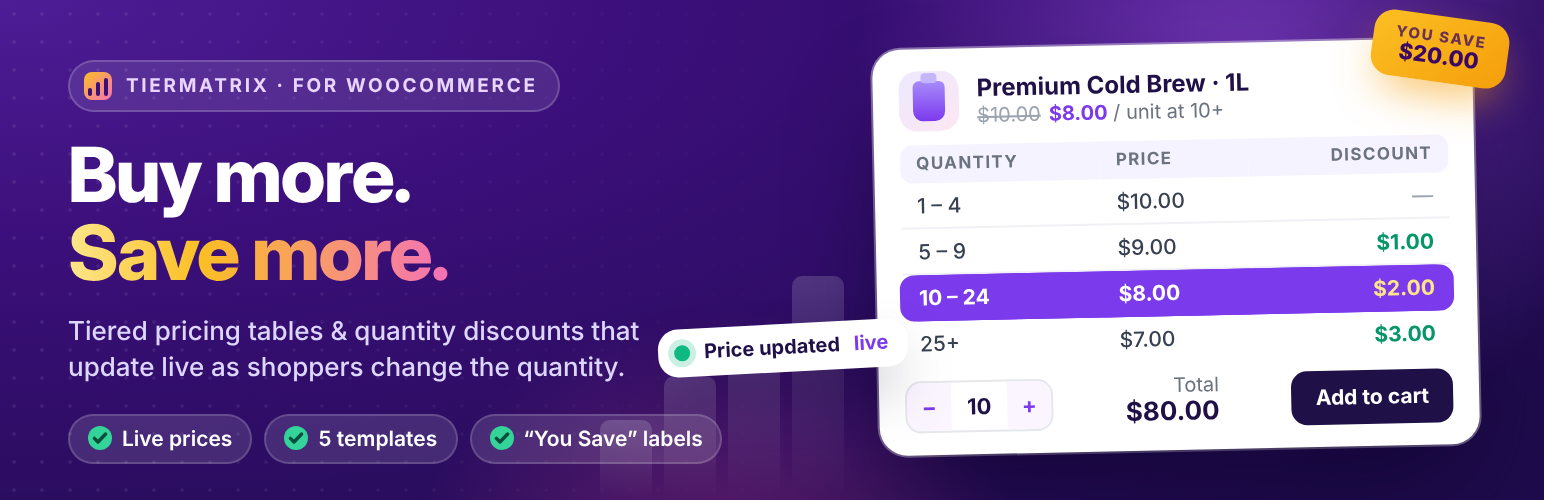
Simple Tiered Pricing Table for WooCommerce 是一款簡單易用的外掛,能為您的 WooCommerce 商店添加分級定價、數量折扣及批量價格優惠。顧客在購買更多商品時,能即時看到節省的金額,無需進行升級銷售或編碼。
【主要功能】
• 數量基礎的分級定價
• 提供五種價格表顯示模板
• 設定每個產品的最小與最大訂購數量
• 產品頁面即時價格更新
• 支援簡單與變數產品
外掛標籤
開發者團隊
② 後台搜尋「Simple Tiered Pricing Table for WooCommerce」→ 直接安裝(推薦)
原文外掛簡介
Simple Tiered Pricing Table for WooCommerce is the easiest way to add tiered pricing, quantity discounts, and volume price breaks to your WooCommerce store. Customers instantly see how much they save when buying more — no coding required.
Set a lower unit price for larger quantities, show a clean pricing table on the product page, and watch the price update live as customers change the quantity.
Free vs Pro at a glance
Free — fixed-price quantity tiers (unlimited tiers and products), 5 display templates (Table, Blocks, List, Tooltip, Dropdown), live price updates, “You Save” labels, minimum/maximum/step quantity controls, shop-page price ranges, colours and labels, shortcode, REST API, CSV import/export.
Pro adds — percentage discounts, different tiers per variation, role-based pricing, global pricing rules with Mix & Match, cart upsell messages, and role-based pricing in CSV import/export.
👉 Get TierMatrix Pro
Free Features
Quantity-Based Tiered Pricing
Set a fixed unit price per quantity tier (e.g. 1–4: $10, 5–9: $9, 10+: $8)
Unlimited pricing tiers on unlimited products
Live price updates as the customer changes quantity
“You Save” labels and a “Selected Tier / Your Price” summary
Simple and Variable products — the table updates when a variation is selected (all variations share the product’s tiers)
Works alongside WooCommerce coupons and taxes
5 Pricing Table Display Templates
Table — classic column layout (Quantity | Discount | Price)
Blocks — card-style grid
List — minimal bullet layout
Tooltip — hover icon keeps the page clean
Dropdown — compact select, ideal for mobile
Set a default template, or choose one per shortcode
Choose where it appears: before/after Add to Cart, before/after product meta, or after the summary
Show or hide the discount column
Optionally hide the table from logged-out visitors
Quantity Controls
Minimum order quantity per product
Maximum order quantity per product
Quantity step — sell in packs of 6, 12, 24…
Shop & Category Page Price Display
Price range (“$75.00 – $100.00”)
Lowest price (“From $10.00”)
“As low as $X.XX”
Custom prefix text
Colours & Labels
Highlight colour, highlight text colour, header background and header text
Rename the Quantity, Discount and Price columns, the summary labels, and unit names (e.g. “box / boxes”)
Developer Tools
Shortcode [tiered-pricing-table] — place the table anywhere
WooCommerce REST API — read and write tiered pricing via /wp-json/wc/v3/products/{id}
CSV import/export of tiers and quantity controls via WooCommerce’s built-in product CSV tools
Built-in transient cache
HPOS (Custom Order Tables) compatible
Classic and block-based Cart & Checkout supported
Pro Features
[PRO] Percentage Discounts
Give 10% off at 10+ units, 15% off at 25+, and so on — on any product or global rule.
[PRO] Different Tiers per Variation
Give each variation its own pricing type and tiers — for example, Small T-shirt 5+ = $8 and Large T-shirt 5+ = $10 — instead of one set of tiers for the whole product. The product page table switches when a variation is chosen, and the cart, checkout and shop-page prices follow.
[PRO] Role-Based Pricing
Different regular prices, sale prices, tiers and minimum quantities for Wholesale, Retailer, VIP or any custom role. Hide the pricing table for selected roles.
[PRO] Global Pricing Rules
Create one rule and apply it to many products and/or categories — or your whole catalogue. Target user roles or specific customers, set priorities, and add per-rule quantity limits.
[PRO] Mix & Match Quantities
Let different products count together toward the same tier.
[PRO] Cart Upsell Messages
Show “Buy 2 more to save 15%!” in the cart. Customise the message with {qty_needed}, {discount} and {next_price} placeholders.
[PRO] Role Pricing in CSV
Export and import role-based prices and tiers with WooCommerce’s built-in product CSV tools, alongside the free tier columns.
👉 Get TierMatrix Pro
Already using the plugin?
If your store used percentage discounts before version 1.0.3, you keep them — free, automatically. Nothing changes on your store.
Upgrading from Free to Pro
Pro is a separate plugin: deactivate the free plugin, then install and activate Pro. Pro imports your existing tiers, quantity controls and settings automatically, so your store keeps working without any setup. Your free-version data stays saved in case you ever switch back.
Enjoying This Plugin?
If Simple Tiered Pricing Table has helped you set up quantity discounts and bulk pricing on your store, please take a moment to leave a ★★★★★ review. Your review helps other WooCommerce store owners discover the plugin and directly supports its continued development. Thank you!
Shortcode Usage
[tiered-pricing-table product_id="123"]
The prefixed alias [anhqtm-pricing-table] also works.
Choose a template per placement:
[tiered-pricing-table product_id=”123″ template=”blocks”] — table, blocks, list, tooltip, dropdown
REST API
The plugin extends the WooCommerce Products REST endpoint with a tiered_pricing field.
Read pricing data:
GET /wp-json/wc/v3/products/123
Returns:
`json
{
“tiered_pricing”: {
“pricing_type”: “fixed”,
“tiers”: [
{ “qty”: 5, “value”: 9.00 },
{ “qty”: 10, “value”: 8.00 }
],
“min_qty”: 1,
“max_qty”: 0,
“qty_step”: 0
}
}
`
"pricing_type": "percentage" requires Pro.
Write pricing data (requires authentication):
POST /wp-json/wc/v3/products/123
Send the same tiered_pricing object in the request body.
The field anhqtm_tiered_pricing is also available as a prefixed alias for backward compatibility.
Per-variation tiers via /products/{id}/variations/{vid} require Pro.