內容簡介
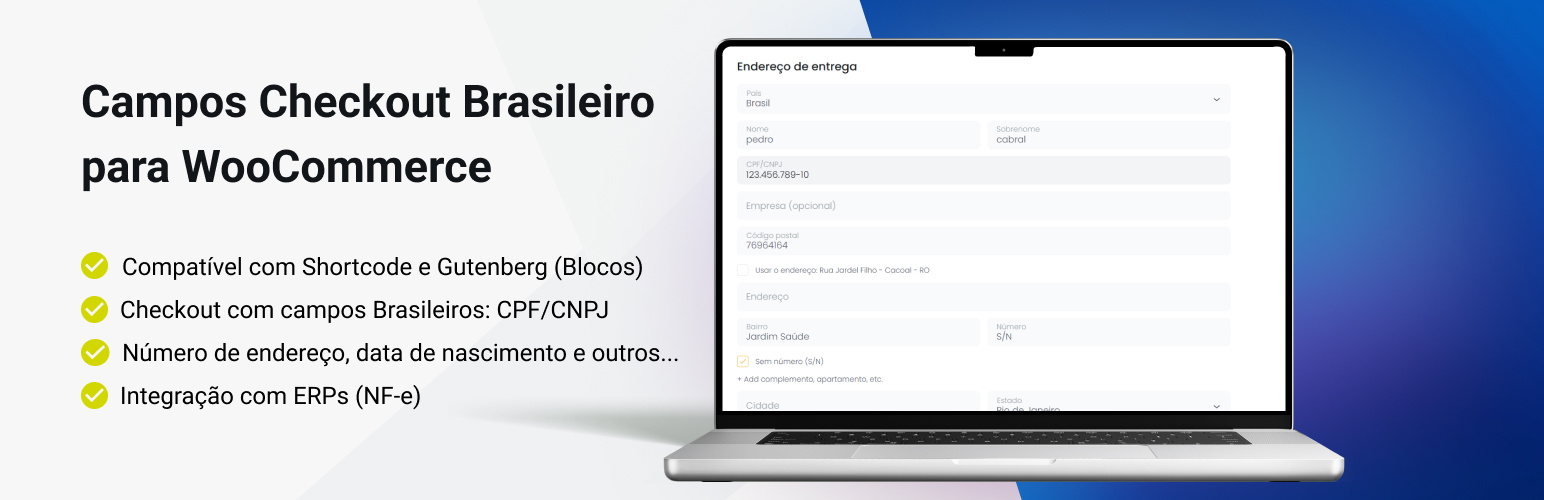
Campos Checkout Brasileiro para WooCommerce 是專為巴西 WooCommerce 商店設計的外掛,提供完整的巴西結帳欄位,簡化資料輸入流程,提升使用者體驗並減少購物車放棄率。
【主要功能】
• 自動地址查詢:根據有效的 CEP 自動填寫地址欄位
• CPF & CNPJ 欄位:新增個人及公司稅號欄位並自動驗證
• 必填電話欄位:包含國碼的必填電話欄位
• 動態欄位隱藏:根據需求隱藏不必要的地址欄位
• 支援自訂結帳欄位:可新增生日及其他自訂欄位
外掛標籤
開發者團隊
② 後台搜尋「Campos Checkout Brasileiro para WooCommerce」→ 直接安裝(推薦)
📦 歷史版本下載
原文外掛簡介
Complete Brazilian checkout fields designed specifically for WooCommerce stores in Brazil, making it easier and significantly improving the data entry flow on the checkout pages.
This version includes full compatibility with Shortcodes and Gutenberg themes, allowing you to use the Brazilian checkout fields anywhere on your site with maximum flexibility.
This WordPress plugin ensures faster address verification and cleaner form management, leading to a better user experience and fewer abandoned carts.
Note: The shipping calculator features have moved to the Shipping Simulator for WooCommerce plugin.
🚀 New Features: Complete Brazilian Checkout
We have expanded the plugin capabilities to offer a full checkout solution for the Brazilian market, managing Custom Checkout Fields essential for Brazilian logistics and invoicing.
New Field Features:
* CPF & CNPJ: Adds fields for Individual (CPF) and Company (CNPJ) Tax IDs with automatic validation.
* Address Fields: Adds and manages specific fields for Neighborhood (Bairro), Number, and Complement.
* Phone Masks: Intelligent input masking for Brazilian landlines and mobile phones.
✅ ERP & “Brazilian Market” Compatibility
This is a major update for store owners who need to issue invoices (Nota Fiscal). The plugin is now fully compatible with the data standards used by the Brazilian Market on WooCommerce plugin (by Claudio Sanches).
Why is this important?
1. Bling & ERP Integration: Because we follow the standard meta-keys structure, this plugin is fully compatible with Bling, Tiny, and other ERPs that integrate with WooCommerce. You can issue invoices (NFe) seamlessly without data errors.
2. Standardized Data: Ensures that CPF, CNPJ, and address data are saved exactly how external integration tools expect them.
Watch the Plugin Demo:
Key Features & Improvements:
On the Checkout Page:
✨ NEW: Automatic Address Lookup: Automatically pre-fills the street, neighborhood, city, and state fields after the customer enters a valid CEP.
✨ NEW: Checkout Custom Fields: Adds support for CPF, CNPJ, Number, Neighborhood, and Birthdate.
✨ NEW: Input Validation: Validates CPF/CNPJ algorithms and applies input masks to prevent typing errors.
✨ NEW: Person Type Selector: Allows customers to switch between “Person” (Pessoa Física) and “Company” (Pessoa Jurídica) during checkout.
Required Phone Field with DDI: The phone field is now mandatory and includes a resource to capture the Country Code (DDI), ensuring complete contact information.
Number Field Addition: Adds the mandatory “Number” field, often missing in standard WooCommerce forms. Includes a checkbox option for addresses that are “Sem Número” (No Number).
Dynamic Field Hiding: Option to hide address fields when not needed.
Additional Features:
Fully customizable through the dedicated plugin settings page.
The plugin is fully customizable via action and filter hooks for advanced users.
More details can be found in the Frequently Asked Questions (FAQ).
Help and Support
When you need help, please create a topic in the Plugin Support Forum.
** Recommended Plugins **
* Shipping Simulator for WooCommerce – Shipping calculator for the product and cart pages, free shipping rules and more.
* Link Invoice Payment for WooCommerce – Integrate custom payment methods and offer invoice-based payments in your WooCommerce store.
* Pix For WooCommerce – Integrate Pix, Brazil’s revolutionary instant payment system, into your WooCommerce store