內容簡介
總結:AI Checkout for WooCommerce 可啟用 ChatGPT 即時結帳整合,讓顧客可以在 ChatGPT 內直接瀏覽和購買您的商品,不用離開對話。
問題與答案:
1. 這個外掛能做什麼?
- 可啟用 ChatGPT 即時結帳整合,讓顧客直接在 ChatGPT 內瀏覽和購買您的商品。
2. 有哪些主要功能?
- OpenAI Agentic Commerce Protocol (ACP) 整合符合 OpenAI 的商業規範
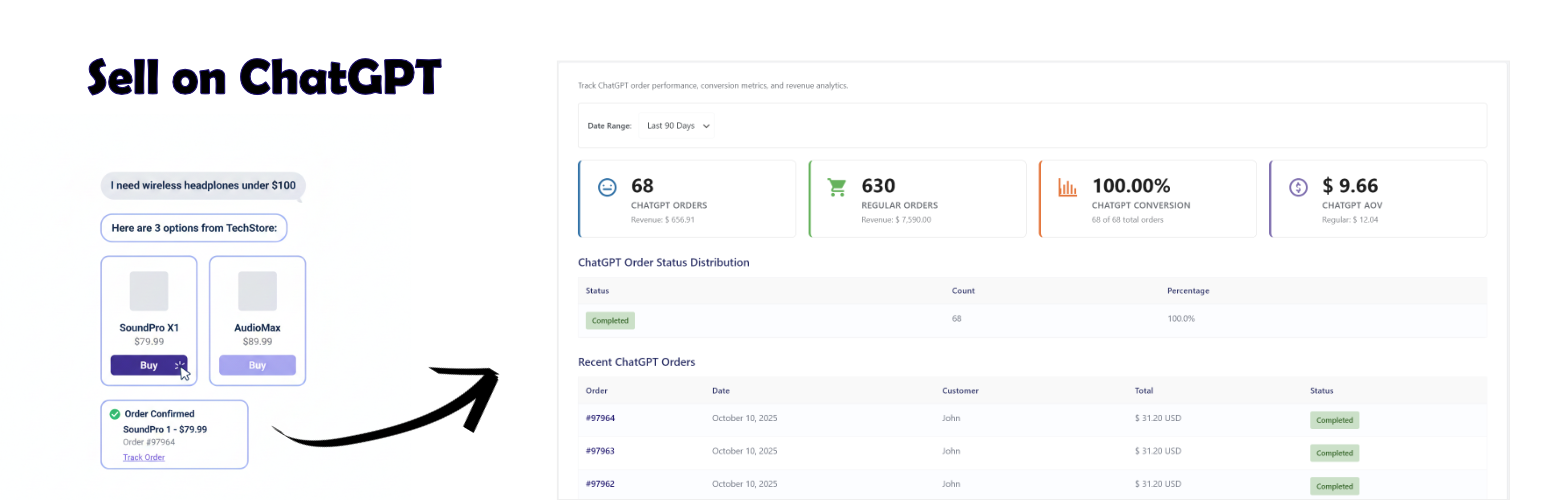
- ChatGPT 即時結帳 - 在 ChatGPT 內無縫結帳體驗
- Stripe 支付處理 - 使用 SharedPaymentToken 技術進行安全支付
- 產品供應管理 - 控制在 ChatGPT 中出現的產品
- 實時庫存同步 - 自動庫存水平同步
- 訂單管理 - 除了常規訂單外,追蹤和管理 ChatGPT 訂單
- 分析儀表板 - 監控 ChatGPT 訂單表現和轉換指標
- 應用程式嚮導 - OpenAI 商戶申請的逐步指南
- 測試模式 - 全面的測試工具和沙箱環境
- 安全第一 - 憑證令牌驗證、HMAC 簽名、IP 白名單
3. 安裝和設置需求是什麼?
- 需要 WooCommerce 7.6 或更高版本、WooCommerce Stripe Gateway 外掛、配置了 API 金鑰的有效 Stripe 帳戶、SSL 憑證 (需要 HTTPS)、OpenAI 商戶批准。
4. 如何處理支付?
- 這個外掛使用 WooCommerce Stripe Gateway 進行支付處理,所有支付都在您的 Stripe 帳戶中進行 - 我們從不接觸您的錢。
5. 有關隱私與數據的注意事項?
- 這個外掛不會保存任何客戶支付數據,所有支付都通過您的 Stripe 帳戶進行,符合 PCI-DSS 要求 (SAQ A),並且符合 GDPR 的數據導入/刪除工具。
6. 與哪些第三方服務集成?
- 這個外掛與 OpenAI (ChatGPT) 和 Stripe 整合。您使用該外掛即表示同意這些第三方的條款和政策。
外掛標籤
開發者團隊
原文外掛簡介
AI Checkout for WooCommerce enables ChatGPT Instant Checkout integration for your WooCommerce store. Customers can browse and purchase your products directly within ChatGPT without leaving the conversation.
Key Features:
OpenAI Agentic Commerce Protocol (ACP) Integration – Full compliance with OpenAI’s commerce specification
ChatGPT Instant Checkout – Seamless checkout experience within ChatGPT
Stripe Payment Processing – Secure payment processing using SharedPaymentToken technology
Product Feed Management – Control which products appear in ChatGPT
Real-time Inventory Sync – Automatic stock level synchronization
Order Management – Track and manage ChatGPT orders alongside regular orders
Analytics Dashboard – Monitor ChatGPT order performance and conversion metrics
Application Wizard – Step-by-step guide for OpenAI merchant application
Test Mode – Comprehensive testing tools and sandbox environment
Security First – Bearer token authentication, HMAC signatures, IP allowlisting
📖 Full Documentation & Setup Guide
Requirements:
WooCommerce 7.6 or higher (tested up to 10.2)
WooCommerce Stripe Gateway plugin (for payment processing)
Valid Stripe account with API keys configured
SSL certificate (HTTPS required)
OpenAI merchant approval (apply at https://chatgpt.com/merchants)
How It Works:
Install and activate the plugin
Configure your Stripe payment gateway
Select products to make available in ChatGPT
Complete the OpenAI merchant application wizard
Submit application to OpenAI for approval
Once approved, your products appear in ChatGPT search results
Customers can purchase directly through ChatGPT conversations
Payment Processing:
This plugin uses WooCommerce Stripe Gateway for payment processing. Payments are processed through YOUR Stripe account – we never touch your money. OpenAI does not charge payment fees, only a small transaction fee per completed purchase.
Privacy & Data:
No customer payment data is stored by this plugin
All payments processed through your Stripe account
Complies with PCI-DSS requirements (SAQ A)
GDPR compliant with data export/erasure tools
Third-Party Services
This plugin integrates with the following external services:
OpenAI (ChatGPT)
* Service: https://openai.com
* Used for: Product discovery and checkout in ChatGPT
* Privacy Policy: https://openai.com/policies/privacy-policy
* Terms of Service: https://openai.com/policies/terms-of-use
Stripe
* Service: https://stripe.com
* Used for: Payment processing via SharedPaymentToken
* Privacy Policy: https://stripe.com/privacy
* Terms of Service: https://stripe.com/legal
Your use of this plugin constitutes agreement to these third-party terms and policies.