
內容簡介
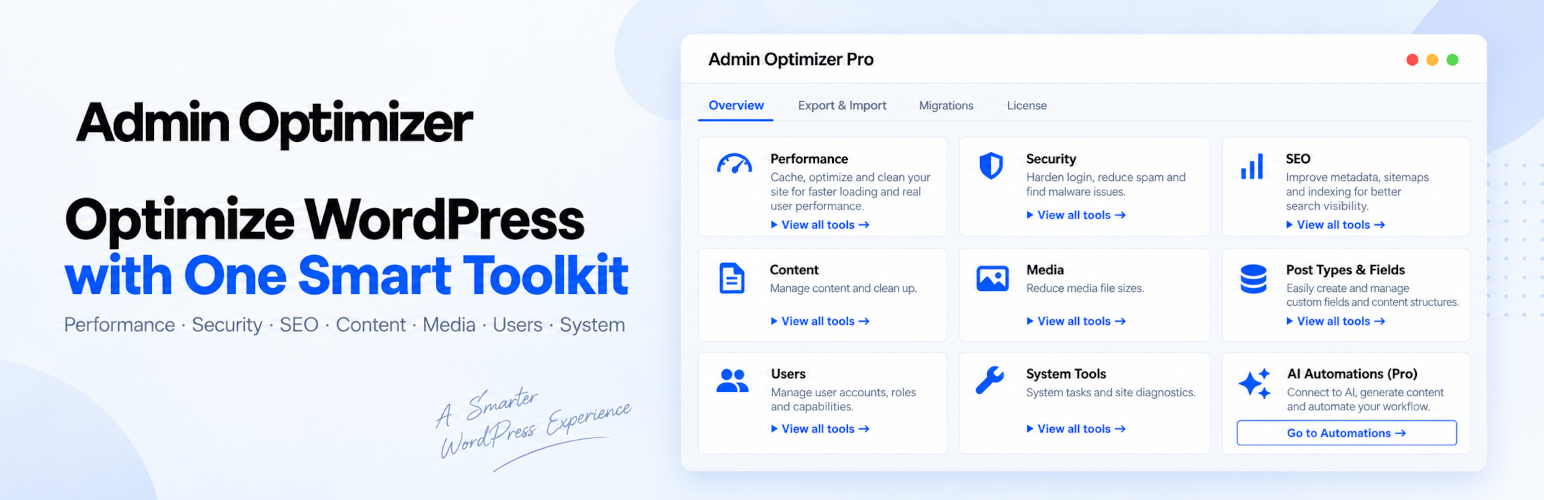
Admin Optimizer 是一款全方位的 WordPress 優化外掛,旨在清理和優化資料庫、加強安全性、管理 SEO、內容及媒體,並簡化日常網站管理,無需為每項任務安裝單獨的外掛。
【主要功能】
• 優化 WordPress 性能及資料庫活動
• 清理資料庫並移除不必要的數據
• 加強登錄安全性及應用 WordPress 硬化
• 管理 SEO 元數據及重定向
• 組織和維護 WordPress 媒體庫
• 發送 WordPress 郵件通過 SMTP
外掛標籤
開發者團隊
② 後台搜尋「Admin Optimizer – Performance, Security & Site Cleanup」→ 直接安裝(推薦)
📦 歷史版本下載
原文外掛簡介
Admin Optimizer is an all-in-one WordPress optimization plugin and toolkit cleaning and optimizing your database, strengthening security, managing SEO, content and media, and simplifying everyday site administration — without installing a separate plugin for every task.
Clean your database, manage redirects, protect your login, configure SEO metadata, send email through SMTP, add custom code, create forms, manage users, build custom post types, and more from one integrated optimization toolkit.
Admin Optimizer is organized into focused sections so you can quickly find the tools you need. Larger modules can be enabled or disabled individually, while smaller controls are grouped with the area of WordPress they affect.
Key highlights:
Optimize WordPress performance, database activity, frontend resources, and background processes
Clean and optimize the WordPress database and remove unnecessary data
Strengthen login security and apply practical WordPress hardening
Manage SEO metadata, redirects, sitemaps, robots.txt, and indexing controls
Manage content workflows and common editor behaviour
Organize and maintain the WordPress Media Library
Add custom post types, taxonomies, statuses, and custom fields
Manage users, roles, capabilities, and access
Send WordPress email reliably through SMTP
Add custom CSS, JavaScript, and HTML without editing theme files
Build forms and collect submissions
Track site traffic without a separate analytics plugin
Connect AI providers to access supported Admin Optimizer Pro features
Migrate supported data from other WordPress plugins into Admin Optimizer
Use one toolkit instead of maintaining a collection of unrelated plugins. Enable the modules you need and leave the rest disabled.
For module-count marketing copy, run npm run registry:counts from the source directory.
Why Admin Optimizer?
One WordPress optimization toolkit — handle performance, database, security, SEO, content, media, user, and administration tasks without assembling a stack of separate plugins.
Modular by design — enable the larger modules you need and leave unused functionality disabled.
Organized by purpose — Performance, Security, SEO, Content, Media, Users, System, and Post Types & Fields keep related tools together.
Lightweight — disabled modules do not run their feature logic or load unnecessary module assets.
Built for WordPress — uses standard WordPress APIs, hooks, capabilities, and data structures.
Useful for beginners and developers — straightforward controls for common tasks with deeper tools available when needed.
Free + Pro architecture — start with the core toolkit and add advanced workflows, automation, AI, and management features with Admin Optimizer Pro.
What can it replace?
Depending on the features you use, Admin Optimizer can reduce or eliminate the need for separate:
Database cleaner and optimization plugins
Redirect and 404 monitoring plugins
Limit login attempts plugins
Two-factor authentication plugins
WordPress security hardening plugins
SEO metadata plugins
XML sitemap plugins
Robots.txt and ads.txt editors
SMTP email plugins
Custom code / code snippets plugins
Form builder plugins
Custom post type and taxonomy plugins
Custom fields plugins for common use cases
User role and capability management plugins
User switching plugins
Media management plugins
Basic page-view tracking plugins
…and more.
Performance
Optimize WordPress performance by reducing unnecessary database activity, frontend resources, and background processes. These WordPress optimization tools help keep your site and admin area leaner without relying on a separate performance plugin for every task.
Database Cleaner: Clean stale WordPress data, schedule database maintenance, optimize database tables, and inspect cleanup activity. Pro adds advanced options-table tools for investigating unused options, autoloaded data, and individual option records.
Heartbeat Control: Adjust WordPress Heartbeat API behaviour to reduce unnecessary server activity.
Disable Emojis: Remove WordPress emoji scripts and styles when they are not needed.
Disable jQuery Migrate: Prevent jQuery Migrate from loading on the frontend when your site does not require it.
Disable 404 Guess Redirect: Stop WordPress from automatically redirecting mistyped URLs to similar-looking content.
Remove oEmbed Discovery Links: Remove oEmbed discovery links from the site header when they are not required.
Security
Protect WordPress login access and apply practical security hardening from one place.
Security Monitor: Review Site Health checks for key WordPress security basics. Pro adds opt-in file-integrity monitoring, activity events, scan logs, and email alerts.
Block Failed Login: Limit repeated failed login attempts and block brute-force login activity. Pro adds configurable lockout behaviour and additional protection controls.
Two-Factor Authentication (2FA): Add TOTP-based two-factor authentication for WordPress users. Pro adds role-based enforcement and trusted-device controls.
Custom Login URL: Replace the standard WordPress login URL with a custom login path to reduce automated login attacks.
Disable XML-RPC: Disable XML-RPC when your site does not rely on services that require it.
Hide WordPress Version: Remove the WordPress version generator information from the frontend.
Remove REST API Discovery Link: Remove REST API discovery links from the site header.
Remove RSD Link: Remove the Really Simple Discovery link used by legacy XML-RPC clients.
Remove Shortlink: Remove WordPress shortlink output from the site header.
Remove X-Pingback Header: Remove the X-Pingback HTTP header.
Remove X-Powered-By Header: Remove the X-Powered-By HTTP header to reduce exposed server information.
Security Monitor
Security Monitor gives you one place to review security-related WordPress settings and, with Admin Optimizer Pro, investigate changes that may need attention.
The included Site Health tab reports the current state of key checks, including file and directory permissions, WordPress security configuration, enabled Admin Optimizer security modules, selected WordPress Site Health results, and useful site information. It identifies checks that need attention and links directly to the relevant setting where possible.
With Admin Optimizer Pro, you can opt in to:
File-integrity scans on a schedule or on demand. Build a baseline for selected WordPress core, themes, plugins, and custom paths, then review added, modified, or deleted files. Changed core files are checked against the official WordPress.org checksums to help distinguish routine core updates from unexpected changes.
Monitoring for login and logout activity, privileged-user and role changes, selected post-status changes, and Admin Optimizer custom-code edits. Each activity type is enabled separately, so you collect only the events you need.
Scan Logs and Events views that show what was found, preserve unresolved file changes for review, and let you mark reviewed changes as expected.
Optional email alerts for selected file and activity events, with a dashboard summary of open issues.
File scanning is opt-in and starts only after the server compatibility check passes. Security Monitor is not currently available on WordPress multisite networks.
SEO
Manage essential technical and on-page SEO without requiring a separate tool for every SEO task.
SEO Manager: Manage SEO titles, meta descriptions, focus keywords, canonical URLs, social images, indexing rules, and automatic schema for supported content. Pro adds AI-assisted metadata generation, SEO automation, and other advanced SEO workflows.
XML Sitemap & Google News Sitemap: Configure WordPress XML sitemap behaviour for search engines. Pro adds advanced sitemap features including Google News sitemap support.
Redirect Manager: Create and manage URL redirects directly from WordPress. Pro adds automatic redirects after permalink changes, 404 monitoring, and additional redirect workflows.
Robots.txt & Ads.txt: Manage robots.txt, ads.txt, and app-ads.txt from the WordPress dashboard without FTP or manual file editing.
Disable Category Archives: Disable category archive pages when they are not part of your site’s SEO strategy.
Disable Tag Archives: Disable tag archive pages.
Disable Author Archives: Disable author archive pages.
Disable Date Archives: Disable date-based archive pages.
Content
Manage publishing workflows and common WordPress content behaviour.
Content Refresher: Duplicate content into a working draft and update the original content when the refreshed version is ready, preserving the original URL and content identity.
Lock Post Modified Date: Prevent unnecessary changes to a post’s modified date. Pro adds additional post-type and permission controls.
Content Author Policy: Control which user roles can be recorded as the author when configured content is published. Automatically assign an eligible author or return the content to Draft when the author does not meet the policy. Pro
Auto Publish Missed Schedule: Automatically publish posts that WordPress failed to publish at their scheduled time.
Disable Comments: Disable comments and pingbacks and remove related WordPress admin interfaces.
Auto Add HTML Anchor: Automatically add anchor targets to WordPress heading blocks for direct section linking.
Disable Gutenberg Editor: Disable the WordPress block editor and use the Classic editor where configured.
Page Ordering: Reorder hierarchical pages and supported custom post types using drag and drop.
Media
Keep the WordPress Media Library organized and control how uploaded media is handled.
Media Manager: Organize, audit, and maintain the WordPress Media Library with virtual folders, enhanced search and filters, attachment usage lookup, batch usage scanning, review workflows, safe unused-file cleanup, and media health information. Pro
Limit Image Upload File Size: Set a maximum image upload size to prevent unnecessarily large files from being added to the Media Library.
SVG Image Upload: Allow SVG uploads with automatic sanitization for safer use.
Set Image Filename as Alt Text: Automatically populate empty image Alt text from the uploaded filename.
Convert Underscores to Hyphens: Automatically replace underscores in uploaded image filenames with hyphens.
Users
Manage WordPress users, capabilities, access, and common account administration tasks.
User Access Manager: Review and edit role capabilities, add custom capabilities, control WordPress admin access by role, and manage frontend admin toolbar visibility. Pro adds custom role management and admin menu visibility controls.
Disable User Account: Disable individual WordPress accounts without deleting them.
User Switching: Temporarily switch into another non-privileged user account to verify permissions and access, with a secure switch-back workflow. Pro
Hide Update Notice: Hide WordPress update notifications from users who do not have permission to perform updates.
Track User Last Login: Record and display each user’s latest login date.
Track User Registration Date: Display account registration dates in the WordPress Users list.
Disable New User Signup Notification: Suppress the default administrator notification when a new user account is created.
System
Manage site-wide services and technical tools used across WordPress.
Custom Code: Add and manage custom CSS, JavaScript, and HTML snippets without editing your theme. Control common output locations and manage snippets from WordPress. Pro adds presets, conditional loading, targeting rules, shortcode snippets, minification, priority controls, and additional loading options.
Email & SMTP: Replace the default WordPress mail transport with configurable SMTP delivery. Includes provider presets, encrypted SMTP password storage, sender controls, test email tools, direct email sending, and convenient admin email tools. Pro adds multiple SMTP profiles, email routing, ordered delivery fallback, advanced routing rules, delivery logging, and developer APIs.
Site Traffic Manager: Track page views for posts, pages, and supported public post types and view content performance directly inside WordPress.
Post Types & Fields
Create and manage custom WordPress content structures without manually registering them in theme or plugin code.
Custom Post Types: Register custom post types from the WordPress dashboard.
Custom Taxonomies: Create custom taxonomies and assign them to supported post types.
Custom Post Status: Create custom post statuses for editorial and content workflows. Pro adds post-type assignment and role-based availability controls.
Custom Fields Builder: Build reusable custom field groups for posts, pages, custom post types, terms, and users. Create common text, media, choice, relationship, date, editor, and layout fields; control where groups appear; and display stored values through blocks, shortcodes, template helpers, and admin columns. Pro
Forms
Build and manage WordPress forms without installing a separate form builder.
Form Builder: Create contact and data-collection forms with drag-and-drop fields, row layouts, styling controls, entry storage, email notifications, import/export, and spam protection. Display forms with a Gutenberg block or shortcode. Pro adds form presets, advanced field options, submission limits, access controls, additional workflows, and CSV entry export.
AI & Automation
Admin Optimizer Pro provides shared AI and automation infrastructure for supported features.
AI Connectors: Connect supported AI providers, securely manage API credentials, choose models for supported Admin Optimizer AI tasks, route requests, and monitor usage. Pro
Automation: Run supported Admin Optimizer workflows asynchronously and manage recurring or background AI-powered tasks without tying long-running work to the current browser request. Pro
AI Connectors is shared infrastructure: individual Admin Optimizer modules decide how AI is used for their own features, such as generating SEO metadata.
Migration
Move supported data from other WordPress plugins into Admin Optimizer instead of rebuilding everything manually.
The Admin Optimizer Migration Tool uses a guided Scan → Review → Migrate workflow to detect supported plugins, show what can be transferred, and migrate compatible data into the corresponding Admin Optimizer modules.
Supported migration workflows include data from selected SEO, forms, and redirect plugins.
The migration tool is installed separately so migration code does not need to remain loaded on every Admin Optimizer site after migration is complete.
Modular by Design
Admin Optimizer is designed so you do not have to run every feature just because the plugin is installed.
Larger modules have their own activation state and can be enabled or disabled from the Admin Optimizer interface. Smaller controls are grouped inside the section where they belong, making the toolkit easier to navigate without turning every small tweak into another WordPress admin page.
This gives you the convenience of an all-in-one WordPress toolkit while retaining control over which functionality your site actually uses.
Learn more about Admin Optimizer >>
Your feedback is WELCOME!














