
內容簡介
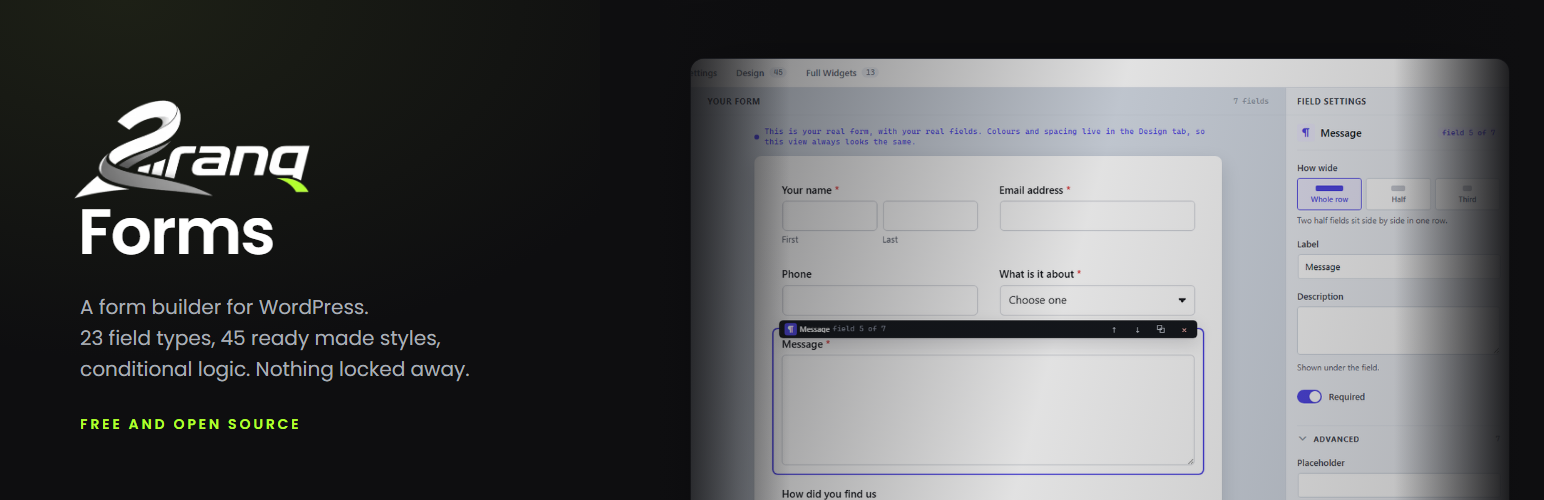
2ranq Forms 是一款免費的拖放式表單建構器,無需付費或試用,提供即時預覽和多種功能,讓使用者輕鬆創建自訂表單。
【主要功能】
• 拖放式建構器,實時預覽表單
• 23 種欄位類型,包括姓名、地址和檔案上傳
• 條件邏輯,根據先前回答顯示或隱藏欄位
• 多步驟表單,帶有進度條和驗證
• 自訂樣式,提供 45 種現成設計
• 數據儲存在自己的資料庫中
外掛標籤
開發者團隊
原文外掛簡介
2ranq Forms is a drag and drop form builder. Everything it does is free. There is
no pro tier, no trial, and no feature that stops working after a while.
What it does
Drag and drop builder with a live preview of your real form
23 field types, including name, address, phone with per country checks, date, time, rating, ranking, picture choice, signature, password and file upload
Conditional logic: show or hide any field based on what was answered earlier
Multi-step forms with a progress bar and per step validation
File uploads with type, size and content checks
Entries stored in your own database, with their own screen in the dashboard
Email notification on every entry, with a reply address taken from the form
A Design tab with 45 ready made styles, and a setting for every colour, corner, space and button
13 full width sections that wrap around a form, with heading, contact details and photo
Gutenberg block, Elementor widget and a plain shortcode
29 ready made forms in nine groups: start here, contact, bookings and appointments, quotes and orders, applications step by step, verification and documents, support, sign ups and events, feedback and surveys. Seven of them are split into steps
Built to stay light
Nothing is sent to the visitor on pages that have no form on them. Forms use plain
JavaScript, so jQuery is not loaded on your site because of us. No payment library
ships inside the plugin. A page with a form loads about 8 KB of stylesheet and
6 KB of script, gzipped, and the sections stylesheet is a separate file that only
loads on pages that use a section.
It works without JavaScript too
If scripts are blocked, every step is shown at once, every field is shown, and the
form submits normally. The server checks the same rules either way, so nothing is
lost and nothing slips through.
Your data stays yours
Entries are stored in a table in your own database and files in your own uploads
folder. Nothing is ever sent to us: there is no account, no licence check and no
usage report. Storing the visitor IP address can be turned off in the settings.
The plugin can connect to a small number of outside services, but every one of
them is switched off until you turn it on and enter your own keys. They are all
listed under External services below, with what is sent and when.
External services
Out of the box this plugin does not connect to any external service. Nothing is
sent to 2ranq at any point. The services below are optional: each one is off
until you switch it on in the plugin settings and enter your own keys, and each
one only sends data for the forms where you have enabled it.
If you enable one of them, personal data from that form reaches that company, so
say so in your own privacy notice.
Google reCAPTCHA
Used to stop automated spam, if you pick it as your spam check.
The reCAPTCHA script (https://www.google.com/recaptcha/api.js) is loaded in the
visitor’s browser on every page that shows a protected form, which lets Google see
the visitor’s IP address and browser. When the form is submitted, the token from
that widget and your secret key are sent from your server to
https://www.google.com/recaptcha/api/siteverify to be verified. The answers typed
into the form are never sent.
Service provided by Google. Terms of service: https://policies.google.com/terms
Privacy policy: https://policies.google.com/privacy
hCaptcha
Used for the same job as reCAPTCHA, for people who would rather not send their
visitors to Google.
The hCaptcha script (https://js.hcaptcha.com/1/api.js) is loaded in the visitor’s
browser on every page that shows a protected form, which lets hCaptcha see the
visitor’s IP address and browser. When the form is submitted, the token and your
secret key are sent from your server to https://api.hcaptcha.com/siteverify to be
verified. The answers typed into the form are never sent.
Service provided by Intuition Machines, Inc. Terms of service:
https://www.hcaptcha.com/terms
Privacy policy: https://www.hcaptcha.com/privacy
Cloudflare Turnstile
Used for the same job as reCAPTCHA, usually without showing the visitor anything
to click.
The Turnstile script (https://challenges.cloudflare.com/turnstile/v0/api.js) is
loaded in the visitor’s browser on every page that shows a protected form, which
lets Cloudflare see the visitor’s IP address and browser. When the form is
submitted, the token and your secret key are sent from your server to
https://challenges.cloudflare.com/turnstile/v0/siteverify to be verified. The
answers typed into the form are never sent.
Service provided by Cloudflare, Inc. Terms of service:
https://www.cloudflare.com/terms/
Privacy policy: https://www.cloudflare.com/privacypolicy/
Mailchimp
Used to add the person who filled in the form to one of your audiences.
After an entry is saved, and only for a form where you have chosen Mailchimp, your
server sends the email address from the entry, the name if the form has a name or
text field, and any tags you set, to
https://.api.mailchimp.com/3.0/lists//members, authenticated with
your own API key. The person is added with the status “subscribed”, so ask for
their consent on the form itself. The data centre prefix comes from your key and
the audience id is the one you enter yourself.
Service provided by Intuit Mailchimp. Terms of use:
https://mailchimp.com/legal/terms/
Privacy policy: https://mailchimp.com/legal/privacy/
Slack
Used to post every new entry into a channel, so a team sees it without opening the
dashboard.
After an entry is saved, the form name and the submitted answers are sent to the
incoming webhook address you paste into the settings, on hooks.slack.com. Nothing
is sent until that address is entered.
Service provided by Slack Technologies. Terms of service:
https://slack.com/terms-of-service
Privacy policy: https://slack.com/trust/privacy/privacy-policy
A webhook address of your own
Used to send the entry to any address you give, which is how people reach Zapier,
Make, n8n or their own system.
After an entry is saved, the entry is sent as JSON to the address you typed into
the form settings: the entry and form ids, the form name, your site address, the
time, and every submitted field. An optional secret of yours travels in an
X-Ranq-Secret header. There is no fixed provider behind this one: the address is
yours, so the terms and the privacy policy are those of whatever service you point
it at.
Credits and origin
2ranq Forms is written by Quantum, Serbia, and published by 2ranq
(https://2ranq.com). The plugin page is at
https://2ranq.com/plugins/2ranq-forms/. Copyright (c) 2026 Quantum. The plugin is
free software under the GNU General Public License, version 2 or later. The full
text is in LICENSE.txt inside the plugin folder.
The layouts are not guesswork. In August 2026 we measured seventeen live sites we
build and maintain, and the numbers decided the defaults: field height, corner
rounding, how a contact section splits into columns, and how many fields a real
contact form has. The thirteen ready made sections are copies of those sites,
rebuilt field by field, with sample details that belong to nobody: phone numbers
from the 555-01xx range and email addresses on the reserved .example domain.













