內容簡介
外掛總結:X3P0麵包屑是為WordPress建立的最先進和堅固的麵包屑導航系統之一。它最初於2009年發布,並成長為可以處理幾乎任何網站設置的系統,以顯示每個頁面的最準確的麵包屑。 - 支援經典主題和區塊主題。 - 可以在任何WordPress網站上使用。 - 對於區塊主題,可以通過WordPress網站編輯器將其插入到任何模板或模板部分中。 - 對於經典主題,必須手動將PHP代碼添加到主題中以調用麵包屑導航。 - 外掛會自動檢測您的永久鏈接設置,並根據該結構顯示麵包屑。 - 外掛可以識別自定義文章類型和分類法。 - 無論您添加什麼內容,外掛都有解決方案。
外掛標籤
開發者團隊
原文外掛簡介
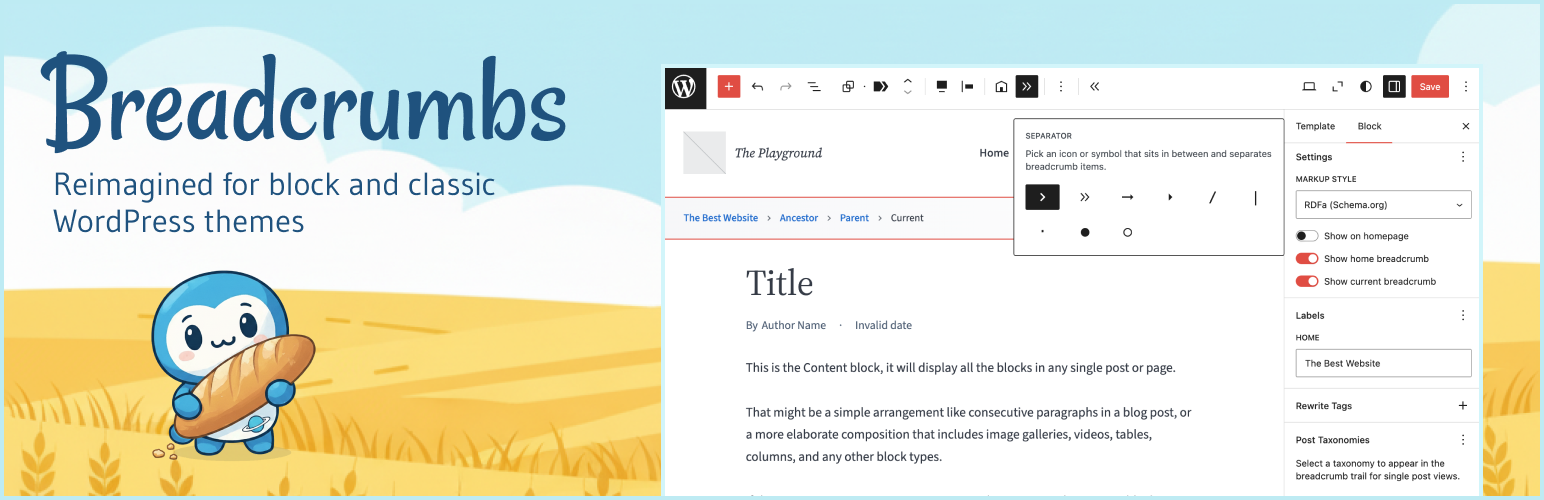
X3P0: Breadcrumbs is the most robust breadcrumb navigation system for WordPress. Built on 17+ years of development, it automatically detects your permalink structure and displays accurate breadcrumbs for every page on your site. Perfect for improving site navigation and SEO, this breadcrumbs plugin works seamlessly with both block themes and classic themes. Simply insert the Breadcrumbs block via the WordPress Site Editor or add it to your theme templates. Key Features Automatic Site Structure Detection The plugin automatically detects your permalink setup and builds breadcrumbs based on your site’s hierarchy. No configuration needed–it just works out of the box. But you can also customize if you need to change it. Custom Post Type Support Automatically recognizes custom post types and custom taxonomies created by other plugins or your theme. Whether you’re running an ecommerce solution, a portfolio site, or any custom setup, breadcrumbs will display correctly. Block Theme and Classic Theme Compatible Insert breadcrumbs using the WordPress block editor in any template, template part, or pattern. For classic themes, easily add breadcrumbs using a simple PHP function call. Developer Customization Built on a robust object-oriented PHP foundation with extensive hooks and filters. Developers can customize every aspect of breadcrumb generation and display. Schema.org Structured Data Support Choose from plain HTML, Schema.org microdata, or RDFa formats for optimal SEO and search engine visibility. Flexible Display Options Control which breadcrumb items display, customize separators, hide breadcrumbs on specific pages, and style breadcrumbs to match your theme. How to Add Breadcrumbs to Your Site For Block Themes: Go to Appearance → Editor Open your Header template part (or any template where you want breadcrumbs) Click the block inserter (+) and search for “Breadcrumbs” Insert the block and customize settings in the block sidebar Save your template The breadcrumbs will automatically display site-wide based on your permalink structure. For Classic Themes: Add this code to your header.php or any template file where you want breadcrumbs to appear: SEO Benefits Breadcrumbs improve your site’s search engine optimization by: Providing clear site structure signals to search engines Reducing bounce rates by offering easy navigation Supporting Schema.org structured data markup Creating internal linking structure automatically Improving user experience and site usability Search engines like Google display breadcrumbs in search results when properly formatted, giving your site more visibility and higher click-through rates. Supported Content Types The breadcrumbs plugin automatically handles: Pages and subpages (hierarchical structure) Blog posts with category breadcrumbs Custom post types (products, portfolios, etc.) Custom taxonomies (tags, genres, locations, etc.) Archive pages (date, author, taxonomy archives) Search results pages 404 error pages Attachment pages Customization Options Block Settings: Show/hide on the homepage Show/hide first crumb (home link) Show/hide last crumb (current page) Link the last crumb (current page) Choose separator style (e.g., slash, arrow, greater-than, bullet, chevron) Customize labels and text Determine whether to automatically detect permalink structure Choose taxonomies to match post types Developer Options: Custom query classes for unique breadcrumb logic Custom assembler classes for conditional breadcrumb display Custom crumb classes for specialized breadcrumb items Filter hooks for modifying which breadcrumbs are shown How It Works This breadcrumbs plugin analyzes the current WordPress query and generates breadcrumbs based on: Your permalink structure – Date-based, post name, category-based, or custom Content hierarchy – Parent pages, category relationships, custom taxonomies Post type configuration – Custom post type archives and relationships Taxonomy settings – Primary categories and taxonomy hierarchies The plugin automatically detects these settings and builds the most accurate breadcrumb trail for each page, so you don’t need to configure complex rules. Developer Documentation For developers who want to customize breadcrumbs programmatically, the plugin provides extensive PHP classes and hooks. See the GitHub repository for full developer documentation. Why Choose X3P0: Breadcrumbs? Unlike simpler breadcrumb plugins, X3P0: Breadcrumbs handles complex site structures automatically: Hierarchical pages – Automatically shows parent → child relationships Category-based permalinks – Shows category structure in URLs Date-based archives – Displays year/month/day breadcrumb trails Custom post type archives – Links back to custom post type archive pages Taxonomy hierarchies – Displays parent/child category relationships Multisite networks – Can include network home in breadcrumb trail The plugin has been refined since 2009, making it one of the most mature and reliable breadcrumb solutions for WordPress.