
內容簡介
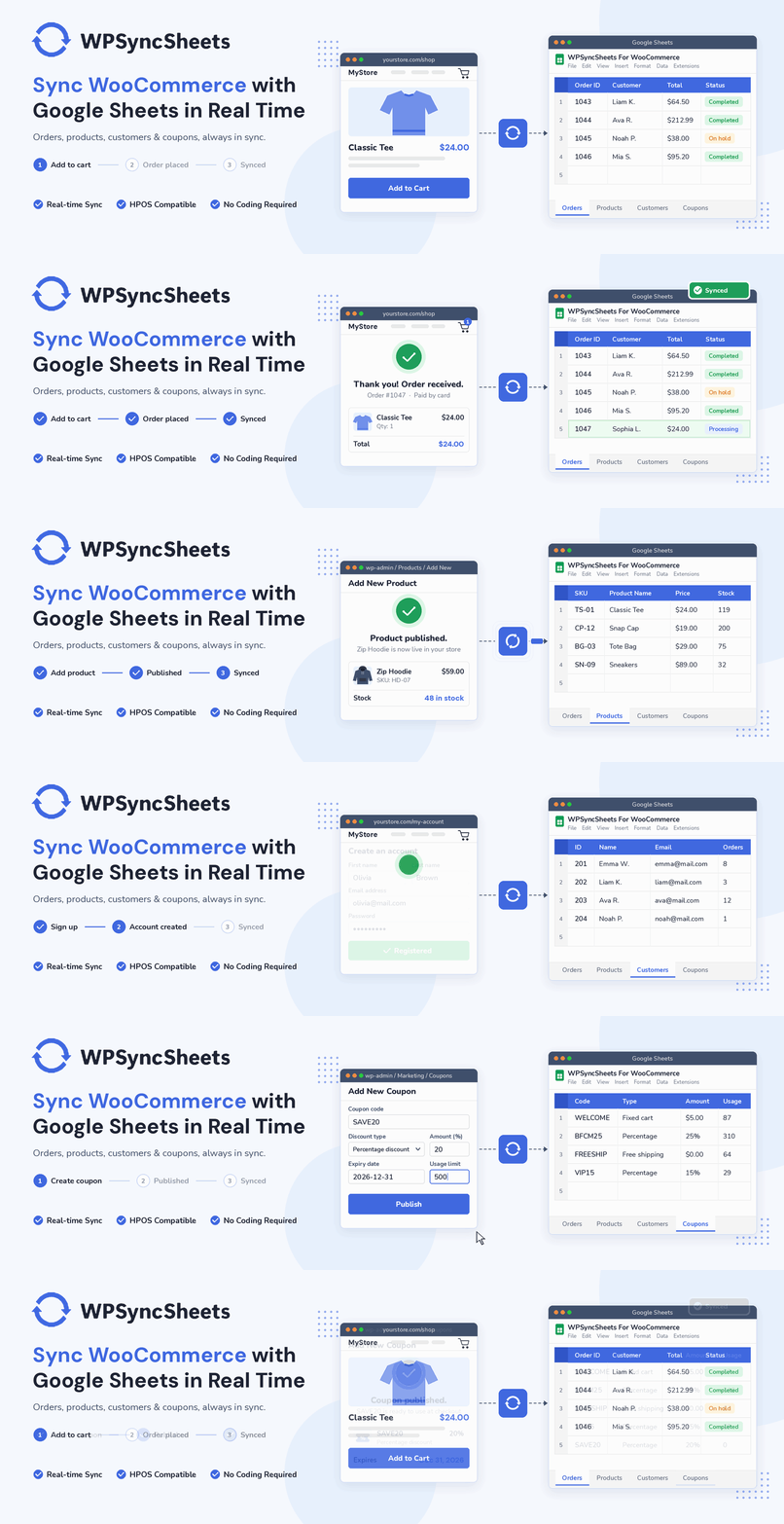
WPSyncSheets For WooCommerce 是一款能夠自動將 WooCommerce 的訂單、產品、顧客和優惠券即時匯出並同步到 Google Sheets 的外掛。它確保您的商店數據始終保持最新,無需手動匯出,方便備份和報告分享。
【主要功能】
• 即時匯出 WooCommerce 訂單到 Google Sheets
• 每種數據類型自動創建獨立的工作表標籤
• 方便分享,不需提供管理員權限
• 支援本地 CSV 和 Excel (.xlsx) 匯入匯出
• 大量數據友好,輕鬆篩選數千行數據
• 互動式設置向導和一鍵連接 Google Sheets
外掛標籤
開發者團隊
② 後台搜尋「WPSyncSheets For WooCommerce – Import & Export Orders, Products, Customers & Coupons to Google Sheets in Real-Time」→ 直接安裝(推薦)
📦 歷史版本下載
原文外掛簡介
WPSyncSheets For WooCommerce automatically exports and syncs your WooCommerce orders, products, customers, and coupons to Google Sheets in real time. Every new order, product, customer, or coupon is added to your connected spreadsheet the moment it is created, so your store data is always current without a single manual export.
If you are looking for a WooCommerce Google Sheets Connector that keeps each data type in its own tab inside a single spreadsheet, this plugin is built for that job. Use it to back up store data, share live reports with your team, migrate WooCommerce content between sites, or feed your accounting and analytics workflows.
Demo | Sample Sheets | Docs | Support | Pro
🚀 Why Use This Plugin?
➜ Real-time export of WooCommerce orders to Google Sheets
➜ Separate, automatically created sheet tabs for each data type
➜ Share without giving admin access — send a sheet link to your accountant, VA, or supplier
➜ Local CSV & Excel (.xlsx) import and export
➜ Bulk-friendly — read and filter thousands of rows in Sheets instead of paging through wp-admin
➜ Interactive setup wizard and one-click Google Sheets connection
➜ 100% HPOS compatible, multisite ready
WPSyncSheets For WooCommerce Features
WooCommerce to Google Sheets Integration
Connect WooCommerce with Google Sheets and export store data in real time. Create a new spreadsheet or select an existing one, and let the plugin add a dedicated tab for orders, products, customers, and coupons, each with a complete set of default columns. Data is synced using secure Google authentication, and no Google account or Drive data is stored by the plugin author.
Export WooCommerce Orders by Status
Export order data based on WooCommerce order status so processing, completed, pending, cancelled, and refunded orders can be tracked separately. The built-in “Click to Sync” action pushes all of your existing orders into the connected sheet in one go, and every new order after that is appended automatically.
Export Product Types, Customers & Coupons
Export simple, variable, grouped, and external products, including product images and variations, along with your full customer and coupon lists. Bulk export is supported for every data type, so an entire catalogue or customer base can be moved into Google Sheets in a single run.
CSV & Excel Import Export with Validation Preview
Import and export WooCommerce orders, products, customers, and coupons as local CSV or Excel (.xlsx) files. A smart validation preview shows valid versus error row counts before anything is written to your store, and chunked background processing keeps large files from triggering server timeouts (504 errors).
Modern Dashboard & Guided Setup
An interactive setup wizard walks you through the Google connection, and the dashboard inside WordPress admin shows each data type with its current sheet, header configuration, and sync status. Every sheet includes all default headers for its data type, with their default names and order.
🧪 Check Live Demo
Demo Link: Open Demo
Sample Google Sheets (view exported data):
Exported Orders
Exported Products
Exported Customers
Exported Coupons
To test the demo store: add any product to the cart, proceed to checkout, place the order with real or test billing details, then click “View Your Orders in Spreadsheet” to see the data land in Google Sheets.
📌 How to Use this Plugin
Step 1 – Install & Activate
Install and activate the plugin. You will find the WPSyncSheets For WooCommerce menu in your WordPress admin.
Step 2 – Connect Google
Open the API Integration tab and connect your Google account, either with the one-click connection or with your own Client ID, Secret Key, and Token. Make sure to ALLOW the Google Drive and Google Sheets permissions when prompted.
Step 3 – Configure Export Settings
Create new or select existing spreadsheet to use, then enable the data types you want (orders, products, customers, coupons). Each sheet includes all default headers.
Step 4 – Click to Sync
Use “Click to Sync” to send existing WooCommerce data to Google Sheets. From that point on, every new order, product, customer, or coupon is added to the connected sheet automatically.
📖 Step-by-Step Guides
Written walkthroughs for the most common WooCommerce and Google Sheets workflows:
How to Export WooCommerce Orders to Google Sheets Automatically
How to Import WooCommerce Orders to Google Sheets
Real-Time Sync of WooCommerce Order Status to Google Sheets
Bulk Product and Order Management in WooCommerce
How to Bulk Edit WooCommerce Product Prices for a Sale
How to Use Google Sheets as Your WooCommerce Inventory Control Center
Google Sheets vs the WooCommerce Default Dashboard: Which Is Better for Store Management?
How to Automatically Sync WordPress Data to Google Sheets
How to Build a Marketing Dashboard from WordPress Data Using Google Sheets
How to Turn Your WordPress Data into AI-Powered Insights with Google Sheets
Browse every tutorial on the WPSyncSheets Blog.
🔒 Upgrade to Pro
Unlock two-way syncing with WPSyncSheets For WooCommerce Pro:
✅ All free features – data export, bulk export, CSV/Excel import export
✅ Import orders, products, customers, coupons & events from Google Sheets to WooCommerce
✅ Bulk import of orders, products, coupons, customers, and events
✅ Auto field mapping between WooCommerce and Google Sheets
✅ Additional sheet headers from plugins, custom fields and metadata
✅ Choose, rename and reorder sheet headers
✅ Add, modify, and delete store data directly inside Google Sheets
✅ Scheduled imports and exports at your own intervals
✅ Advanced filters to selectively import or export data
✅ Date range sync – send only the records from a selected date range
✅ Category-wise product sheets, and import of product categories, tags and attributes from Google Sheets
✅ Custom field data from ACF Lite or Pro
✅ Visual graphs generated inside Google Sheets
✅ Freeze headers and change row background colours
✅ Compatible with 45+ popular WooCommerce and WordPress plugins
✅ Multisite support
Pro sample sheets: Products Sold Bar Graph | Total Orders Line Graph
You can check out the user guide to set up the plugin, or watch the videos below.
How to Export WooCommerce Orders?
How to Export WooCommerce Products?
How to Export WooCommerce Customers?
How to Export WooCommerce Coupons?
📣 Trusted by Over 10,000+ Customers
Trusted by online retailers, developers, and marketing teams globally to streamline WooCommerce data management. Subscribe to the WPSyncSheets Newsletter for tips, updates, and exclusive discounts.
Other WPSyncSheets Plugins
WPSyncSheets also offers Google Sheets integrations for Contact Form 7, Gravity Forms, WPForms, Ninja Forms, Fluent Forms, Formidable Forms, Elementor forms, Document Library Pro and WordPress posts and pages. See the WPSyncSheets website for the full list.
External services
This plugin connects to the following external services. No data is sent to any of them until you take the action described.
Google Sheets API and Google Drive API
Used to create spreadsheets and sheet tabs, write and update rows, and list the spreadsheets you have shared with the plugin. WooCommerce order, product, customer and coupon data that you enable for export is sent to the spreadsheet you select, each time a record is created or updated and when you run a manual or test sync. The plugin requests only the drive.file scope, so it can access spreadsheets it created or that you explicitly picked. The Google Picker script (apis.google.com) is loaded on the plugin settings and setup wizard screens so you can choose a spreadsheet.
Provider: Google LLC. Google Terms of Service, Google APIs Terms of Service, Google Privacy Policy.
WPSyncSheets OAuth relay (api.wpsyncsheets.com)
Used only when you choose the one-click “Connect with Google” option. It registers your site so Google can return you to it after authorization, exchanges the authorization code for tokens, refreshes access tokens when they expire, and revokes the connection when you disconnect. It sends your site URL, home URL, the plugin version, a random installation ID generated by the plugin, and the OAuth code or refresh token issued by Google. It is not used when you connect with your own Google client ID and secret.
Provider: Creative Werk Designs (WPSyncSheets). Terms and Conditions, Privacy Policy.
WPSyncSheets feedback service (feedback.wpsyncsheets.com)
Used only if you choose to submit the optional feedback form shown when deactivating the plugin, and only after you tick the consent box. It sends the reason you selected, your message, the plugin name and version, the site administrator email address and the site URL.
Provider: Creative Werk Designs (WPSyncSheets). Terms and Conditions, Privacy Policy.
Source code
All JavaScript and CSS shipped with this plugin is unminified, human-readable source; there is no build step. The bundled assets/js/wpsslw-ui.js is an unmodified custom build of jQuery UI 1.12.1 (its source is at github.com/jquery/jquery-ui). PHP libraries under lib/vendor are installed with Composer from lib/composer.json; run composer install --no-dev inside lib/ to rebuild them.














