
內容簡介
WPO365 | MICROSOFT 365 GRAPH MAILER 是一款現代化且高效的 WordPress 外掛,透過 Microsoft Graph API 發送交易性電子郵件,取代傳統的 SMTP 方法,確保郵件的可靠性與安全性。
【主要功能】
• 使用 Microsoft Graph 發送郵件
• 支援 HTML 格式郵件
• 自動儲存已發送郵件至收件箱
• 附加檔案作為郵件附件
• 提供詳細的設定與測試郵件功能
• 支援大型附件及郵件別名發送
外掛標籤
開發者團隊
② 後台搜尋「WPO365 | MICROSOFT 365 GRAPH MAILER」→ 直接安裝(推薦)
📦 歷史版本下載
原文外掛簡介
WPO365 | MS GRAPH MAILER provides you with a modern, reliable and efficient way to send WordPress transactional emails from one of your Microsoft 365 / Exchange Online / Mail enabled accounts.
The plugin re-configures your WordPress website to send emails using the Microsoft Graph API instead of – for example – SMTP. Sending WordPress emails using the Microsoft Graph API has become the only available alternative after Microsoft has disabled basic authentication (username and password) over the SMTP protocol.
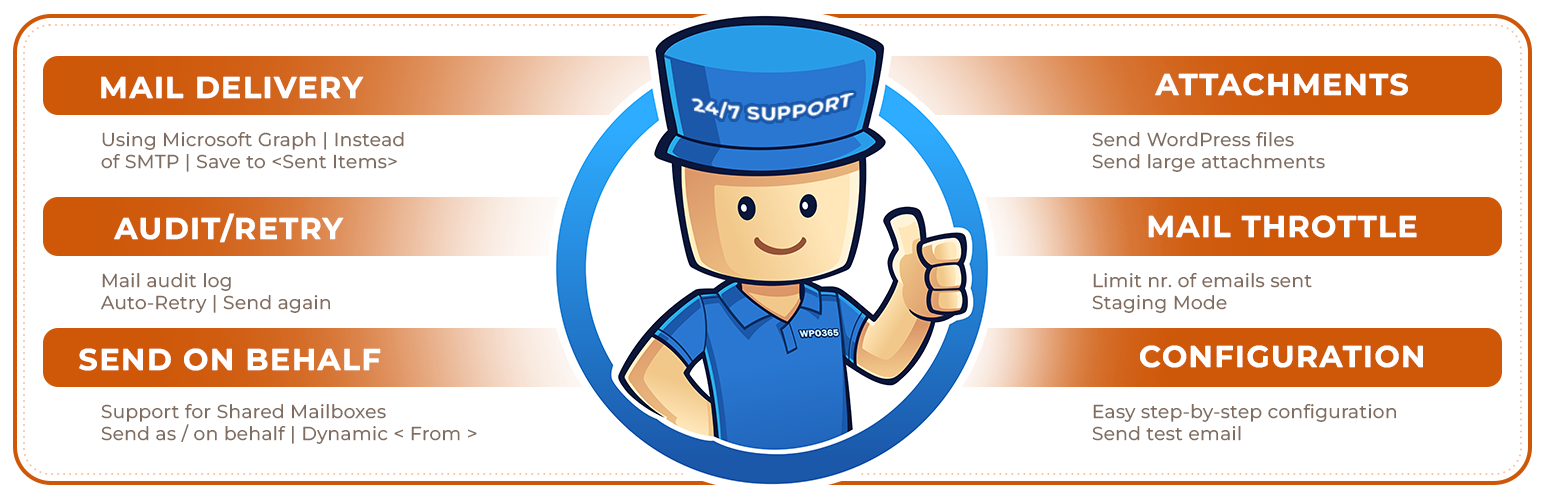
DELIVERY
Send WordPress transactional emails from one of your Microsoft 365 Exchange Online / Mail enabled accounts using Microsoft Graph instead of – for example – SMTP.
Choose between delegated (send mail as a user) and application-level (send mail as any user) type permissions.
Or: Select either a Microsoft 365 account or a personal Microsoft account, like Hotmail.com or Outlook.com, to send WordPress emails.
Or: Configure RBAC for Exchange Online and authorize as an application but with a limited scope e.g. one specific mailbox.
Daily refresh of Microsoft Graph access and refresh token.
Auto-flagging and suppression of duplicate emails.
Auto-retry when throttled (HTTP 429).
SEND AS HTML
Send emails formatted as HTML.
SAVE TO SENT ITEMS
Emails sent will be saved in the account’s mailbox in the Sent Items folder, further helping to track (successful) mail delivery.
ATTACHMENTS
Send files from your WordPress website as attachments.
WPO365 INSIGHTS
See what matters, when it happens Track key WPO365 events like sent emails with WPO365 Insights more
CONFIGURATION / TEST EMAIL DELIVERY
Easy configuration with detailed step-by-step Getting started guide and video.
Send test email to recipients incl. CC, BCC and attachment.
ADD FUNCTIONALITY WITH PREMIUM EXTENSIONS
The following features can be unlocked with the WPO365 | MAIL extension.
WPO365 INSIGHTS
Get WPO35 Alerts in your inbox when email delivery is failing more
Auto-Retry
Log every email sent from your WordPress website, review errors and (automatically) try to send unsuccessfully sent mails again.
LARGE ATTACHMENTS
Add support to send WordPress emails with attachments larger than 3 MB using Microsoft Graph.
SEND FROM ALIAS
Send emails from an alias address (but submit to Microsoft Graph as the authorized user).
SEND AS / SEND ON BEHALF OF
Send email as / on behalf of another user or distribution list.
SHARED MAILBOX
Send email from Microsoft 365 Shared Mailbox.
STAGING MODE
Mail Staging Mode is useful for debugging and staging environments. WordPress emails will be logged and saved in the database instead of being sent.
DYNAMIC SEND-FROM
Allow forms to override “From” address e.g allow Contact Form 7 to dynamically configure the account used to send the email from (requires application-level Mail.Send permissions).
MAIL THROTTLE
Throttle the number of emails sent from your website per minute.
WP-CONFIG FOR AAD SECRETS
Further improve overall security by choosing to store Azure Active Directory secrets in your WordPress WP-Config.php (on disk) and have those secrets removed from the database.
SEND AS BCC
Send emails as BCC instead and prevent reply-to-all mail pollution.
REPLY-TO
Configure a default reply-to mail address if this should differ from the account’s mail address that is used to send WordPress transactional emails from.
Prerequisites
We have tested our plugin with WordPress >= 5.0 and PHP >= 5.6.40.
You need to be an Entra ID Tenant Administrator to configure both Azure Active Directory and the plugin.
Support
We will go to great length trying to support you if the plugin doesn’t work as expected. Go to our Support Page to get in touch with us. We haven’t been able to test our plugin in all endless possible WordPress configurations and versions so we are keen to hear from you and happy to learn!
Feedback
We are keen to hear from you so share your feedback with us on LinkedIn and help us get better!
Open Source
When you’re a developer and interested in the code you should have a look at our repo over at WordPress.














