
內容簡介
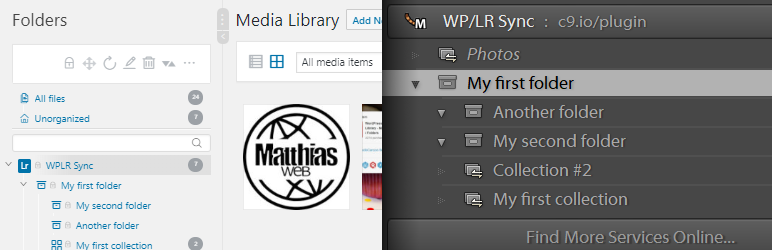
這個外掛可以在 Lightroom 和 WordPress Real Media Library 之間同步你的照片、集合、關鍵字和 Metadata。所有在 Lightroom 中的更改都會在你的 WordPress Media Library 的資料夾結構中複製。
需求
這個外掛是一個附加功能,允許你一起使用必須安裝的以下外掛:
WP/LR Sync
Real Media Library
功能
自動新增資料夾/集合
自動移除和移動資料夾/集合
將一張圖片插入到多個集合中
遵循 Lightroom 中的圖片順序
在你的資料夾結構中使用自訂資料夾圖示
基於你的 Lightroom 集合生成圖庫:當 Lightroom 層次結構和附件與你的 WordPress 安裝同步時,你可以在文章和頁面上生成動態圖庫
更多連結
如果你想學習更多,有問題,或你是一位開發者,以下的連結是提供給你的:
WP/LR FAQ
Real Media Library 知識庫
devowl.io 支援(針對 Real Media Library 和這個外掛)
WP/LR Sync Folders 的 Git 存儲庫
這個外掛是 Real Media Library 的免費小型附加功能,有限的支援。
外掛標籤
開發者團隊
② 後台搜尋「WP/LR Sync Folders with Real Media Library」→ 直接安裝(推薦)
原文外掛簡介
Synchronize your photos, collections, keywords, and metadata between Lightroom and WordPress Real Media Library. All changes in your Lightroom are replicated in the folder structure of your WordPress Media Library.
Requirements
This plugin is an add-on that allows you to use the following plugins together, which must be installed:
WP/LR Sync
Real Media Library
Features
Add folders/collections automatically
Remove and move folders/collections automatically
Inserting an Image into multiple collections
Respect the Lightroom image order
Custom folder icons in your folder structure
Galleries based on your Lightroom collections: When the Lightroom hierarchy and attachments are synchronized with your WordPress installation, you can generate dynamic galleries on your posts and pages
Further links
If you want to learn more, have a problem or if you are a developer, the following links are for you:
WP/LR FAQ
Real Media Library Knowledge Base
devowl.io support (for Real Media Library and this plugin)
Git repository of WP/LR Sync Folders at GitHub
This plugin is a free micro add-on for Real Media Library with limited support.