內容簡介
總結:WPApps Table Collapser是一個輕量的外掛程式,可使您的表格具有可摺疊功能。透過為表格添加collapsible-table類別,使用者可以通過點擊表頭來切換表格主體的可見性。
問題與答案:
1. WPApps Table Collapser有哪些功能?
- 可摺疊的表格:透過添加簡單的類別使任何表格具有可摺疊功能。
- 切換指示器:自動在表頭的最後一列添加+/-指示器。
- 可自訂:透過自己的CSS風格化切換指示器和表格外觀。
- 區塊編輯支援:包含Gutenberg區塊,以便輕鬆創建表格並實現折疊功能。
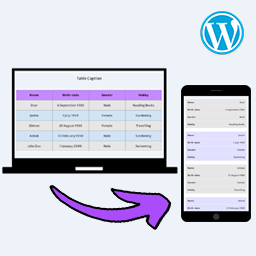
- 手機友好:具備響應式設計,可在手機設備上無縫運作。
2. 如何使用WPApps Table Collapser?
- 確保您的表格具有<thead>標籤作為表頭,但如果在設定中啟用"Allow Table Without <thead>"選項則無需必要。
- 將collapsible-table類別添加到您的表格。
- 可選地,為您的表格添加data-title屬性,以設置手機緊湊視圖的自定義標題。
- 表頭中的最後一列將添加一個切換指示器(+/-)。點擊表頭的任何位置將會顯示或隱藏表格主體。
外掛標籤
開發者團隊
原文外掛簡介
WPApps Table Collapser is a lightweight plugin that makes your tables collapsible. By adding a collapsible-table class to your tables, you enable users to toggle the visibility of the table body by simply clicking on the table header.
Features
Collapsible Tables: Make any table collapsible by adding a simple class.
Toggle Indicator: Automatically adds a +/- indicator to the last column of the table header.
Customizable: Style the toggle indicator and table appearance with your own CSS.
Block Editor Support: Includes a Gutenberg block for easy table creation and collapsing functionality.
Mobile Friendly: Works seamlessly on mobile devices with responsive design.
Usage:
Ensure that your table has a
tag for the table header, though it’s not mandatory if you enable the “Allow Table Without ” option in settings.Add the class collapsible-table to your table.
Optionally, add a data-title attribute to your table to set a custom title for the mobile compact view.
The last column in the table header will have a toggle indicator (+/-) added to it. Clicking anywhere in the header will show or hide the table body.