內容簡介
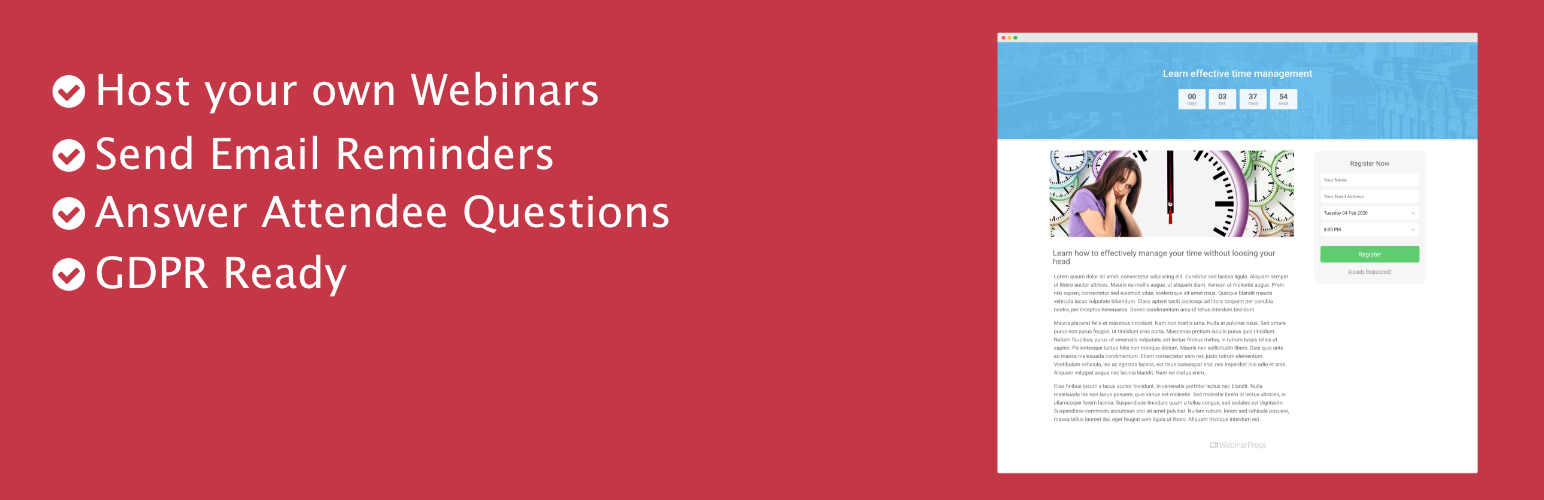
使用 WebinarPress 直接在您的網站上舉辦現場和自動化網路研討會,提供完全可自訂的參與者體驗,無需任何技術技能。
利用強大的 YouTube Live 直播或任何您在 YouTube、Vimeo 或自己的伺服器上託管的預錄影片的直播功能。
允許參與者發問並在網路研討會中回答問題,可以透過視頻或問答功能進行。
完全響應式設計,讓訪客可以從任何移動裝置或平板電腦參加網路研討會。
收集參與者的姓名和電子郵件地址,並將它們匯入您的第三方電子郵件提供者中。
完全可自訂的電子郵件提醒,以確保您的參與者不會錯過網路研討會。
提供選擇性回放功能,讓錯過時段的參與者有第二次機會。
介紹 WebinarPress 和如何設置您的第一個網路研討會
功能
使用 Hangouts、Youtube 或 Vimeo(在 專業版中也有 MP4 影片檔、嵌入式網頁和 RTMP 流)組織現場網路研討會。
自訂每個網路研討會頁面的風格。
使用短碼將註冊或登錄表單放置在網站的任何地方。
響應式/適用於行動設備的網路研討會頁面。
在參加研討會時收集參與者的姓名和電子郵件地址。
自動發送提醒信,並按照您的需求進行自訂。
在註冊後顯示確認頁面。
倒數頁面顯示事件即將開始。
在您的網路研討會期間查看有多少人在線上。
匯出參與者名單為文字或 CSV 檔。
在現場網路研討會期間讓參與者發問並記錄問題。
在現場網路研討會或回放期間提供獎勵活動。
讓註冊者在錯過網路研討會時觀看回放。
與幾乎任何佈景主題兼容。
專業版功能
自動記錄網路研討會 (專業版)
重複性、長效、即時和按需網路研討會 (專業版)
自訂註冊欄位 (專業版)
有償網路研討會 (專業版)
會員網路研討會 (專業版)
在您的網路研討會期間查看參與者的名稱 (專業版)
網路研討會期間進行即時聊天 (專業版)
讓參與者舉手
外掛標籤
開發者團隊
② 後台搜尋「WebinarPress – Webinar System for WordPress」→ 直接安裝(推薦)
📦 歷史版本下載
原文外掛簡介
Webinarpress is the ultimate webinar solution designed exclusively for WordPress, rich with beginner-friendly features you can use to host free webinars that serve as a powerful tool for generating leads and sales.
Designed with simplicity in mind, our WordPress plugin empowers you to effortlessly host live webinars, automate pre-recorded sessions, and even offer on-demand replays, ensuring maximum reach and flexibility for your audience.
Interact with your attendees by letting them ask questions and answer them during the webinar either in your video or with a question and answer feature.
Fully responsive pages so visitors can attend a webinar from every mobile device or tablet.
Collect attendees’ name and email address and import them into your third party email provider.
Fully customizable email reminders so your attendees so they don’t miss the webinar.
Optional replays so attendees who missed the timeslot get a second chance.
Host Free Webinars on WordPress with WebinarPress
WebinarPress is available in two versions, the free WebinarPress Lite and the premium WebinarPress Pro.
Both are packed with all the essential features needed to create engaging webinars that serve as one of your most valuable marketing assets.
These features include:
Effortless Webinar Setup
Create and launch successful webinars in just a few quick clicks without ever leaving the WordPress environment.
Add a title, select a webinar type, and you’ll be ready to launch in just a few seconds.
Automated Webinars (Available in Pro)
Pre-record your sessions and schedule automatic replays, transforming your webinar into a lead-generating machine that keeps running around the clock.
Customizable Registration Forms
As a unique brand with unique goals, boilerplate form templates don’t always allow you to capture attendee information that’s most pertinent to your strategy.
WebinarPress’s conversion-optimized attendee registration forms are fully customizable, with the ability to add custom fields to capture the data that matters most to you.
Interactive Chat Functionality (Available in Pro)
One of the biggest advantages of live webinars over other types of marketing is that it allows you to engage with your audience in real time, creating a sense of community and building personal relationships with your audience that can lead to better conversions.
WebinarPress Pro offers a seamlessly integrated live chat experience that you can use to encourage questions, address concerns, and engage your attendees just as you would if they were there with you in person.
In-Screen Calls to Action
Drive immediate action from your attendees by creating eye-catching action buttons and offers within your webinar.
Giving your audience the ability to take action without leaving the webinar interface reduces the friction points within your sales process, resulting in more qualified leads.
Limit Available Places (Available in Pro)
Limit the number of available places for your webinar, creating a sense of urgency and exclusivity to boost registrations.
Engage Your Audience with Polls(Available in Pro)
Create interactive Polls that allow you to gather different kinds of data from your webinar attendees. These Poll fields include MCQs, Open ended question, Checkbox, Date, and NPS.
Certificate of Attendence(Available in Pro)
Enhance your webinars with the Certificate of Attendance feature by WebinarPress. Recognize attendee commitment effortlessly with professionally designed certificates seamlessly integrated into your webinar process.
Tags Mapping for Integration(Available in Pro)
It allows webinar hosts to create tags in their mailing list platforms and map them to our webinar plugin. This integration enables seamless and automated tag management, ensuring that your mailing lists stay up-to-date with the latest webinar attendee data.
How Can WebinarPress Help Your Business?
Whether your goal is to generate leads for your marketing company, sell a course, or boost sign-ups to your SaaS (Software as a Service) platform, WebinarPress Lite and WebinarPress Pro offer a host of benefits for businesses of every type and every size.
Engage Your Audience
Few things are more challenging than remembering the name of all your attendees while simultaneously staying on track with your perfectly-prepared presentation.
WebinarPress Pro makes life easier by displaying the name of your attendees alongside their video feed or profile picture, meaning you can start making personal connections right from the get-go.
Combine that with the integrated live chat and the Attendee Raise Hand feature that ensures no one gets overlooked, and you’re ready to seize upon the unique audience-engagement opportunities that webinars offer.
Generate More Leads and Sales
At its core, WebinarPress is a lead-generation tool designed to get your sales appointment calendar chock-full of qualified leads.
The valuable attendee information captured via your customized registration form can be synced with a number of top email marketing and CRM (Customer Relationship Management) platforms to help you nurture leads effectively.
Meanwhile, using active offers and attractive Call to Action prompts helps generate more sales, encouraging your audience to take immediate action.
Make Webinar Management Easier
From easy webinar creation to automated scheduling, attendee management, and post-webinar analytics, our webinar WordPress plugin streamlines every aspect of your webinar workflow, saving you time and effort.
Create Paid Webinars (Available in Pro)
WebinarPress integrates with WooCommerce to help you transform your expertise into a profitable venture.
Once activated, you can set a price for your webinar and WooCommerce will automatically generate a product page where attendees can sign-up, pay the fee, and receive a welcome email with a secure link to login.
Simulated Chat(Available in Pro)
Use simulated chat messages to give your automated and on demand webinar an even more interactive feel.
A Free Webinar Service That Works With Your Favorite Marketing Tools
The plugin is designed as an all-in-one solution, meaning every stage of the process attendee signup to post-webinar follow up emails can be handled from within your WordPress.
However, that doesn’t mean that you can use your favorite marketing tools right alongside it.
WebinarPress integrates with a host of world-class platforms including:
ActiveCampaign
Aweber
ConvertKit
Drip
EmailOctopus
Enormail
FluentCRM
GetResponse
MailChimp
Brevo
MailerLite
MailPoet
Mailrelay
Mautic
Zapier
WooCommerce.
Through these integrations, you’ll have no trouble connecting your webinar registration forms directly to your email marketing tool of choice, effortlessly building your subscriber list and automating your email campaigns for greater efficiency.
Elsewhere, the plugin works well with popular CRM solut ions for more effective lead management, as well as top analytics tools, giving you valuable insights into the vital metrics that matter most to you so that you can measure the success of your webinars.
Take Full Control With Advanced Customization Options
Webinarpress offers a plethora of customization options, allowing you to tailor your webinars in a way that aligns with your brand and delivers an unforgettable experience for your attendees.
Branding Customization
Maintain consistency with your brand identity by customizing the look and feel of your webinars. Adjust colors, fonts, and styles to match your brand guidelines, ensuring a cohesive and professional presentation.
Personalized Registration Forms
Capture essential attendee information and create personalized registration forms that reflect your branding. Customize form fields, add your logo, and tailor the form layout to gather the data you need from your attendees.
Customizable Email Templates
Craft engaging and on-brand email communications with customizable email templates. From registration confirmations to reminder emails and follow-up messages, personalize the content, design, and branding to leave a lasting impression on your attendees.
Visually Appealing Webinar Landing Pages
Create stunning webinar landing pages that captivate your audience from the moment they arrive. With Webinarpress’s intuitive drag-and-drop builder, you can easily arrange elements, add compelling visuals, incorporate multimedia, and design attention-grabbing calls-to-action to drive conversions.
Extensive Support and Documentation Available
WebinarPress is designed to be as simple as possible, but if you do run into trouble, don’t worry, you’ll have an extensive array of support options at your disposal:
Detailed, Plain-English Documentation
Our comprehensive documentation talks you through every aspect of the plugin’s features, settings, and functionality, arming you with all the knowledge you need to truly make the most of your webinars.
Video Tutorials
Prefer to be shown what to do rather than just read about it?
We’ve got you covered there too with a library of videos detailing the step-by-step process for key tasks such as setting up your webinar, customizing your pages with drag-and-drop, and integrating with third-party tools.
Checkout Our Youtube channel for Tutorial
Dedicated Customer Support
If none of the above options gave you the answers you were looking for, you can always contact us.
Open up a support ticket and a member of the team will reach out within 24 hours and stop at nothing to get you the resolution you’re looking for.
What Others Say About WebinarPress
“WebinarPress is everything I was looking for and more. I am eager to see its next features and evolution.”
User @Geotraveler
“WebinarPress… is a powerful and user-friendly plugin that allows you to create, host, and promote your own webinars efficiently.” –
WPLift
“Exactly what I needed. I’ve been using this plugin for several months now. It’s easy to use and I’ve got some great technical support”
User @Gagamboy
Ready to harness the power of webinars to grow your business?
Download our free WordPress webinar plugin today and discover how easy it is to build your audience and generate more leads and sales with one of the most effective forms of marketing there is.
Complete Feature List
Organize live webinars with Hangouts on Air, Youtube or Vimeo (MP4 video files, iframes and RTMP streams are also available in the Pro version)
Customize the styling of every webinar page
Use shortcodes to place a registration or login form anywhere in your website
Responsive / mobile friendly webinar pages
Collect attendees name and email when they sign up
Send automatic reminders and customize them to your needs
Confirmation pages after signing up
Countdown page to show before the event starts
See how many people are online during your webinar
Export attendees to text or CSV file
Let attendees ask questions during the live event and keep a log of it
Give away an incentive during your live webinar or replay
Have a replay available for registrants that missed out on the webinar
Works with almost any theme
Pro Features
Automated recorded webinars (Pro version)
Recurring, evergreen, ‘just in time’ and ‘on demand’ webinars (Pro version)
Custom registration fields (Pro version)
Paid webinars (Pro version)
Member webinars (Pro version)
Certificate of Attendence (Pro version)
Tags Mapping for Integration (Pro version)
See the names of attendees during your webinar (Pro version)
Live chat during webinars (Pro version)
Let attendees raise their hand (Pro version)
Show Call to Action elements during webinar (Pro version)
Widgets with past and upcoming webinars (Pro version)
Per webinar emails (Pro version)
Custom registration pages (Pro version)
Custom confirmation pages (Pro version)
Automated replays (Pro version)
Integration with WooCommerce (Pro version)
Integration with WooCommerce Memberships (Pro version)
Integration with Mailchimp (Pro version)
Integration with Brevo (Pro version)
Integration with Aweber (Pro version)
Integration with ActiveCampaign (Pro version)
Integration with Mailpoet 2 & 3(Pro version)
Integration with Drip (Pro version)
Integration with GetResponse (Pro version)
Integration with Enormail (Pro version)
Integration with Zapier (Pro version)
Integration with FluentCRM (Pro version)
Import & Export your webinar settings (Pro version)
Let attendees import the webinar to their Outlook or Google calendar (Pro version)
Simulated Chat (Pro version)
& more functionalities and integrations are on its way!
You can find more information on the Pro version on our website: webinarpress.com
For more guides, information & documentation please go to our website: webinarpress.com
(Formerly WP WebinarSystem)