內容簡介
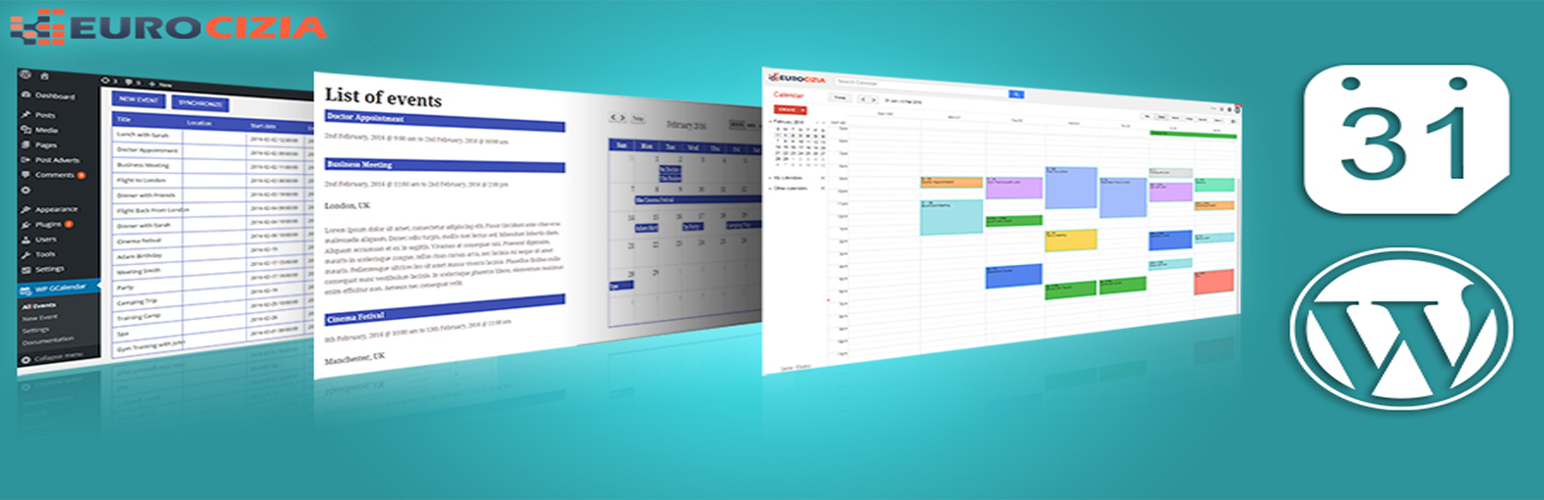
我們的WordPress WP Google Calendar Manager外掛是一個不錯而且易於使用的工具,可以在您的WordPress網站上以多種模式顯示Google日曆事件。
使用WP Google Calendar Manager,您可以僅通過單擊按鈕即可獲取Google日曆中即將發生的事件。
WP Google Calendar Manager功能
顯示來自Google日曆的事件。
直觀的管理員設置,可進行簡單的配置更改。
從Google日曆導入即將發生的事件。
以漂亮的多模式日曆在前端顯示您的日曆。
以多種語言顯示您的日曆。
懸停時顯示事件詳細信息的工具提示。
使用OAuth標準在您的站點和Google之間建立安全連接。
內含完整使用說明文件。
使用該外掛的說明
如何在Google API控制台中創建客戶端ID
WP Google Calendar Manager PRO功能
輕鬆的活動註冊(單日活動使用開始/結束時間)。
管理和同步多個日曆。
保持從Google日曆和WordPress雙方管理事件。
從WordPress添加事件到您的Google日曆中,大部分Google日曆功能(參與者、活動時間、通知等)可用。
啟用來自前端日曆添加事件的選項。
新的工具提示可在日曆中顯示事件詳細信息(開始、結束、位置等)。
支援多種語言。
以一個額外好看的列表顯示日曆和事件詳細信息在前端。
使用OAuth標準在您的站點和Google之間建立安全連接。
要嘗試WP Google Calendar Manager PRO演示版本: Calendar Demo
使用者名稱:demo
密碼:demo
要訂購Pro版請到:WP Google Calendar Manager Pro
保持聯繫,在Facebook上關注我們:@wpgcalendar ,在Twitter上關注我們:@wpgcalendar
如需任何自訂選項,請通過電子郵件聯繫我們:[email protected]
(部分功能不適用於所有版本)。
我們要特別感謝所有客戶,他們幫助我們改進WP Google Calendar Manager。謝謝。
外掛標籤
開發者團隊
② 後台搜尋「WP Google Calendar Manager – Google Calendar Plugin」→ 直接安裝(推薦)
原文外掛簡介
Our WordPress WP Google Calendar Manager plugin is an nice and user friendly tool for Displaying your Google calendar events on your WordPress website as a nice Calendar with multi-modes.
With WP Google Calendar Manager you can get your upcoming events from your Google calendar just with a button click.
WP Google Calendar Manager features
Display events from Google Calendars.
Intuitive admin settings for simple configuration changes.
Import upcoming events from Google Calendar.
Display your calendar in the frontend with a nice calendar with multi-modes.
Display your calendar with many languages.
Display event details with a tooltip on hover.
Secured connection established between your site and Google using the OAuth standard.
Documentation included inside with full instructions of use.
Instructions to use the plugin
How to create a Client ID in Google API console
WP Google Calendar Manager PRO features
Easy event registration (single day with start/end times).
Manage and synchronize Multi-calendars.
Keep managing events from both sides – Google Calendar and WordPress.
Add events from your WordPress to your Google Calendar with most of the Google calendar features ( attendees, event time, notifications, etc.. ).
Option of enabling the Add of events from the frontend calendar.
New tooltip to display event detail in the calendar (start, end, location, etc..).
Supporting many languages.
Display your calendars in the frontend with an extra nice list with event details.
Secured connection established between your site and Google using the OAuth standard.
To try WP Google Calendar Manager PRO demo : Calendar Demo
username : demo
password : demo
To order Pro version : WP Google Calendar Manager Pro
To keep in touch Follow us on facebook: @wpgcalendar and twitter: @wpgcalendar
For any customization please contact us on : [email protected]
(Some features not available in all versions).
We want to give a special Thanks to all the customers who are helping us to improve WP Google Calendar Manager. Thank you.