內容簡介
你正在尋找一個酷炫的設計,讓你可以許願並將其添加到列表中。
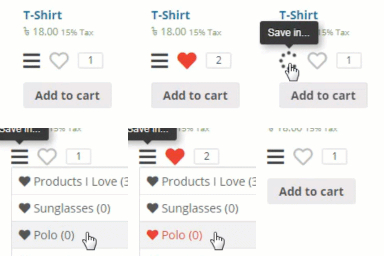
這就是完美的解決方案。使用 WooCommerce Wishlist,您可以通過點擊一個按鈕將多達您喜歡的產品保存到您的愿望清單中,並且您可以即時查看添加的每個產品在一個固定的 Wishlist 方框中。
就像這樣,您可以保存您未來的購買清單。每個用戶都可以擁有自己的愿望清單,在其中儲存他們最喜歡的產品,並隨時訪問它們。當然,您需要登錄才能訪問您的愿望清單。
WooCommerce Wishlist 功能:
讓您的客戶選擇創建自己的愿望清單的選項。
在任何頁面上添加簡碼以顯示愿望清單。
根據您的要求更改愿望清單圖標的形狀和顏色。
選項將添加到“愿望清單”的圖標位置在每個產品上。
將愿望清單圖標更改為文本的選項。
選項編輯您的愿望清單標題。
此外,我們還有一個附加功能,可以顯示所有添加的產品列表的固定框。您可以將該框的位置放置在站點的 6 個不同位置。
外掛標籤
開發者團隊
原文外掛簡介
Looking for some cool design to make a wish and add it into a list.
Here is the perfect solution for that. With WooCommerce Wishlist you can save as many as product you like to your Wishtlist with just one click and you can view each product added instantly on a fixed Wishlist box.
Just like this you can save your list for future buy. Each user can have there own wishlist in which they can store there favorite products and access them any time they like. Of course you will need to login before you can access to your Wishlist.
WooCommerce Wishlist Features :
Options to let your customers create there own wishlist.
Add shortcode on any page to display the wishlist.
Change wishlist icon shape and color as your requirment.
Options to postion the add to wishlist icon on each product
Options Change the wishlist icon to text.
Options to edit title of your wishlist.
Added to all we have an additional feature which display a fixed box with the list of all added products. You can position the box to 6 different location in your site.