
內容簡介
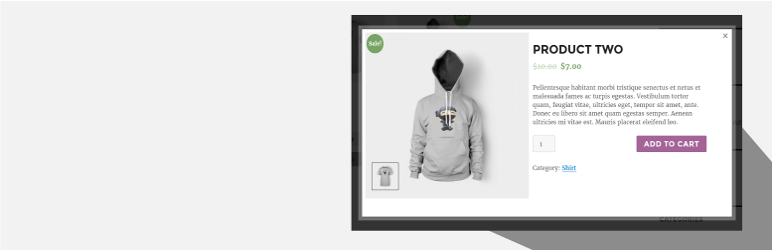
WooCommerce Quick View (Woo Quick View) 是一個外掛,允許使用者在不打開產品頁的情況下快速預覽產品。用戶可以使用上一個和下一個產品按鈕在不同產品之間瀏覽。
前往 設置 > 快速預覽。
示範:https://woo.ciphercoin.com/
WooCommerce Quick View 的功能
在產品循環中添加按鈕以使用 ajax 打開包含產品摘要的模態窗口
產品圖像、標題、價格、數量和加入購物車按鈕將顯示在彈出窗口中
在移動裝置上禁用“快速查看”
為“快速查看”按鈕設置標籤
易於使用
開發人員友好且易於自定義
自定義模態風格
其他 WooCommerce 外掛
WooCommerce 丟棄購物車恢復
支援:http://www.ciphercoin.com/contact/
外掛標籤
開發者團隊
原文外掛簡介
Quick View For WooCommerce (Woo Quick View) allows users to get a quick look of products without opening the product page.Customers can navigate from one product to another using next and previous product button.
Go to Settings > Quick View.
Demo : https://woo.ciphercoin.com/
Features of Quick View For WooCommerce
Add a button in product loop to open a modal window with the product summary using ajax
Product image , title, price, quantity and add to cart button will be shown on popup.
Disable “Quick View” on mobile.
Set a label for the “Quick view” button.
Easy to use
Developer friendly & easy to customize
Customize style of modal
Other WooCommerce Plugin
WooCommerce Abandoned Cart Recovery
Support : http://www.ciphercoin.com/contact/














