內容簡介
Bulk Edit Products for WooCommerce - WP Sheet Editor 是一款專為 WooCommerce 設計的產品批量編輯外掛,能快速編輯和創建產品,提升管理效率,特別適合需要大量處理產品的商店。
【主要功能】
• 快速編輯 WooCommerce 產品
• 批量創建產品
• 支援關鍵字、狀態和作者搜尋
• 編輯所有產品類型及其屬性
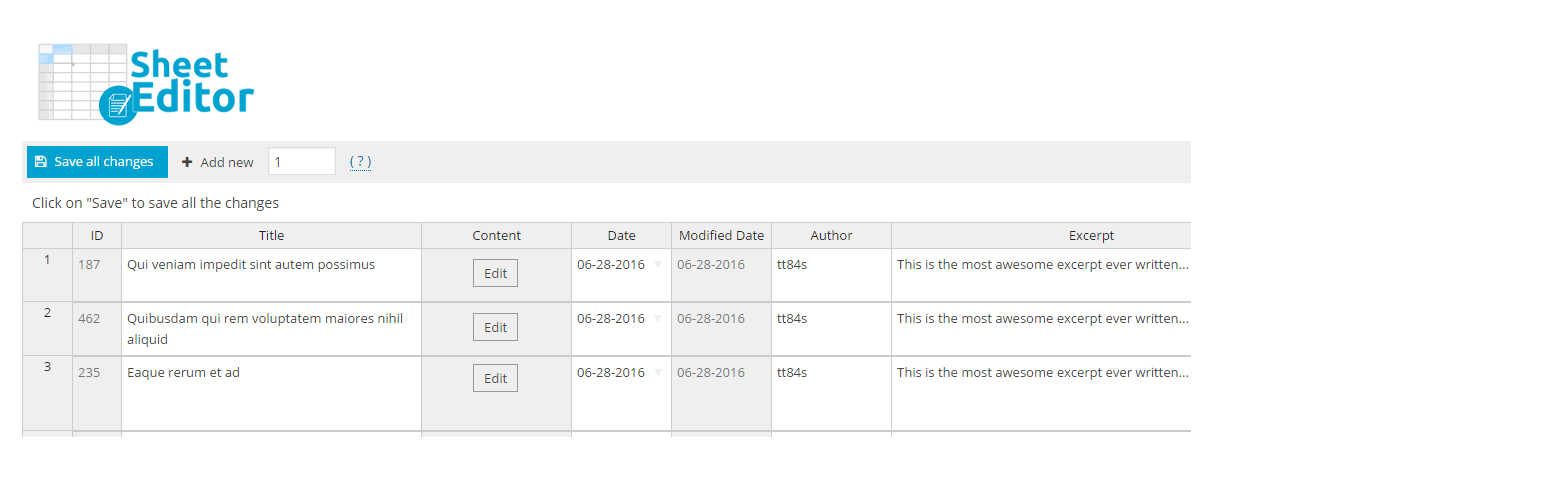
• 透過試算表管理產品資訊
外掛標籤
開發者團隊
② 後台搜尋「Bulk Edit Products for WooCommerce – WP Sheet Editor」→ 直接安裝(推薦)
📦 歷史版本下載
原文外掛簡介
Products Bulk Editor where you can Edit WooCommerce products Quickly and you can bulk create products too.
Use Cases
WooCommerce stores : you can view all your products in a single page
You want to create a lot of products Quickly
You want to edit products Quickly
You want to search products by Keyword, Status, Author
You want to Update Hundreds of products quickly using a spreadsheet
You want to copy settings from one product into a lot of products
Products Bulk Editor where you can view all the products in a spreadsheet table
Free Features
You can view and edit simple products only
You can view all the product information
You can edit the product title, description, sku, stock quantity, stock status, manage stock, regular price, sale price, and is virtual
Premium features
Buy premium plugin
Money back guarantee. We´ll give you a refund if the plugin doesn´t work.
Full Product Integration
Edit all product types, including Simple, Variable, Variations, External products, Subscription products, Membership products, etc.
You can edit all product fields, including Gallery Images, Attributes, Variations, and Custom Fields added by other plugins
Title
URL Slug
Content
Date
Modified Date
Short description
Status
Enable reviews
Featured Image
Product categories
Product tags
Edit attributes
Type
SKU
Regular Price
Sale Price
Weight
Width
Height
Length
Manage stock
Stock status
Stock
Visibility
Gallery
Downloadable
Virtual
Sales price date from
Sales price date to
Sold individually
is featured?
Allow backorders
Purchase note
Shipping class
Download limit
Download expiry
Download type
Download files
Variation description
Variation enabled?
Default attributes
Custom Fields
Buy premium plugin
Money back guarantee. We´ll give you a refund if the plugin doesn´t work.
Multiple editors
You can edit in our spreadsheet inside wp-admin, so all the changes apply live.
You can also edit in Excel or Google Sheets and import the changes easily.
Perfect for Product Attributes, Variations, and Downloadable Files
You can view the product variations in the spreadsheet, so you can edit the fields quickly.
You can create variations in bulk in the spreadsheet too.
You can copy product variations and attributes from one product to multiple products. This will save you a lot of time.
You can copy downloadable files from one product to another product, you can update the files in bulk.
Make Advanced Searches
You can search by multiple fields and using multiple conditions.
For example, find all products from category “Music” with Stock < 100
Find all products with keyword “Steve” and without images
Find products by date, etc.
You can make searches using any product field and any search operator (<,>,=,<=, >=, LIKE, NOT IN, etc.).
Buy premium plugin
Money back guarantee. We´ll give you a refund if the plugin doesn´t work.
Edit thousands of products at once
We have a formulas engine that lets you update a lot of products quickly.
You can replace values in ANY field:
– Replace brand names in product descriptions
– replace one image in all the products
– replace one category with another for 100 products, etc.
You can do math operations:
– Increase product prices by 20%
– Decrease stock by 10
– Use any math formulas
You can combine fields:
– Copy the “regular price” to the “sale price” field
– Copy information between products
– And more
Add new fields to the bulk editor
The bulk editor automatically recognizes all custom fields added by other plugins. You don’t need to setup the new fields.
It will show all the fields added by Advanced Custom Fields and any other WooCommerce Extension, so you can start editing right away.
And more.
Buy premium plugin
Money back guarantee. We´ll give you a refund if the plugin doesn´t work.
Spanish / Español
Este plugin te permite editar productos de WooCommerce usando una hoja de cálculo dentro de WP admin.
Tú puedes ver todos los productos en la hoja de cálculo y rápidamente editar los campos de WordPress.
La versión gratuita te permite:
– Ver todos los productos en la hoja de cálculo
– Crear y editar productos rápidamente
– Puedes buscar productos por palabra clave, fecha, o autor
– Puedes copiar información de un producto a otro
– Funciona con el nuevo editor de WordPress (Gutenberg)
– Puedes editar estos campos: título del producto, contenido, estado, sku, stock / inventario, estado de inventario, precio regular, precio con descuento, y “es virtual”
– Editar precios de productos rápidamente usando la hoja de cálculo
– Editar inventario de tienda rápidamente usando la hoja de cálculo
La versión de pago te permite:
– Editar todos los tipos de productos y variaciones de productos con atributos
– Exportar e importar productos para editar en excel o Google Sheets
– Importa inventario y precios de productos desde el CSV brindado por tus proveedores
– Editar todos los campos, el editor mostrará todos los campos del producto. Puedes editar rápidamente atributos, variaciones, descuentos, precios, galería de fotos, archivos descargables, y todos los campos agregados por otros plugins
– Hacer búsquedas avanzadas por cualquier combinación de campos (ej. buscar por precio, stock, SKU, URL, palabras claves, información seo, etc.)
– Editar miles de productos a la vez en un segundo (ej. eliminar cientos de productos, reemplazar textos, establecer precios en lotes, actualizar fotos, etc.)
Descarga versión de pago
Garantía de devolución de dinero si no te funciona el plugin.