內容簡介
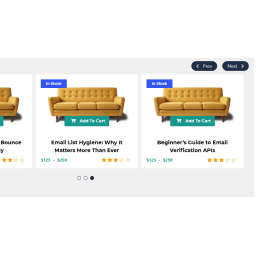
WIP WooCarousel Lite 可讓您在 WooCommerce 網站上建立產品輪播幻燈片。
您可以從以下連結獲得進階版本:
安裝 WIP WooCarousel Lite,以顯示帶有 WooCommerce 產品的輪播幻燈片。
實時演示:http://demo.themeinprogress.com/woocarousel/free-version/
安裝
安裝外掛後,只需啟用即可使用。
配置
WIP WooCarousel Lite 將添加一個新的管理頁面,您可以在此管理外掛。
您需要插入短碼[wip_woocarousel_products_carousel]或使用 WordPress 編輯器中的短碼生成器:
以下是短碼配置。
product_items: 添加 -1 以顯示所有產品或插入要顯示的產品數量
product_bestseller: 啟動此選項可顯示最暢銷產品
product_columns: 設置此幻燈片的列數。
product_rating: 啟動此選項可顯示產品評分
product_dots: 啟動此選項可顯示輪播幻燈片圓點
[wip_woocarousel_products_carousel product_items=”-1″ product_bestseller=”off|on” product_columns=”1|2|3|4|5…” product_rating=”off|on” product_dots=”off|on”]
翻譯者
可用語言
英語(默認)
意大利語
外掛標籤
開發者團隊
📦 歷史版本下載
原文外掛簡介
WIP WooCarousel Lite allows you to create a product slider carousel for your WooCommerce website.
You can get the premium version, from the following link:
Install our WIP WooCarousel Lite, to show a carousel with your WooCommerce products.
Live demo: http://demo.themeinprogress.com/woocarousel/free-version/
Installation
Once you have installed the plugin, you just need to activate the plugin in order to enable it.
Configuration
WIP WooCarousel Lite will add a new admin page, where you can manage the plugin.
You need to insert the shortcode [wip_woocarousel_products_carousel] or use the shortcode generator from the WordPress editor:
Below the shortcode configuration.
product_items: Add -1 to display all products or insert the number of products to display
product_bestseller: Set this option ON, to display the best seller products for first
product_columns: Set the number of colums for this carousel.
product_rating: Set this option ON, to display the product rating
product_dots: Set this option ON, to display carousel dots
[wip_woocarousel_products_carousel product_items=”-1″ product_bestseller=”off|on” product_columns=”1|2|3|4|5…” product_rating=”off|on” product_dots=”off|on”]
Translators
Available Languages
English (Default)
Italiano