內容簡介
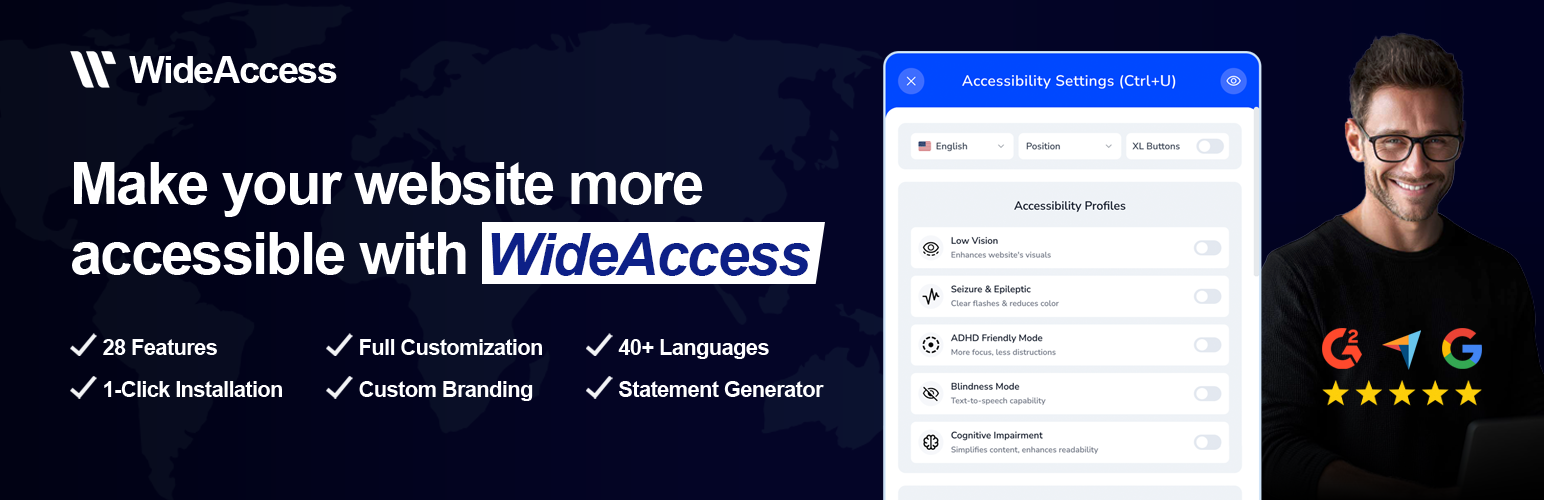
WideAccess Accessibility Widget 是一款簡單而有效的網站無障礙解決方案,旨在提升網站的可及性。透過一鍵啟用,無需編碼即可遵循 WCAG 2.1 AA、ADA 等標準,讓所有使用者都能輕鬆訪問網站內容。
【主要功能】
• 一鍵設置,快速啟用無障礙功能
• 提供 23 種工具與 5 種現成配置
• 支援 40 多種語言,適合全球用戶
• GDPR 合規,保護用戶數據
• 自訂品牌設計,符合網站風格
• 自動生成無障礙聲明
外掛標籤
開發者團隊
② 後台搜尋「WideAccess Accessibility Widget」→ 直接安裝(推薦)
原文外掛簡介
WideAccess is a simple but effective web accessibility solution designed to make your website more accessible.
With one-click activation, you can make your website more accessible based on WCAG 2.1 AA, ADA, AODA, ACA, EAA, and Section 508 requirements — no coding required.
Our accessibility widget provides 23 tools + 5 ready-to-use profiles that allow every visitor to personalize their browsing experience. From text magnifiers and dyslexia-friendly fonts to color contrast controls and keyboard navigation, WideAccess empowers all users to access your content comfortably.
Whether you manage a small website or a large business platform, WideAccess offers a fast, simple, and effective path to improved accessibility.
💖 PRO version is FREE without registration until end of 2026 – one click to get PRO
💖 Show You Care
Demonstrate that your brand genuinely values accessibility and inclusivity by providing an experience that supports every user’s needs.
Accessibility Made Simple for WordPress
⚙️ One-Click Setup
Activate accessibility on your website instantly by only clicking on it.
🔒 GDPR-Compliant
WideAccess does not collect any user data and is more compliant with GDPR regulations, ensuring 100% data protection for your visitors.
🎨 Custom Branding
Personalizations to match your website’s design and brand identity:
• default language
• colors
• icons
• positioning
• hide WideAccess Logo
🌐 Multi-Language Support
Available in 40+ languages, ensuring a seamless experience for global audiences.
⚡️ Lightweight & Fast
Optimized for performance — WideAccess loads asynchronously after all website content is fully loaded, ensuring your site speed is not affected.
📝 Accessibility Statement Generator
Automatically create a professional accessibility statement for your website.
If your website is missing a statement, WideAccess will generate one for you to quickly fill the gap.
Modules
Accessibility Tools (23 included):
Text & Spacing:
✅ FREE – Bigger/Smaller Text – Adjust text size for better readability.
✅ FREE – Wider/Tighter Line Height – Adjust line spacing to improve readability.
✅ FREE – Wider/Tighter Letter Spacing – Modify spacing between letters for readability.
✅ FREE – Readable Font – Use a clearer, more readable font.
💎 PRO – Text Magnifier – Increase the size of selected text for easier viewing.
✅ FREE – Text Align – Adjust text alignment to suit text layout for each individual.
💎 PRO – Dyslexia Font – Switch to a font designed for dyslexic readers.
💎 PRO – Text-to-Speech – Read website content aloud.
Visual Adjustments:
✅ FREE – High Contrast – Enhance contrast for better visibility.
✅ FREE – Grayscale – Switch display to black and white.
✅ FREE – Low Saturation – Adjust color saturation for easier viewing.
✅ FREE – High Saturation – Adjust color saturation for easier viewing.
✅ FREE – Hide Images – Remove distracting images for focus.
Navigation & Focus:
✅ FREE – Big Black/White Cursor – Enlarge the cursor for better visibility. Two options provided for better contrast for any website.
💎 PRO – Reading Black/White Line – Highlight the current line while reading. Two options provided for better contrast for any website.
✅ FREE – Focus Tunnel – Highlight specific areas for attention.
✅ FREE – Highlight Links – Make clickable links easier to spot.
💎 PRO – Mute Sounds – Silence distracting audio.
Unlock Full Accessibility → Get WideAccess Pro!
Accessibility Profiles
👁 Low Vision – Enhances website’s visuals
⚡️ Seizure & Epileptic – Clear flashes & reduces color
🎯 ADHD Friendly Mode – More focus, less distractions
🗣️ Blindness Mode – Text-to-speech capability
🧠 Cognitive Impairment – Simplifies content, enhances readability
Supported Languages
🇺🇸 English
🇩🇪 German
🇪🇸 Spanish
🇫🇷 French
🇮🇹 Italian
🇵🇱 Polish
🇸🇪 Swedish
🇫🇮 Finnish
🇵🇹 Portuguese
🇷🇴 Romanian
🇸🇮 Slovenian
🇸🇰 Slovak
🇳🇱 Dutch
🇩🇰 Danish
🇬🇷 Greek
🇨🇿 Czech
🇭🇺 Hungarian
🇭🇷 Croatian
🇧🇬 Bulgarian
🇳🇴 Norwegian
🇹🇷 Turkish
🇮🇩 Indonesian
🇯🇵 Japanese
🇰🇷 Korean
🇨🇳 Chinese
🇦🇪 Arabic
🇮🇳 Hindi
🇺🇦 Ukrainian
🇷🇸 Serbian
🇦🇿 Azerbaijani
🇻🇳 Vietnamese
🇲🇰 Macedonian
🇦🇲 Armenian
🇮🇱 Hebrew
🇵🇰 Urdu
🇹🇭 Thai
Reliable Support
Our team provides responsive support to help you configure, customize, and maintain your accessibility setup at every step.