
內容簡介
此外掛可快速自訂 WooCommerce 在無法提供運送選項時顯示的訊息,幫助顧客了解運送限制並提供後續聯絡資訊,提升顧客體驗。
【主要功能】
• 自訂購物車頁面無運送選項訊息
• 自訂結帳頁面無運送選項訊息
• 自訂結帳嘗試後的通知訊息
• 提供聯絡頁面連結以便顧客聯繫
外掛標籤
開發者團隊
② 後台搜尋「No Shipping Message for WooCommerce」→ 直接安裝(推薦)
📦 歷史版本下載
原文外掛簡介
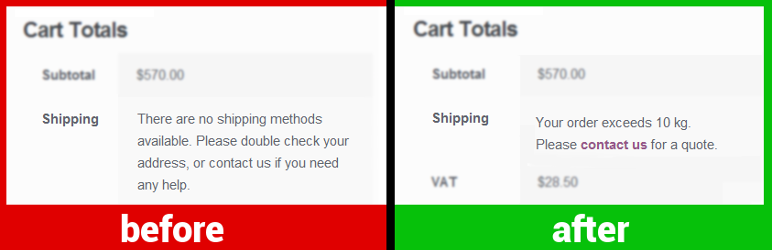
The plugin allows quickly customizing the messages WooCommerce displays to the customer when shipping is not available:
1. “No shipping options were found” on the cart page (screenshot)
2. “There are no shipping options available” on the checkout page (screenshot)
3. “No shipping method has been selected” notice appearing after a checkout attempt (screenshot)
Customers see a no-shipping-options message when there are no delivery options configured for their order because they choose a destination you don’t ship to, or have too many items in the cart, or meet another edge condition. Providing a custom message may be useful to explain why shipping is not available and what to do next. You can also provide an actual link to your contact page.
Message examples:
“Your order exceeds 10 kg. Please contact us to get a quote.”
“Shipping to the selected country for orders under $100 is not available. Please add more items to your order or contact us.”
“[Product] is not available for shipping to the selected destination.”
“Unfortunately, we can’t deliver your order. Please contact us for details.”
