內容簡介
Vova's Post Grids 是一個原生的 Gutenberg 區塊,讓使用者能夠在 WordPress 編輯器中直接建立響應式的文章網格。使用者可以靈活地查詢內容,並在不撰寫程式碼的情況下微調結果。
【主要功能】
• 靈活的內容查詢
• 響應式佈局設定
• 完整的卡片控制
• 平滑的 AJAX 分頁
• 原生、免費且開源
外掛標籤
開發者團隊
原文外掛簡介
Vova’s Post Grids is a native Gutenberg block for building responsive post grids directly in the WordPress editor.
Build a dynamic query or hand-pick specific posts, then fine-tune the result without touching code.
Flexible content queries
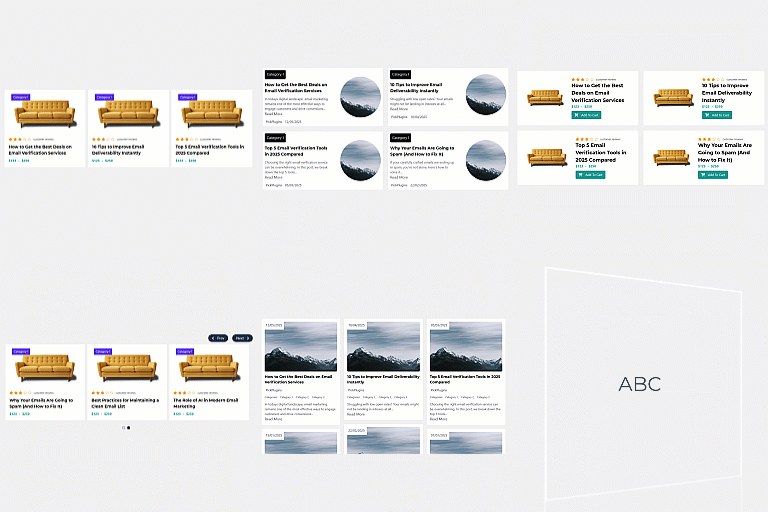
Query any public post type and its public taxonomies. Filter content by taxonomy terms, keyword, author, date range, featured image, or custom fields. Control ordering, sticky posts, the current post, and the number of posts per page.
Responsive layouts
Configure desktop, tablet, and mobile column counts independently. Adjust horizontal and vertical spacing to create classic grids, editorial layouts, compact feeds, or image-first galleries.
Complete card controls
Reorder or hide the featured image, title, metadata, excerpt, and read-more link. Customize image treatment, typography, colors, spacing, excerpt length, metadata, taxonomy badges, and link presentation.
Smooth AJAX pagination
Add numbered or previous/next pagination. The block loads each selected page through the WordPress REST API and updates the grid in place without reloading the whole page.
Native, free, and open source
The block uses WordPress data APIs, server-side rendering, and core editor components. Every feature is included for free: there is no Pro tier, trial, account, or external service. Vova’s Post Grids is licensed under GPL-2.0-or-later and can be used on commercial websites.
The project source code and releases are available on GitHub.
Development
The release archive includes the human-readable block source and locked npm dependency metadata.
Install Node.js and npm, then run npm ci.
Install WP-CLI with the i18n command available.
Run npm run build to compile production assets and regenerate the translation template.
Run npm run lint:js and npm run lint:css for JavaScript and stylesheet checks.
Install the Composer development dependencies and run npm run lint:php for WordPress and PHP 7.4 compatibility checks.
Run npm run export to build and create the release ZIP in dist/.