內容簡介
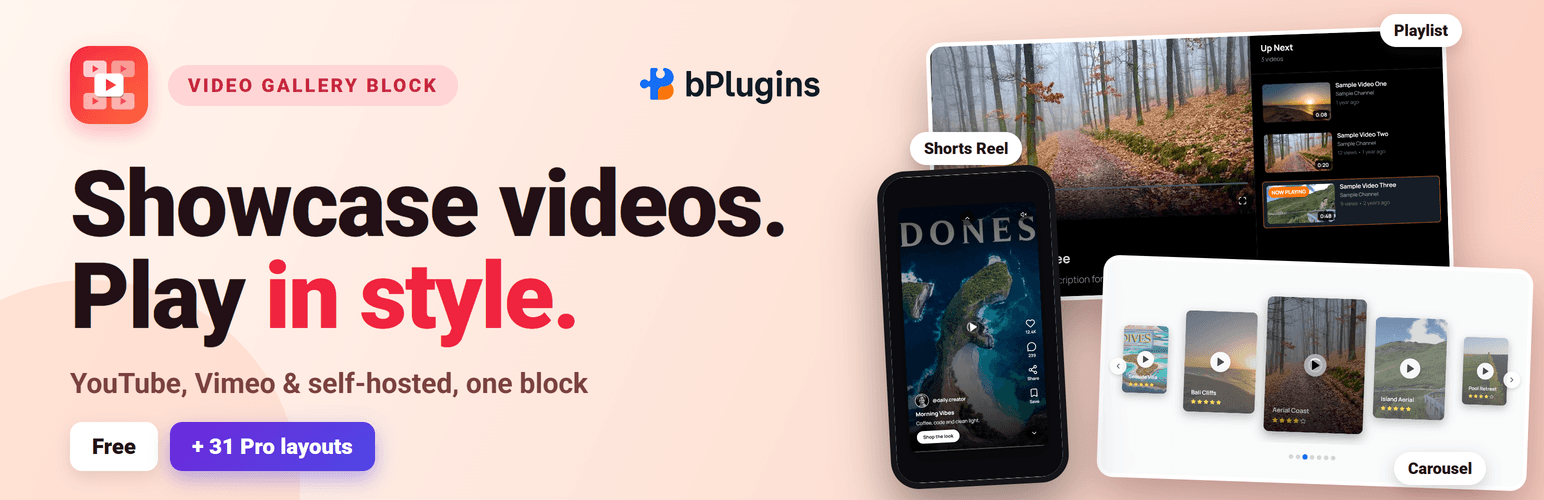
Video Gallery Block 是一款輕量級的 WordPress 外掛,能將分散的 YouTube 和 Vimeo 影片轉換為美觀的可篩選畫廊,讓訪客在輕鬆的環境中瀏覽和播放影片,無需編碼。
【主要功能】
• 響應式影片畫廊區塊
• 影片專輯與篩選系統
• 自動或自訂縮圖
• 優雅的彈出式播放介面
• 批次匯入影片連結
外掛標籤
開發者團隊
② 後台搜尋「Video Gallery Block – showcase your videos in a filterable gallery」→ 直接安裝(推薦)
📦 歷史版本下載
原文外掛簡介
Turn scattered YouTube and Vimeo videos into a beautiful, filterable gallery your visitors can browse and play in a lightbox – no code required.
Video Gallery Block | Pricing | Support | Demo
Why Video Gallery Block?
Video Gallery Block is a WordPress video gallery plugin that lets you create responsive video galleries, YouTube galleries, Vimeo galleries, and video collections directly inside the Gutenberg block editor. It loads its scripts only on pages that use it and needs no jQuery.
Organize videos into albums, let visitors filter by category, and play everything in an elegant lightbox popup. Thumbnails are generated automatically (or upload your own poster images), and captions keep every video labeled.
The Pro version adds 31 more video blocks (most of them also play Wistia), live streams, view counts and advanced layouts like sliders, carousels, masonry grids, and playlist galleries – ideal for video portfolios, product galleries, training libraries, and course videos.
Included Free
Things many video gallery plugins keep for a paid plan, all in the free Video Gallery block:
Automatic channel feeds: point it at a YouTube channel or playlist, or a Vimeo profile, channel, group or showcase, and new videos appear by themselves.
Video SEO markup: Schema.org VideoObject JSON-LD for every video.
GDPR consent (off by default): turn it on under Privacy & SEO, and no YouTube, Vimeo or Facebook player loads, and no third-party cookie is set, until the visitor agrees.
Google Analytics 4 video events: play, 25%, 50%, 75% and finished, with the video’s title.
Thumbnails served from your own site: no request to YouTube or Vimeo on every page view.
Fast by Design
No jQuery, no Isotope: about 120 KB less JavaScript on the front end than older versions of this plugin.
Rendered on the server: search engines and visitors see the gallery instantly, and it still works on sites that delay JavaScript (WP Rocket, LiteSpeed, Perfmatters).
Loads only when used: scripts and styles are added only on pages that contain the block, and a video loads its player only when someone plays it.
Thumbnails from your own site: YouTube and Vimeo thumbnails are cached in your Media Library, so there is no request to YouTube or Vimeo on every page view.
Free Features
Everything below is part of the free Video Gallery block.
Responsive Video Gallery Block: Clean grid layouts that automatically adapt to desktop, tablet, and mobile screens.
Album & Filter System: Organize videos into albums and let visitors filter by category.
Responsive Column Layouts: Set different column numbers for desktop, tablet, and mobile.
Multiple Video Sources: Add videos from YouTube, Vimeo, Facebook and your own video files from the Media Library (Wistia is available in most Pro blocks).
Custom Styling Controls: Adjust spacing, padding, borders, backgrounds, and shadows from the block settings.
Automatic or Custom Thumbnails: Auto-generate thumbnails or upload custom poster images.
Video Captions: Add captions or titles to each video in the gallery.
Lightbox Video Popup: Play videos in an elegant popup lightbox.
Bulk Import: Paste a list of video links, one per line, and the gallery fills itself in — titles and posters come from YouTube and Vimeo automatically, with no API key to set up.
Thumbnail Shape: Lay tiles out as 16:9, 4:3, 1:1 or 9:16 for vertical Shorts and Reels, instead of a fixed pixel height.
Ready-Made Section Patterns: Five fully configured patterns in the inserter — Video gallery with album filters, Course video library, Product demo showcase, Customer video stories, and Portfolio showreel wall — so you start from a finished layout, not a blank block.
Show / Hide Filter Bar: A dedicated toggle to show or hide the album filter buttons.
Load More Pagination: Set how many videos show at first; a Load More button reveals the rest, so a large gallery doesn’t overwhelm the page on first paint.
YouTube Shorts Filter: Show every video, hide Shorts, or show only Shorts — detected from the link itself, no API key needed.
Play Icon on Thumbnails: A play icon over every tile, so it reads as a video before anyone hovers or clicks — color, size, and the hover zoom are all customizable, or turn it off entirely.
Item Border & Shadow: Round the corners and add a drop shadow to each thumbnail tile, independent of the gallery container’s own border and shadow.
Translation Ready: Fully compatible with multilingual websites.
Sort Order: Show videos in the order you added them, or automatically sort by Newest First / Oldest First — no need to re-order videos by hand after a Bulk Import.
Row Alignment: Control how a leftover row (one that doesn’t fill every column) lines up — left, center, or right — instead of it always being stretched or left stranded on one side.
Per-Device Column & Row Gap: Set the spacing between tiles separately for desktop, tablet, and mobile, the same way column counts already work per device.
Facebook Video Support: Add Facebook videos to the gallery alongside YouTube and Vimeo, using Facebook’s public embed — no app or API key required.
YouTube & Vimeo Channel Auto-Feed: Show a YouTube channel or playlist, or a Vimeo profile, channel, group or showcase. New uploads appear by themselves on the schedule you choose (hourly to daily), or click “Check now”. Vimeo needs no key; YouTube needs a free Data API key once, with step-by-step setup in the sidebar.
Feed Alerts: If a feed stops updating (a wrong or expired key, a used-up quota, a deleted playlist), administrators see a notice that says what is wrong and where to fix it, with an optional email.
Channel Name: Show the channel’s name under each title for YouTube and Vimeo feeds.
Play in Place: Play a video inside its own tile instead of the lightbox.
Add Many Videos at Once: Pick or upload many videos from the Media Library in one go, or drag video files from your computer — or YouTube and Vimeo links from another browser tab — straight onto the gallery.
Drag to Reorder: Drag videos on the canvas to change their order, or use the Move left / Move right buttons.
Copy a Feed to Your Own List: Turn a channel’s videos into your own list in one click, then reorder or edit them.
Easy, Step-by-Step Settings: Panels follow the order you work in — Video source, Videos, Layout, Display, Playback, Privacy & SEO — with buttons instead of long dropdowns.
Pro Version
Video Gallery Block Pro extends the plugin with additional Gutenberg video blocks and advanced gallery layouts.
Free vs Pro at a glance (the block each feature works in is shown in brackets):
Blocks: Free has 1 block, Video Gallery — Pro adds 31 more video blocks (32 in total).
Layouts [Video Gallery]: Free has a responsive grid — Pro adds Cards, List and Showcase layouts and lets you choose which video sits on top in Showcase.
Titles [Video Gallery]: Pro only — title on the video, on hover or below it, and long titles cut to 1–3 lines.
Video details [Video Gallery]: Free shows the channel name — Pro adds view counts and like counts.
Playback [Video Gallery]: Free has the lightbox and play in place — Pro adds preview on hover and actions when a video ends (next video, replay or your own button).
Live streams [Video Gallery]: Pro only — LIVE and Upcoming badges, live streams first, and a live player above the gallery.
Channel feeds [Video Gallery]: Free shows 1 YouTube or Vimeo channel or playlist, up to 50 videos — Pro merges up to 10 channels or playlists, shows up to 1,000 videos or a whole channel, and adds Live, Search and chosen-videos feeds and title keyword filters.
Channel feeds in other blocks [20 Pro blocks]: Pro only. Up to 100 videos, merged channels and keyword filters in 20 more blocks, such as Lightbox Video Gallery, Masonry Video Grid, Video Slider and Video Playlist Gallery. Video Curriculum Accordion makes one section per playlist, and Video Tabs Gallery one tab per playlist.
Choice of player [20 Pro blocks]: Pro only. Play YouTube and Vimeo in the bPlugins player or with their own controls, site-wide, in 20 Pro blocks such as Masonry Video Grid, Video Bento Grid and Video Map Gallery.
Video sources: Free plays YouTube, Vimeo, Facebook and your own files in Video Gallery. Pro adds Wistia in 24 Pro blocks, such as Lightbox Video Gallery, Video Slider and Video Playlist Gallery.
Privacy [all 32 blocks]: Free has GDPR consent in Video Gallery — Pro has it in every block.
Design [all Pro blocks]: Free has the essential style controls — Pro adds advanced typography, overlays and per-element styling.
Support: Free uses the WordPress.org forum — Pro gets priority email support.
Only in Pro:
31 Premium Video Blocks: Video Slider, Carousel, Playlist Gallery, Masonry Video Grid, Lightbox Video Gallery, Parallax Row Video Gallery, Slider Autoplay Video, Video Testimonial Section, Video Podcast Episodes, Video Stories, Video Shorts Reel, Video Showcase Wall, Video Curriculum Accordion, Video Hotspot Scene, Video Tabs Gallery, Video Scrollytelling Showcase, Video Timeline Gallery, Video Bento Grid, Video Comparison Gallery, Video Justified Gallery, Video Expanding Panels, Video Wall with Floating Player (PiP), Video Swipe Deck, Video Marquee Wall, Video Flip Cards Gallery, Video Map Gallery, Video Property Tour Gallery, Video Workout Planner, Video Wedding Story Gallery, Video Menu Showcase, and Video Feature Tour.
Masonry & Mixed Ratio Layouts [Masonry Video Grid, Video Justified Gallery, Video Bento Grid]: Dynamic masonry galleries and mixed aspect ratio grids.
Video Sliders & Carousels [Video Slider, Video Carousel Gallery, Slider Autoplay Video]: Interactive sliders with autoplay and navigation controls.
Playlist Video Gallery [Video Playlist Gallery]: Organized playlists with navigation and sequential playback.
Parallax Video Sections [Parallax Row Video Gallery]: Background video sections with parallax scrolling effects.
Advanced Typography & Overlays [all Pro blocks]: Customize titles, captions, and overlay effects per video.
Custom Navigation & Player Controls [Video Slider, Video Carousel Gallery, Slider Autoplay Video, Video Playlist Gallery]: Control slider navigation, autoplay, and player interactions.
WooCommerce Video Product Carousel [Video Carousel Gallery]: Show product videos in carousel layouts for WooCommerce stores.
Priority Support: Faster assistance and updates.
Try the Video Gallery Block – Unlock all premium features now!
How to Use
Open any page or post in the WordPress block editor (Gutenberg).
Click the + (Add Block) button and search for Video Gallery Block, then insert it.
Add video URLs from YouTube or Vimeo in the block settings panel.
Create albums for filtering, adjust columns and layout, and customize styling; enable or disable filter buttons.
Preview the page on different devices, then publish.
Using Premium Blocks: The Pro blocks (Video Slider, Parallax Row and the rest) come with the Pro plugin — install and activate it and they appear in the inserter alongside the free block. To see what they do first, use the Check Pro Version button in the block toolbar, or browse the live demos.
Live Demo | Get Video Gallery Block PRO
Use Cases
Video Portfolios: Present your creative work in filterable galleries.
Product Video Galleries: Showcase demos and product videos, including WooCommerce carousels (Pro).
YouTube & Vimeo Collections: Curate channel content into organized albums.
Training Libraries & Courses: Group lessons into albums, playlists, and curriculum accordions (Pro).
Blog Video Galleries: Collect your embedded videos in one browsable place.
Feedback
Enjoying Video Gallery Block? A quick rating on WordPress.org helps other people find it.
Did you like this plugin? Dislike it? Do you have a feature request? Please share your feedback with us
Check Out The Parent Plugin of This Plugin-
B Blocks – A blocks collection and page building tool for Gutenberg.
Related Plugins
Other plugins by our team:
Html5 Video Player – Display videos as single and playlist in multiple skins.
PDF Poster – Display/Embed PDF files with different styles.
Html5 Audio Player – Listen audios with awesome visuals.
StreamCast – Customizable radio player with different skins.
3D Viewer – Embed 3D models and 3D products with interaction.
Advanced Post Block – Show posts and custom posts in different layouts.
Source Code
The non-minified source code for this plugin is available on our public repository:
GitHub Repository
Third-Party Libraries
This plugin uses the following third-party libraries:
plyr – MIT License (bundled at public/js/plyr.js, powers the video player UI).
bpl-tools
Source / GitHub: https://github.com/bPlugins/bpl-tools
License: GPL-2.0-or-later – https://www.gnu.org/licenses/gpl-2.0.html
Purpose: Shared utility library providing admin dashboard components and common Gutenberg editor controls.
External Services: The library may connect to bPlugins, WordPress.org, and Freemius services for product data and checkout functionality. See full details: https://github.com/bPlugins/bpl-tools#external-requests–why-they-are-made
As the external service functionality is handled by bpl-tools as a third-party library, the following services are utilized:
bPlugins API
Service URL: https://api.bplugins.com
Purpose: The plugin’s admin dashboard fetches product comparison data and pricing information to display relevant upgrade options and feature details.
Data Sent: Only the plugin slug is transmitted; no personal or site data is collected.
Terms of Service: https://bplugins.com/terms-of-service/
Privacy Policy: https://bplugins.com/privacy-policy/
WordPress.org Plugins API
Service URL: https://api.wordpress.org/plugins/info/1.2/
Purpose: The admin dashboard queries the official WordPress.org Plugins API to retrieve and display a curated list of other plugins by the same author (“Our Plugins” section).
Data Sent: Plugin slugs and author name; no personal or site data is collected.
Terms of Service: https://wordpress.org/about/tos/
Privacy Policy: https://wordpress.org/about/privacy/
Freemius API
Service URL: https://api.freemius.com
Purpose: Handles license activation, premium feature verification, update checks, and opt-in telemetry for both free and pro versions.
Data Sent: Site URL, admin email, license keys, and version numbers.
Terms of Service: https://freemius.com/terms/
Privacy Policy: https://freemius.com/privacy/
Build Process
This plugin uses a build process to generate the production assets (JS/CSS) located in the build/ directory. The human-readable source code is available in the src/ directory.
To build the plugin from source:
1. Clone the repository: https://github.com/bPlugins/video-gallery-block-free
2. Install dependencies: npm install
3. Run the build command: npm run build
Build Tools Used: Webpack, Babel, PostCSS, Gulp.