內容簡介
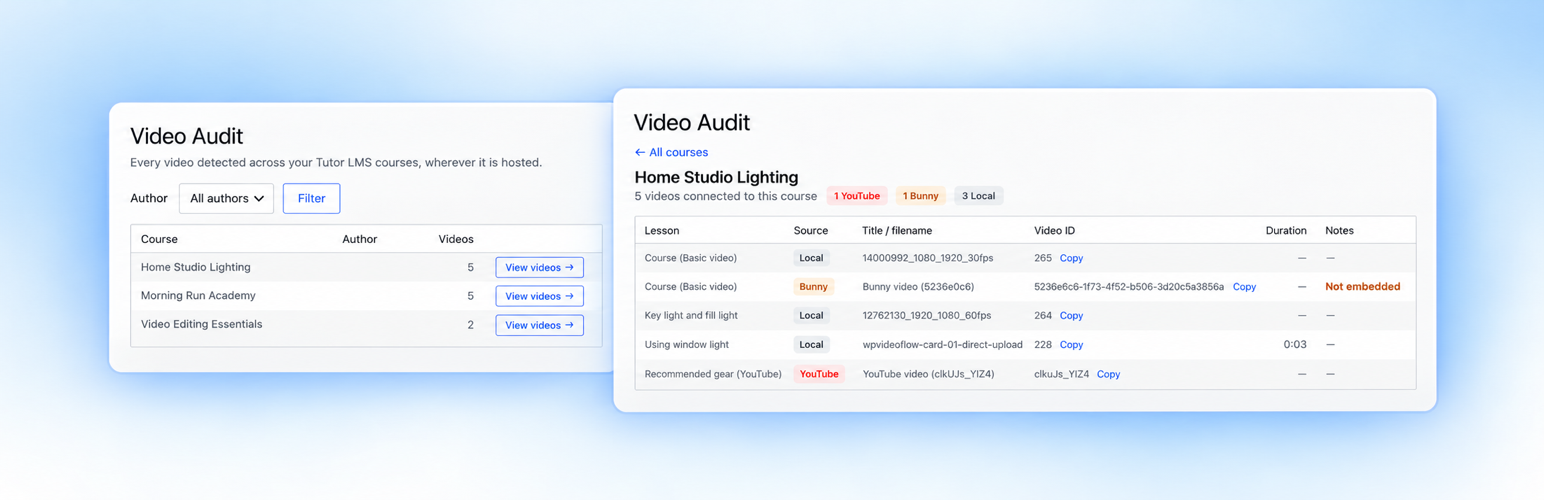
Video Flow Audit for Tutor LMS 是一款專為 Tutor LMS 設計的外掛,能夠掃描課程中的所有影片,並將其整理成清單,幫助使用者了解現有的影片配置,便於清理、切換主機或遷移。
【主要功能】
• 掃描並列出所有課程中的影片
• 支援 Vimeo、YouTube、Bunny Stream 及自架影片
• 提供影片的詳細資訊與使用情況
• 標示未嵌入及來自 oEmbed 快取的影片
• 針對多個課程或課程中的同一影片進行追蹤
外掛標籤
開發者團隊
② 後台搜尋「Video Flow Audit for Tutor LMS」→ 直接安裝(推薦)
原文外掛簡介
Video Flow Audit for Tutor LMS scans your Tutor LMS courses and builds an inventory of every video it can find — Vimeo, YouTube, Bunny Stream or self-hosted — and every image the course uses, grouped by course and lesson.
Videos in Tutor LMS get referenced in several places: the lesson video field, raw URLs and embeds in lesson content, the WordPress oEmbed cache, and self-hosted files in the Media Library. Video Flow Audit pulls all of those references into one admin screen, so you can see what your course-video library actually looks like before you clean it up, switch hosts, or migrate.
The plugin is read-only by design. It never edits a lesson, moves a file, uploads a video, or contacts an external video host. Everything it reports is read from data already stored in your WordPress database — no account, no licence key, no API credentials.
What it shows
Course overview — every course, with its video count. Filter by author.
Per-course breakdown — for each video: the lesson it is on, the provider (Vimeo, YouTube, Bunny Stream, self-hosted, or an externally embedded Bunny video), the title or filename, the video ID (one click to copy), and the duration for self-hosted files.
Audit flags:
Not embedded — the video is tracked against a lesson but is not actually in any active lesson field or content. Usually the leftover of an interrupted upload or a changed video.
From oEmbed cache — WordPress is still holding an oEmbed entry for an old video URL, for example a Vimeo reference on a lesson you have since moved elsewhere.
Used in N places — the same underlying video is referenced from more than one lesson or course, so you know the blast radius before you replace or delete it.
Course images — a second tab per course lists every image the course uses: featured images, Tutor lesson attachments, and images inside course and lesson content. For each image you see a thumbnail, the file name and dimensions, the file size, the alt text, and exactly where it is used. Flags:
Missing alt text — the image has no alt text in the Media Library.
Large file — the image is over 500 KB and worth compressing.
Not in Media Library — the image is hot-linked from another site or a path WordPress does not know about.
What it detects
Video Flow Audit reads Tutor LMS and WordPress data already on your site:
Tutor LMS lesson video fields
Video URLs and embeds in lesson content
The WordPress oEmbed cache
Self-hosted videos in the Media Library
Featured images, Tutor lesson attachments and images in course/lesson content
It identifies Vimeo, YouTube and Bunny Stream references, externally embedded Bunny Stream videos, and self-hosted WordPress videos. It does not log in to Vimeo, YouTube, Bunny Stream or any other platform, and it does not perform a remote orphan scan of your video-host account — it reports what your WordPress site references.
Who it is for
Tutor LMS site owners, course creators and administrators who need to understand an existing course-video setup — typically before migrating off Vimeo, moving to Bunny Stream, cleaning up an older site, or reviewing a mixed hosting setup.
Privacy
Video Flow Audit sends nothing anywhere. It makes no external requests, requires no API credentials for Vimeo, YouTube or Bunny Stream, and does not send your course or video data to WPVideoFlow. The audit runs entirely on data stored in your WordPress installation.
Need to migrate and manage videos too?
Video Flow Audit only reports. If you also need to migrate Vimeo and self-hosted videos to Bunny Stream, upload through the Tutor course builder, reuse existing Bunny videos, fix alt text in place, serve course images from Bunny Storage, or manage everything from one Course Media screen, see Video Flow for Tutor LMS. It already includes this audit view, so if it is active, Video Flow Audit stays dormant.
More on the free plugin: Video Flow Audit for Tutor LMS