
內容簡介
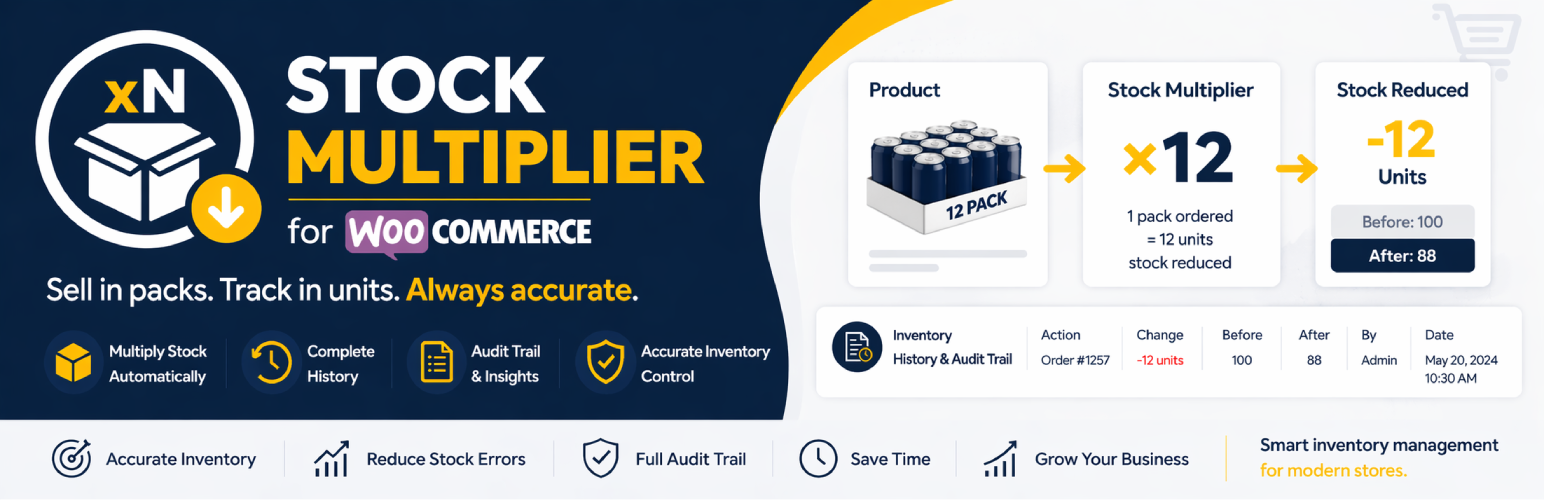
Stock Multiplier for WooCommerce 外掛解決了在銷售產品包裝時的庫存管理挑戰。它能自動計算庫存減少量,並追蹤每一個庫存變動,確保準確的庫存記錄,適合銷售捆包、批發或多單位產品的網路商店。
【主要功能】
• 自訂乘數設定,適用於各種產品
• 自動計算庫存減少,無需手動計算
• 智能繼承,變體自動使用父產品設定
• 支援所有產品類型,包括簡單與變數產品
• 自動記錄所有庫存變動,完整的歷史追蹤
• 方便的歷史標籤,查看最近100筆庫存變動
外掛標籤
開發者團隊
② 後台搜尋「Stock Multiplier for WooCommerce」→ 直接安裝(推薦)
原文外掛簡介
Stock Multiplier for WooCommerce solves a critical inventory challenge: selling products in packs while accurately tracking individual units. Whether you sell 6-packs of beverages, bundles of 3 items, wholesale cases, or fabric by the meter – this plugin automatically calculates the correct inventory reduction and tracks every single stock movement with a complete audit trail.
The Problem: You sell a 12-pack of soda, but WooCommerce only reduces your inventory by 1. You need to manually track that you actually sold 12 individual cans.
The Solution: Set a stock multiplier of 12. When someone orders 1 pack, your inventory automatically reduces by 12 units. Plus, you get a complete history of every change – who made it, when, and which order caused it.
Perfect for online stores selling bundles, packs, wholesale quantities, bulk products, or any multi-unit items where accurate inventory tracking is essential for business operations.
Key Features
Stock Multiplier System:
* Custom Multipliers for Any Product – Set different multipliers for simple products and each product variation independently
* Automatic Calculation – Stock automatically reduces by (quantity ordered × multiplier) – no manual math needed
* Smart Inheritance – Variations without a multiplier automatically use the parent product’s setting
* Works for All Product Types – Simple products, variable products, and every variation individually
Complete Inventory History & Audit Trail:
* Track Every Stock Change – Automatic logging of all inventory movements (orders, manual updates, refunds, etc.)
* Detailed Audit Information – See date/time, before/after quantities, who made changes, and which order caused it
* Dedicated History Tab – View last 100 stock movements directly in the product edit page
* Order Linking – Click any order number to view the full order details
* Notes System – Add context and notes to manual stock adjustments
User Experience:
* Zero Configuration – Works immediately after activation, no setup pages or complex settings
* Native WooCommerce Integration – All settings appear naturally in existing WooCommerce tabs
* Lightweight & Fast – Minimal database queries, no performance impact
* Translation Ready – Full internationalization support
Real-World Use Cases
Beverage Industry – Sell 6-packs, 12-packs, or cases while tracking individual bottles/cans
Food & Grocery – Manage bundles like “3-pack yogurt” or “dozen eggs” with accurate unit tracking
Fabric & Textiles – Sell by the meter or yard, track in centimeters or inches
Wholesale & B2B – Different pack sizes (case of 24, box of 50) with proper inventory deduction
Product Bundles – “Starter Kit” with 5 items reduces inventory by 5 automatically
Multi-unit Items – Sock sets, furniture sets, or any product sold as multiples
Craft & Art Supplies – Sell paint sets of 12 colors, track individual tubes
Pet Products – Dog treat packs, cat food multipacks with unit-level tracking
Office Supplies – Pen packs, paper reams sold by case but tracked by unit
Subscription Boxes – Each box contains 8 items, inventory reduces by 8 per order
Compliance & Auditing – Full audit trail for inventory accountability and loss prevention
Warehouse Management – Track which orders depleted stock and when for better forecasting
How It Works
Stock Multiplier:
1. Set a “stock multiplier” value on any product or variation
2. Customer places an order for that product
3. Plugin calculates: stock reduction = ordered quantity × multiplier
4. Inventory is reduced by the calculated amount
5. Change is automatically logged to inventory history
Inventory History:
1. Every stock change is automatically tracked and logged
2. View complete history in the “Inventory History” tab on product edit page
3. See date/time, product/variation, action type, before/after quantities, order links, and user information
4. Add notes to manual stock adjustments for future reference
Example: A 12-pack of soda has multiplier set to 12. Customer orders 2 packs. Your inventory reduces by 24 cans (2 × 12 = 24), and the history shows: Order #123 reduced stock from 100 to 76 (-24).
Configuration
Setting Stock Multiplier
For Simple Products:
1. Go to Products > Edit Product
2. Click on the “Inventory” tab in the Product Data section
3. Find the “Stock reduction multiplier” field
4. Enter your desired multiplier value (minimum: 1)
5. Save the product
For Variable Products:
1. Go to Products > Edit Product
2. Click on the “Variations” tab in the Product Data section
3. Expand any variation
4. Find the “Stock reduction multiplier” field
5. Enter your desired multiplier value for each variation
6. Save changes
Note: If a variation doesn’t have a multiplier set, it will automatically use the parent product’s multiplier value (if set).
Viewing Inventory History
Go to Products > Edit Product
Click on the “Inventory History” tab in the Product Data section
View complete history of all stock movements including:
Date & Time of each change
Product or Variation name
Action type (Order Placed, Manual Update, Stock Increased/Decreased, etc.)
Before and After quantities
Change amount (color-coded: green for increases, red for decreases)
Order number (clickable link to order)
User who made the change
Notes (click info icon to view)
History shows the last 100 records per product
Support
For support, feature requests, or bug reports, please create support ticket: https://wordpress.org/support/plugin/variation-stock-inventory