內容簡介
### 總結
**UploadMate** 是專為 WooCommerce 商店設計的輕量級且用戶友好的圖像上傳外掛程式,讓您的客戶能夠直接在產品頁面上傳圖像,並輕鬆管理這些上傳內容,一切盡在您的 WordPress 後台。
### 問與答
1. **UploadMate 主要適用於哪些業務?**
- 印刷店需要設計圖案
- 定制商品店需要標誌圖像
- 涉及客戶圖像的攝影服務
- 等需要客戶圖像上傳的任何業務
2. **UploadMate 的主要特點有哪些?**
- 簡單圖像上傳:在任何 WooCommerce 產品頁面上一鍵上傳圖像
- 安全圖像存儲:圖像安全存放在受保護的目錄中
- 訂單整合:上傳的圖像會自動與訂單關聯
- 管理員儀表板:直接從訂單頁面查看和下載客戶圖像
- 圖像類型控制:支援 JPG、JPEG 和 PNG 圖像格式
- 尺寸限制:內置可配置的圖像大小限制,以實現最佳性能
- 手機友好:響應式設計可在所有設備上完美運行
3. **UploadMate Pro 提供哪些進階功能?**
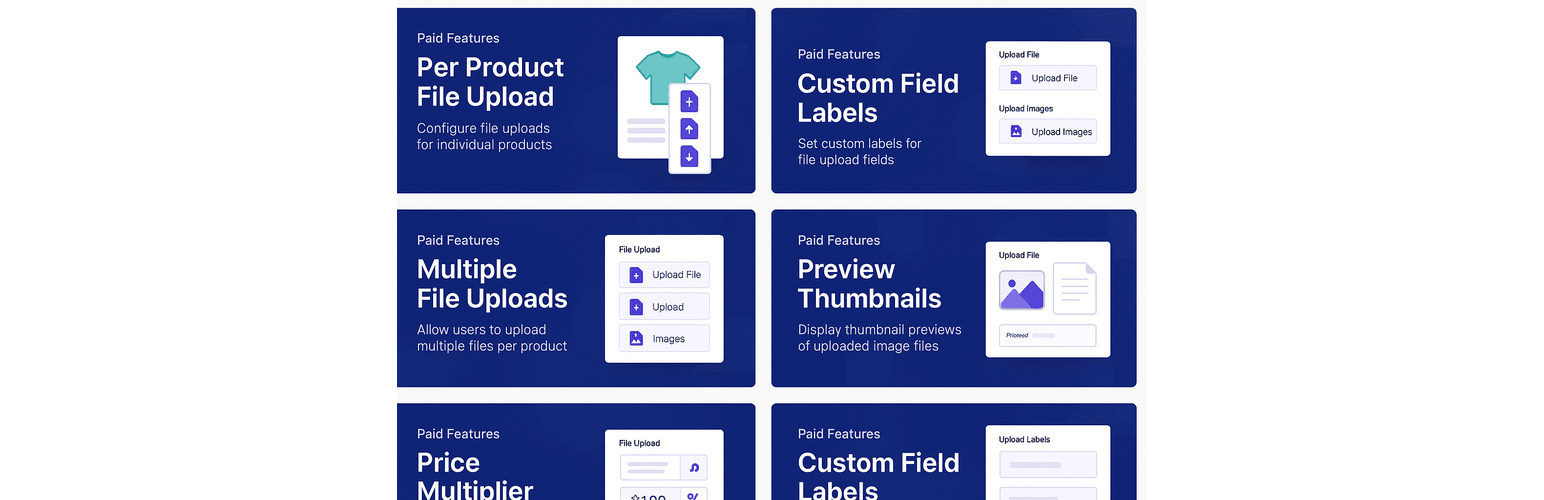
- 每個單獨產品的上傳啟用
- 每項產品所需的上傳
- 自定義產品的上傳標籤
- 每個產品的產品特定文件類型
- 每個產品的自定義最大文件數
- 每個產品的多個文件(最多 20 個)
- 拖放上傳界面
- 文件預覽和進度條
4. **UploadMate 如何確保安全性?**
- 最低技術要求:WordPress 5.0+、WooCommerce 4.0+、PHP 7.4+
- 圖像存儲:使用.htaccess 保護的安全上傳目錄
- 圖像類型:支援 JPG、JPEG 和 PNG
- 圖像大小:可配置的最大值(最高 5MB)
- 安全性:採用驗證、文件類型驗證和安全存儲
5. **欲瞭解更多或獲得支援,應該如何做?**
- 文件:Documentation
- 論壇:Support Forum
- 聯繫:Contact Support
6. **UploadMate 如何遵守隱私政策?**
- 圖像存儲:客戶圖像僅在您的伺服器上本地存儲
- 數據收集:不向外部伺服器發送客戶數據
- 圖像訪問:僅網站管理員可以訪問上傳的圖像
- 數據保留:根據您的商店數據政策保留圖像
- GDPR 合規:與 GDPR 數據導出和刪除請求兼容
7. **使用 UploadMate 前,我應該準備好的技術環境是什麼?**
- WordPress 5.0+、WooCommerce 4.0+、PHP 7.4+
8. **UploadMate 是如何製作的?**
- 遵循 WordPress 最佳實踐
- 符合 WooCommerce 標準
- 響應式設計原則
- 安全優先的方法
9. **如有使用問題、功能建議或 bug 回報,應該如何處理?**
- 問題提交:Support Forum
- 功能建議:Support Forum 或聯繫開發團隊
- Bug 回報:提供 WordPress 版本、WooCommerce 版本、主題名稱、問題詳細描述和重現步驟
10. **若準備使用 UploadMate,應該採取哪些步驟?**
- 安装 UploadMate 外掛
- 或者升级至 UploadMate Pro 版本以获取更强大的功能和支持功能。
外掛標籤
開發者團隊
② 後台搜尋「NextBrill UploadMate: File upload for WooCommerce」→ 直接安裝(推薦)
原文外掛簡介
UploadMate is a lightweight and user-friendly image upload plugin designed specifically for WooCommerce stores. Allow your customers to upload images directly on product pages and easily manage these uploads from your WordPress admin dashboard.
Perfect for businesses that need customers to provide custom images such as:
* Print shops requiring design artwork
* Custom merchandise stores needing logo images
* Photo services requiring customer images
* Any business where customer image uploads are essential
✨ Key Features
Simple Image Uploads: One-click image uploads on any WooCommerce product page
Secure Image Storage: Images are stored securely in a protected directory
Order Integration: Uploaded images are automatically linked to orders
Admin Dashboard: View and download customer images directly from order pages
Image Type Control: Support for JPG, JPEG, and PNG image formats
Size Limitations: Built-in configurable image size limit for optimal performance
Mobile Friendly: Responsive design works perfectly on all devices
Translation Ready: Fully prepared for internationalization
🚀 How It Works
Customer uploads image: Customers can optionally upload images on any product page
Image gets processed: The plugin securely stores the image and validates it
Order connection: The uploaded image is automatically linked to the customer’s order
Admin access: View and download customer images from the order dashboard
🎯 Perfect For
Print & Design Services: Custom t-shirts, business cards, banners
Photography Services: Photo editing, album creation
Document Services: Translation, proofreading, legal services
Custom Manufacturing: 3D printing, custom parts, personalized items
Educational Services: Assignment submissions, course materials
💎 UploadMate Pro
Ready for more advanced features? UploadMate Pro offers:
Enable uploads per individual product
Required uploads per product
Custom upload labels per product
Product-specific file types
Custom max files per product
Multiple files per product (up to 20)
Drag & drop upload interface
File preview and progress bars
Upgrade to UploadMate Pro →
🔧 Technical Details
Minimum Requirements: WordPress 5.0+, WooCommerce 4.0+, PHP 7.4+
Image Storage: Secure uploads directory with .htaccess protection
Image Types: JPG, JPEG, PNG
Image Size: Configurable maximum (UPTO 5MB)
Security: Nonce verification, file type validation, secure storage
Advanced Usage
Support
Need Help?
Documentation
Support Forum
Contact Support
Feature Requests
Have an idea for UploadMate? We’d love to hear it! Post your suggestions in the support forum or contact us directly.
Bug Reports
Found a bug? Please report it in the support forum with:
* WordPress version
* WooCommerce version
* Theme name
* Detailed description of the issue
* Steps to reproduce
Privacy Policy
UploadMate respects your privacy and your customers’ privacy:
Image Storage: Customer images are stored locally on your server
Data Collection: No customer data is sent to external servers
Image Access: Only site administrators can access uploaded images
Data Retention: Images are retained according to your store’s data policy
GDPR Compliance: Compatible with GDPR data export and deletion requests
Credits
Built With:
* WordPress best practices
* WooCommerce standards
* Responsive design principles
* Security-first approach
Thanks To:
* WordPress community
* WooCommerce team
* Plugin beta testers
Ready to start accepting customer image uploads?
Install UploadMate today and enhance your WooCommerce store with professional image upload capabilities!
Upgrade to UploadMate Pro | Get Support