
內容簡介
此外掛專為 WooCommerce 設計,讓商家能夠設定以單位銷售但按重量定價的產品,適合魚類、瓜果等商品,提供靈活的計價方式,提升購物體驗。
【主要功能】
• 設定單位與重量定價
• 支援小數量步進設定
• 實時顯示選擇數量的價格
• 允許在商店頁面選擇產品數量
• 自訂每個產品的數量後綴
外掛標籤
開發者團隊
原文外掛簡介
WooCommerce plugin for configuring products which are sold by units but priced by weight.
Documentation | Contact
For example: fish, watermelon, cabbage.
How To define products which are sold by units but priced by weight
In the plugin settings enable the ‘Quantity Units’ option
Go to the edit product screen
Set the price of 1 unit of the product in the price field (General tab)
Set the weight of 1 unit of the product in the weight field (Shipping tab)
Select ‘Weight’ in the ‘Quantity Units’ option (Unit Price tab)
How It Works
The customer choose how many items he needs from the product
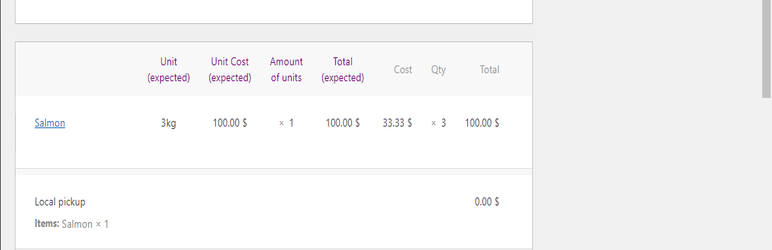
On order creation the item quantity is recalculated based on its weight
The shop owner will be able to update the quantity of it from the edit order screen after he weighs the item
For example:
1. The customer purchased 1 Salmon fish
2. The configured weight of Salmon fish is 3kg, when order is created the quantity of the fish will be modified automatically from 1 to 3
3. The shop owner will weight the actual fish, find out it’s 3.2kg, so he will change the quantity in the order from 3 to 3.2, the total price of the item will be updated automatically
Note: It’s recommended to use with Authorized / Delayed Payment method so the shop owner will be able to charge the exact amount after he weights the products, the order status should be ‘Pending payment’ / ‘delayed payment’.
Features
Quantity Units: Config products which are sold by units but priced by weight (suitable for fish store and butcher).
Quantity Step: Set decimal quantity step per product/variation- for products which are sold by weight (per kg/gram, suitable for supermarket, deli and bakery, selling fruits, vegetables, nuts).
Quantity Suffix: Set quantity suffix per product/variation.
Price Quantity: Display the price per specific quantity per product/variation.
Subtotal: Display the product price by the selected quantity in real-time.
Shop Page Quantity: Allow to choose product quantity on archive pages.