內容簡介
總結文案:
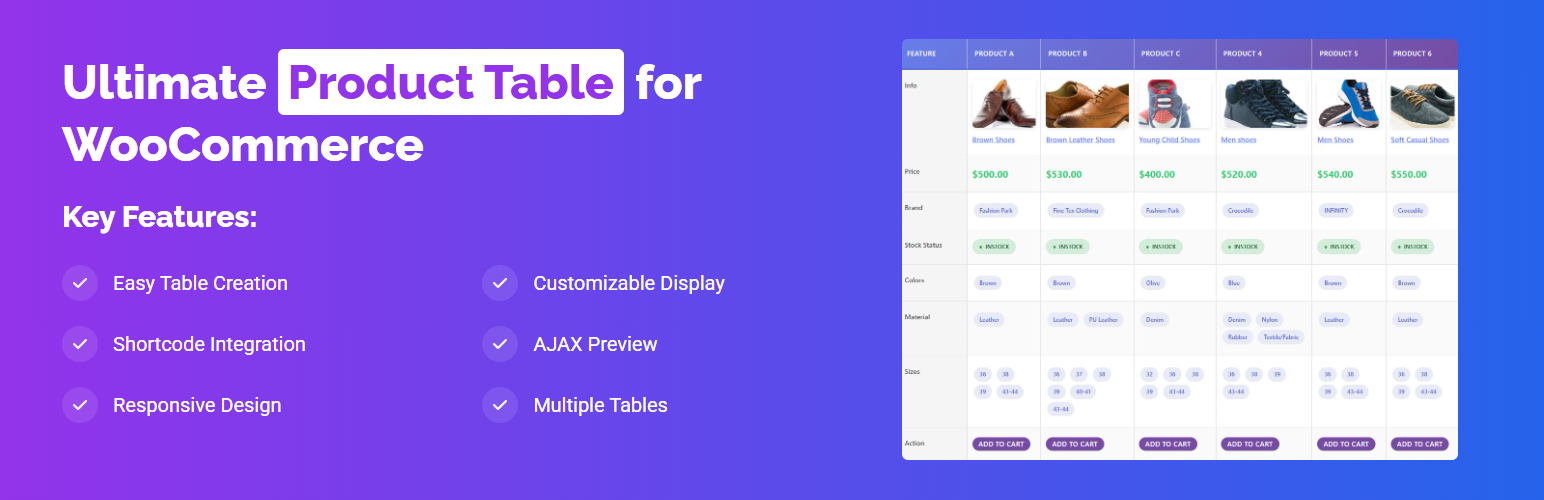
Ultimate Product Table for WooCommerce 讓您可以使用簡單的 shortcode 在 WordPress 站點上建立和展示自定義產品表格,非常適合以整潔、有組織的表格形式展示產品,方便客戶瀏覽和比較。
問題與答案:
1. 這個外掛的特色有哪些?
- 簡單建立表格:透過直觀的管理介面建立自定義產品表格
- Shortcode 整合:使用簡單的 shortcode 在站點上展示表格
- WooCommerce 整合:與現有的 WooCommerce 產品無縫配合
- 響應式設計:表格能夠適應不同螢幕尺寸,提供最佳行動體驗
- 可自訂顯示:控制在表格中顯示哪些產品信息
- AJAX 預覽:在建立表格時實時預覽產品
- 多個表格:建立和管理多個產品表格,用於不同用途
2. 這個外掛適用於哪些情況?
- 產品目錄和列表
- 比較表格
- 批發產品展示
- 特定類別的產品展示
- 首頁產品展示
3. 如何使用這個外掛?
- 安裝並啟用外掛
- 進入 WordPress 管理員中的外掛設定
- 通過選擇產品和自定義顯示選項來建立新的產品表格
- 複製生成的 shortcode
- 將該 shortcode 粘貼到您想要表格出現的任何站點位置
4. 這個外掛的需求是什麼?
- WordPress 5.0 或更高版本
- 安裝和啟用 WooCommerce 外掛
- PHP 7.4 或更高版本
5. 如何獲得支援?
- 請訪問:https://plugincy.com/ultimate-product-table-for-woocommerce/ 以獲得支援和文檔
6. 這個外掛的隱私政策是怎樣的?
- 此外掛不收集、儲存或傳輸任何個人數據,它只與您網站上現有的 WooCommerce 產品數據一起工作。
外掛標籤
開發者團隊
② 後台搜尋「Ultimate Product Table for WooCommerce」→ 直接安裝(推薦)
原文外掛簡介
Ultimate Product Table for WooCommerce transforms your WooCommerce store into a highly customizable, fast-loading, and conversion-optimized product display system.
Create beautiful product tables, comparison charts, grids, and lists with a simple drag-and-drop builder. Perfect for wholesale stores, B2B marketplaces, product catalogs, or any store needing faster product browsing and bulk add-to-cart functionality — all without writing a single line of code.
🌟 Overview
This plugin provides the ultimate flexibility in how you present your products. With six powerful layout types, 40+ customizable product elements, advanced filtering, and AJAX-powered interactivity, you can build stunning tables that enhance usability and boost conversions.
Whether you want a compact data table for technical products or a modern grid for lifestyle items, Ultimate Product Table for WooCommerce adapts to your needs.
» Buy Pro | » More info | » Demos | » Docs
🏗️ Key Features
🧱 Visual Table Builder
Drag-and-drop columns and elements with live preview.
Add, remove, reorder, and duplicate elements easily.
Real-time design updates with undo/redo support.
📊 Six Layout Types
Table Layout – Classic multi-column layout with sorting, sticky headers, and responsive stacking.
Comparison Layout – Compare multiple products side-by-side with highlighted differences.
Grid Layout – Modern, card-style grid display with hover effects and equal-height cards.
List Layout – Clean, row-based layout with detailed product information.
Masonry Layout (Coming Soon) – Pinterest-style layout for dynamic height tiles.
Slider Layout (Coming Soon) – Carousel-based layout with autoplay and swipe support.
🧩 40+ Product Elements
Display detailed product data including:
– Title, image, price (regular/sale/savings)
– Ratings and reviews
– SKU, ID, attributes, and categories
– Stock status, quantity, progress bars, and backorder messages
– Add to cart, quick view, compare, and wishlist buttons
– Vendor info (Dokan, WCFM, WC Vendors compatible)
– Social share buttons and QR codes
– Custom text, meta fields, and shortcodes
🔍 Advanced Query System
Filter by category, tag, product ID, or custom meta.
Show on-sale, featured, or in-stock products only.
Sort by title, price, rating, popularity, or custom order.
Display unlimited tables with unique product sets.
🎨 Complete Design Customization
Control colors, typography, spacing, borders, and hover effects.
Sticky headers, zebra stripes, compact/comfortable modes.
Responsive column visibility and alignment.
Pre-designed templates: Minimal, Modern, Classic, Premium, and more.
🔄 AJAX & Interactive Features
AJAX Add to Cart without page reloads.
AJAX pagination, filtering, and sorting.
Infinite scroll or load more options.
Bulk add-to-cart and checkbox selection.
Quick view popup and lightbox support.
🔌 Integrations & Compatibility
✅ WooCommerce 8.0+
✅ Multi-vendor plugins: Dokan, WCFM, WC Vendors
✅ Wishlist plugins: YITH WooCommerce Wishlist
✅ Page Builders: Elementor, Divi, WPBakery, Beaver Builder, Oxygen
✅ Schema & SEO Ready
✅ GDPR, RTL, and mobile friendly
🎯 Why Choose This Plugin
Visual Drag-and-Drop Builder – Create product tables instantly with live preview.
6 Layout Types – Table, Comparison, Grid, List, Masonry (coming soon), and Slider (coming soon).
40+ Elements – Display images, prices, attributes, stock, ratings, and more.
Performance Optimized – Lightweight, fast, AJAX-powered, and SEO-friendly.
Unlimited Tables – Build different product tables for pages, categories, or use-cases.
No Coding Required – Customize everything visually from your WordPress dashboard.
🧠 Frequently Asked Questions
Do I need coding knowledge?
No, the plugin is completely visual and beginner-friendly. Build tables easily using the drag-and-drop interface.
Can I use this with any WordPress theme?
Yes, it works perfectly with any well-coded WordPress or WooCommerce theme.
Can I create multiple tables?
Yes, you can create unlimited product tables for different pages, categories, or custom queries.
Does it support variable products?
Yes, the plugin fully supports variable products with variation selectors.
Can customers bulk add to cart?
Yes, checkbox selection allows adding multiple products to the cart in one click.
Is the plugin SEO optimized?
Yes, the output uses semantic HTML5, schema markup, and optimized loading for Core Web Vitals.
Is it compatible with page builders?
Yes, all tables are shortcode-based and work seamlessly with Elementor, Divi, WPBakery, and more.
Does it support RTL and multilingual sites?
Yes, the plugin supports RTL languages and is translation-ready with a .pot file included.
Support
For support, feature requests or bug reports, please visit Plugincy Support.
Privacy Policy
To learn more about the data we collect and how we use it, please see our Privacy Policy.