內容簡介
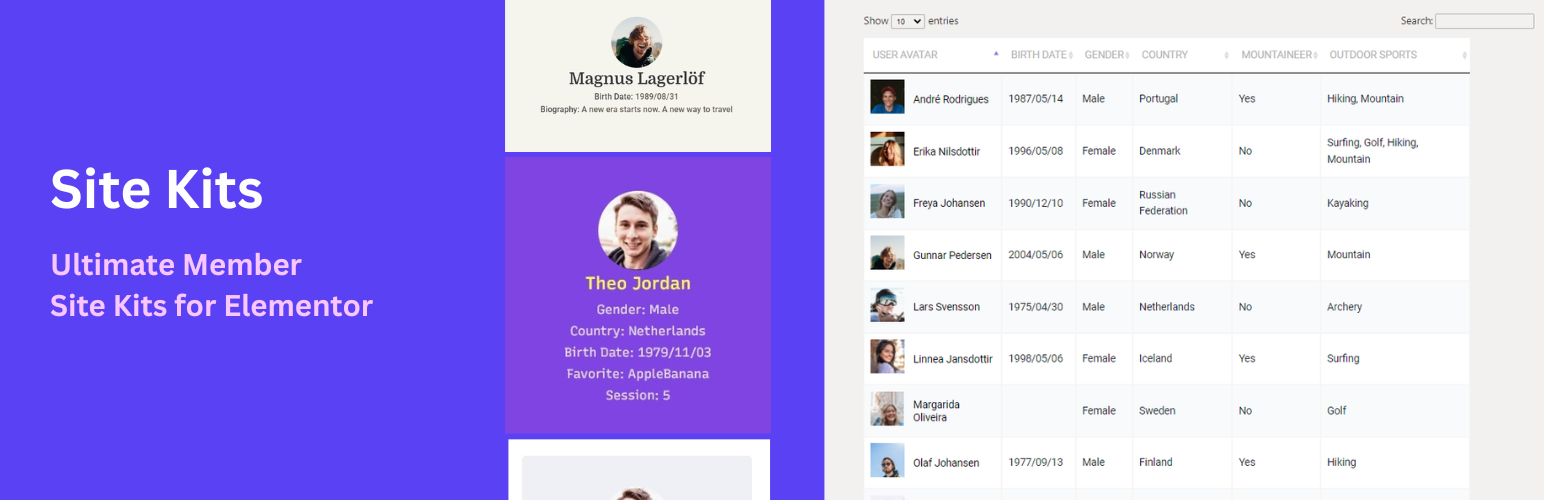
MemberKits 是一款專為 Ultimate Member 設計的外掛,允許使用者透過 Elementor 直觀地自訂登入、註冊及會員資料頁面,提升網站的整體設計與使用者體驗。
【主要功能】
• 使用 Elementor 自訂 Ultimate Member 頁面樣式
• 支援登入、註冊及重設密碼功能
• 建立可搜尋的會員目錄
• 直觀的視覺編輯,不需自訂 CSS
• 提供多種佈局選擇與過濾功能
外掛標籤
開發者團隊
② 後台搜尋「MemberKits – Ultimate Member for Elementor」→ 直接安裝(推薦)
📦 歷史版本下載
原文外掛簡介
Style the Ultimate Member pages you already have.
If your site runs Ultimate Member, the default login, register, directory, and profile pages rarely match the rest of the design. This plugin adds Elementor widgets for those pages so you can change colors, typography, spacing, cards, and fields visually — without custom CSS and without rebuilding the site.
Works with the free version of Elementor. Elementor Pro is not required. Built specifically for Ultimate Member.
Live Demos | Go Pro | Documentation
Why site owners install this plugin
Style the login page in Elementor — Replace the default Ultimate Member login form with a branded layout visitors will trust.
Style the register page the same way — One widget handles both login and register. Field layout, buttons, labels, and spacing stay in the editor.
Build a searchable member directory — AJAX live search, role or custom field filters, and card or list layouts.
Keep editing in Elementor — Change colors, typography, spacing, cards, and fields visually without custom CSS.
Use your existing Ultimate Member pages — Drop widgets onto the login, register, password reset, and members pages you already mapped in Ultimate Member.
What the free version includes
Login, register, and password reset in Elementor
Login / Register Form widget for Ultimate Member forms
Password Reset widget
Logout widget
Field layout controls: multi-column rows, reorder fields, hide labels, control gaps
Visual styling for buttons, inputs, labels, spacing, borders, shadows, colors, and typography
Member directory and user listings
Directory Grid with AJAX live search
Filter by role or custom Ultimate Member fields
Card, list, and custom template layouts
Numbered pagination, Load More, or Infinite Scroll
Sort by display name, registration date, last login, post count, or custom field
Show only approved Ultimate Member members
WordPress Users widget works even without Ultimate Member
Member Flip Cards widget for member or team displays
Profile and visibility widgets
Profile Photo
Profile Fields
Profile Name
UM Visibility for logged-in, logged-out, role-based, or field-based display rules
Account widget for Ultimate Member account tabs
Optional — starter sites if you are launching from scratch
You do not need a kit to use the widgets. If you want a full starter site instead of styling pages you already have:
Import Creator Community or Local Association from MemberKits → Site Kits
The importer can install Elementor and Ultimate Member if they are missing
Pro unlocks additional starter sites, previewed from inside Free
Style login, register, and password reset in Elementor
Your login and register pages are where visitors decide whether your site feels trustworthy. This plugin lets you design those pages in Elementor instead of settling for the default Ultimate Member look.
Login / Register Form — One widget handles both forms. Drag it onto your login or register page, choose Login or Register, then style inputs, labels, buttons, typography, spacing, borders, and shadows. Works with your Ultimate Member forms. Login demo | Register demo | Step-by-step login tutorial
Password Reset — Build a branded password reset page that matches the rest of the sign-in flow. Live demo
Account — Style Ultimate Member account tabs (General, Password, Privacy, Notifications) in Elementor. Place it on the UM Account page.
Logout — Add a clean logout link for logged-in members using your Ultimate Member logout destination.
Build a searchable member directory in Elementor
Directory Grid — Display Ultimate Member users in responsive card or list layouts. Visitors search by name and results update instantly with AJAX. Filter by role or custom UM fields, choose numbered pagination, Load More, or Infinite Scroll, and sort by display name, registration date, last login, post count, or a custom field. Live demo | Directory tutorial
WordPress Users — List native WordPress users by role and user meta. Useful for staff directories, teams, authors, and contributor pages. Works without Ultimate Member installed.
Member Flip Cards — Create hover-to-flip profile cards for member spotlights, team sections, or featured users. Live demo
Profile widgets for Ultimate Member pages
Use Elementor to clean up and personalize Ultimate Member profile pages.
Profile Photo — Standalone avatar widget with size, border, radius, and filter controls. Profile page demo
Profile Fields — Output any mix of Ultimate Member fields for the viewed member. Supports text, URL, phone, image, and file fields with visibility rules. Live demo
Profile Name — Show the profile user’s display name, first name, last name, full name, username, or nickname with Elementor typography controls. Live demo
UM Visibility — Show or hide Elementor sections by login state, user role, or field value conditions.
Get started in minutes
Use the widgets on the Ultimate Member pages you already have.
Activate the plugin with Elementor and Ultimate Member active.
Open your login page in Elementor — add the Login / Register Form widget, choose Login, and style it.
Do the same for Register — switch the form type to Register on your register page.
Add Directory Grid to your members page for a searchable directory.
Optional — import Creator Community from MemberKits → Site Kits if you want a full starter site instead.
Per-page layouts back up the previous Elementor layout before applying changes. Site Kit imports can be undone from the Site Kits screen.
Find widgets in the Elementor panel under Member Pages (forms and profile) and Directories (directory grids and flip cards).
Why this is different from a normal Ultimate Member addon
Most Ultimate Member plugins add one shortcode option or one admin screen. This plugin is the Elementor design layer for the pages members actually use: login, register, password reset, profile, and the member directory.
It also includes one-click page layouts for those mapped Ultimate Member pages, and optional starter sites if you are starting a new community from scratch.
More free Ultimate Member tools from UserElements
These free plugins work great alongside MemberKits. Install them from Ultimate Member → Our Plugins or Settings → Our Plugins:
Member Export for Ultimate Member — Export and import member data as CSV with filters, column mapping, and saved presets
SEO for Ultimate Member — Privacy-aware profile sitemap, Yoast & Rank Math integration, Person schema, and Open Graph tags
Faceted Search for Ultimate Member — Filter sidebar for member directories with live AJAX facet counts
Upgrade to Pro when you need more
The free plugin covers login, register, password reset, account, profile widgets, and directories. MemberKits Pro is for replacing the profile page and building advanced directories:
Profile Page Builder — Replace the default Ultimate Member profile template with a custom Elementor layout
Member Table — Sortable directory with clickable column headers, global AJAX search, and CSV / Excel export. Tutorial
Faceted Directory — A full member listing with live facet counts, not a filter bar for Directory Grid
Directory Map — Show members on a map
Member Filter — Standalone filter panel with unlimited fields, dropdowns, checkboxes, and radio buttons
Member Carousel — Touch-friendly slider for featured members, alumni spotlights, or testimonials
Member Card Grid — Multi-column and zigzag directory layouts
Member Search — Dedicated AJAX search bar, independent of the directory grid
UM Directory Styler — Full Elementor visual control over the native Ultimate Member directory shortcode
Member Loop Grid, Split View, and Alphabet Index — Advanced directory layouts with Elementor templates, side-panel browsing, and A–Z name navigation
More starter sites — Alumni, startup, church, school, healthcare, and other Pro kits, previewed from the Free library
See all Pro features and live demos →
Pricing: Free — unlimited sites. Pro from $45/year. All Access bundle also available.
Do not activate Free and Pro together. Pro replaces Free.
Who is this for?
Ultimate Member site owners who already have login, register, and members pages and want them to match the rest of the site
Membership site owners who need a branded login, register, profile, and directory experience in Elementor
Community builders creating searchable, filterable member directories
Agencies styling Ultimate Member for client sites
Directory-style businesses and marketplaces where people browse, search, and filter members or professionals
New community sites that want an optional starter kit after the widgets, not instead of them