
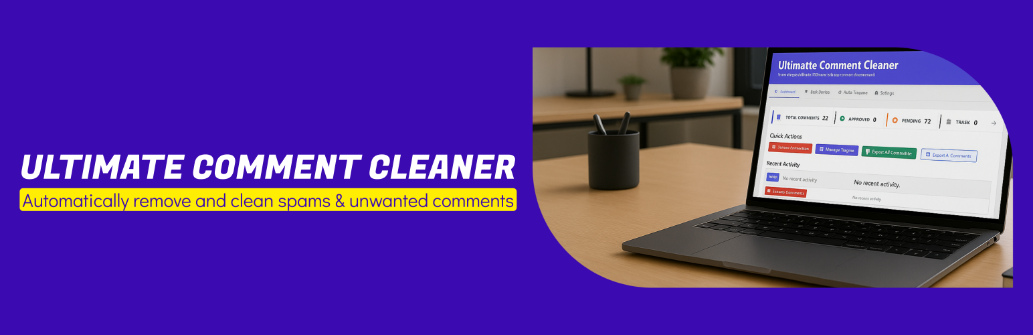
內容簡介
總結:Ultimate Comment Cleaner 是一個全面的 WordPress 評論管理外掛,可以透過進階的篩選選項,有效地批量刪除評論。無論您需要清理垃圾郵件、移除舊評論,或按照特定標準管理評論,此外掛都提供您所需的所有工具。
問題與答案:
1. Ultimate Comment Cleaner 是一個用於哪個內容管理系統的外掛?
- 答案:WordPress
2. 該外掛具有哪些主要功能?
- 答案:Creative Dashboard、Bulk Delete、Advanced Filters、Auto Triggers、Export Functionality、Preview Count、Activity Log、Real-time Stats、WordPress Standards
3. 有哪些功能可以在儀表板上看到?
- 答案:Visual stat cards、Total comments、Active triggers counter、Recent activity log、Quick action buttons
4. 可以按照哪些標準來批量刪除評論?
- 答案:狀態、日期範圍、文章類型、作者、URL 存在、字數、自定義標準
5. 什麼是 Auto Triggers?
- 答案:可以設置定期運行的自動刪除規則
6. 如何導出評論?
- 答案:導出至 CSV 副本
7. 可以預覽多少符合條件的評論後再進行刪除?
- 答案:在刪除前顯示符合條件的數量
8. 如何查看執行歷史記錄?
- 答案:查看執行歷史记录
外掛標籤
開發者團隊
原文外掛簡介
Ultimate Comment Cleaner is a comprehensive WordPress comment management plugin that allows you to efficiently delete comments in bulk with advanced filtering options. Whether you need to clean up spam, remove old comments, or manage comments by specific criteria, this plugin provides all the tools you need.
Key Features
Creative Dashboard – Beautiful, modern dashboard with real-time statistics and visual cards
Bulk Delete – Delete comments by status, date range, post type, author, and more
Advanced Filters – Filter by URL presence, word count, and custom criteria
Auto Triggers – Set up automatic deletion rules that run on schedule
Export Functionality – Export comments to CSV before deletion
Preview Count – See how many comments match your criteria before deleting
Activity Log – Track all deletion activities
Real-time Stats – Live statistics that update automatically
WordPress Standards – Follows WordPress coding standards and best practices
Dashboard Features
Visual stat cards showing comment counts by status
Total comments, approved, pending, spam, and trash counts
Active triggers counter
Recent activity log
Quick action buttons
Bulk Delete Options
Filter by status (All, Approved, Pending, Spam, Trash)
Date range filtering
Post type filtering
Author filtering
Comments with/without URLs
Short comments (less than 10 words)
Custom word count range (min/max words)
Preview count before deletion
Export to CSV
Auto Triggers
Create automatic deletion rules
Schedule: hourly, daily, or weekly
Filter by status and age (older than X days)
Enable/disable individually
View execution history