內容簡介
**總結:**
Trustlocal Widgets 讓您在網站上展示您的 Trustlocal 評分和評論。這個外掛使在您的 WordPress 網站上安裝 Trustlocal Widgets 變得更加容易。從 Trustlocal 儀表板中檢索代碼,安裝外掛,然後將 Trustlocal 評分小工具和 Trustlocal 評論小工具等小工具放在您網站的任何地方。
**問題與答案:**
1. 什麼是 Trustlocal Widgets 外掛的主要功能?
- 提供三種小工具類型:評分小工具、評分+Google 小工具和評論小工具。
- 支持 Gutenberg Blocks、短代碼,可輕鬆在文章、頁面和小工具中使用。
- 在網站上任何位置展示小工具,提高公司的可見性和可信度。
2. 安裝和啟用 Trustlocal Widgets 外掛後如何操作?
- 在 Trustlocal 儀表板中請求 API 金鑰,使用方便的控制條來與網站和品牌設計匹配。
- 在 WordPress 中下載外掛,粘貼代碼,然後即可完成。小工具將立即顯示在您的網站上。
- 您可以在 Trustlocal 儀表板中選擇要顯示的內容。
3. Trustlocal Widgets 外掛支持哪些短代碼?
- [trustlocal_score]:顯示評分小工具。
- [trustlocal_score_google]:顯示評分+Google 小工具。
- [trustlocal_reviews]:顯示評論小工具。
4. Trustlocal Widgets 外掛可以與哪些第三方服務整合?
- 可與 Trustlocal 服務整合,以在您的網站上顯示小工具。
5. Trustlocal 是什麼服務?它主要用於什麼?
- Trustlocal 是一項第三方服務,整合並顯示來自多個平台的企業評分、評論和評分。
- 這個外掛使用 Trustlocal 服務來展示業務評分、評論,並提供可定制的小工具,與您網站的設計匹配。
6. 何時以及哪些數據被發送到 API 認證 (後端)?
- 在外掛啟用期間、API 金鑰驗證以及訪問管理設置頁面時。
- 發送的數據:您的 API 金鑰(僅用於身份驗證)。
- 目的:驗證您的 API 金鑰並檢索您的帳戶信息。
7. 使用該外掛需要同意哪些隱私政策和服務條款?
- 通過使用此外掛,您同意 Trustlocal 的隱私政策和服務條款。
外掛標籤
開發者團隊
📦 歷史版本下載
原文外掛簡介
Trustlocal Widgets – Display your Trustlocal Score and reviews on your website
With this plugin, it’s easier than ever to install the Trustlocal Widgets on your WordPress website. Retrieve the code from your Trustlocal Dashboard, install the plugin, and place widgets such as the Trustlocal Score Widget and the Trustlocal Review Widget anywhere on your site.
Trustlocal Score Widget
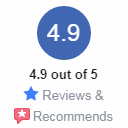
This widget adds an icon with your company’s Trustlocal Score to your website. Visitors immediately see your business is highly rated, which builds trust and strengthens your reputation.
Trustlocal Review Widget
Your business probably gets reviewed on different platforms: Google, Trustpilot, Facebook or industry-specific sites. Wouldn’t it be great to show them all in one place? The Trustlocal Review Widget automatically gathers your customer reviews and displays them right on your website.
Features
Three Widget Types: Score Widget, Score + Google Widget, and Review Widget
Gutenberg Blocks: Visual block editor with live preview and customization options
Shortcode Support: Easy-to-use shortcodes for posts, pages, and widgets
Display the widgets anywhere on your website
Show star ratings in Google search results
Increase your company’s visibility and credibility
Easily adjust the design to match your website via your Trustlocal Dashboard or custom HTML
Works in every browser and on mobile
Straightforward installation process
Also available as Shortcode and Gutenberg Blocks
Widget Types
Score Widget – Display your Trustlocal score
Score + Google Widget – Score widget with Google integration
Review Widget – Display customer reviews
How does it work?
After installing and activating the plugin:
Request your API key in the Trustlocal Dashboard and use the handy sliders to match the design with your website and branding. Download the plugin in WordPress, paste the code, and you’re done. The widget will instantly appear on your website. In your Trustlocal Dashboard, you can select exactly what you want to display.
Go to Settings → Trustlocal Widgets
Enter your Trustlocal API Key
Add widgets using Gutenberg blocks or shortcodes
Shortcodes
[trustlocal_score] – Score Widget
[trustlocal_score_google] – Score + Google Widget
[trustlocal_reviews] – Review Widget
Customization
All widgets support customization through attributes:
[trustlocal_score theme=”dark” size=”large”]
[trustlocal_reviews theme=”dark”]
Third-Party Services
This plugin integrates with Trustlocal services to display widgets on your website.
What is Trustlocal?
Trustlocal is a third-party service that aggregates and displays business ratings, reviews, and scores from multiple platforms. The service provides widgets that can be embedded on websites to showcase customer feedback and ratings.
What is it used for?
This plugin uses Trustlocal services to:
* Display business scores and ratings
* Show customer reviews from multiple platforms
* Display Google ratings alongside Trustlocal scores
* Provide customizable widgets that match your website’s design
What data is sent and when?
API Authentication (Backend)
* When: During plugin activation, API key validation, and when accessing the admin settings page
* Data Sent: Your API key (used for authentication only)
* Purpose: To verify your API key and retrieve your account information (client ID, provider name, country code)
Note: No personal user data is collected or sent. Only Trustlocal account identifiers and widget configuration preferences are transmitted.
Privacy and Terms
Privacy Policy: EN | DE | BE | ES
Terms of Service: EN | DE | BE | ES
By using this plugin, you agree to Trustlocal’s privacy policy and terms of service.