
內容簡介
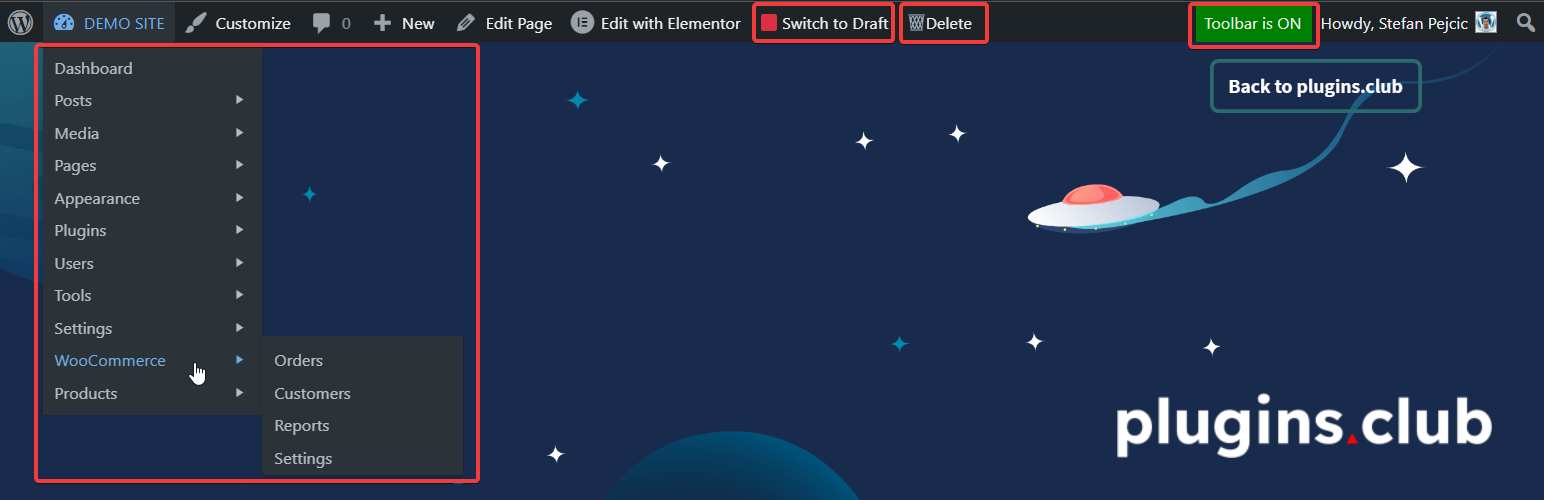
這個外掛會在上方工具列新增一些實用的連結,讓管理員更容易進入 wp-admin 控制台。
🟩 發布 / 🟥 轉換至草稿的連結,用於發布/取消發布文章
🗑️ 工具列裡的刪除連結,用於刪除文章與頁面
👍 取代工具列下拉式選單為 wp-admin 選單
❌ 移除工具列左上角的 WP logo
📴 可啟用/停用的按鈕,可用於開啟或隱藏工具列
每個選項都可以在「設定」>「工具列連結」中開啟或關閉。
如需更多免費 WordPress 外掛,請造訪♣plugins.club。
外掛標籤
開發者團隊
原文外掛簡介
This plugin will add new usefulf links in the toolbar, making it simpler for Administrators to access the wp-admin dashboard.
🟩 Publish / 🟥 Switch to Draft links to publish/unpublish posts
🗑️ Delete link in toolbar to delete posts & pages
👍 Replace the toolbar dropdown menu with wp-admin menu
❌ Remove WP logo from top-left corner of the toolbar
📴 Enable/Disable button to toggle the toolbar
Each option can be enabled or disabled from Settings > Toolbar Links.
For more free WordPress plugins please visit ♣plugins.club.