內容簡介
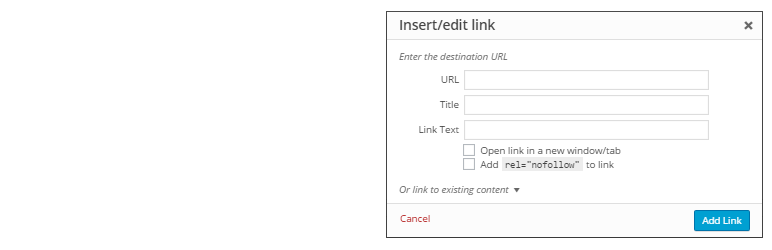
這個外掛程式在插入連結彈出框中恢復了 WordPress 4.2 中刪除的「Title」欄位,並新增了一個「將連結加上 rel="nofollow"」的勾選框。
Gutengerg(區塊編輯器)注意事項:目前還無法在 Gutenberg 中新增此功能,因為 Gutengerg 與經典編輯器是不同的系統,且沒有允許新增自訂設定的 hook/filter。一旦 Gutenberg 可以新增此功能,我們會更新這個外掛程式。
這個外掛程式已被 WordPress 資源網站 WPKube 接手並維護,你可以在該網站找到有關 WordPress 外掛程式、WordPress 主機和更多指南。
外掛標籤
開發者團隊
② 後台搜尋「Title and Nofollow For Links (Classic Editor)」→ 直接安裝(推薦)
原文外掛簡介
The plugin restores the Title field (that was removed from WordPress 4.2) in the insert link popup box and adds a new Add rel="nofollow" to link checkbox to it.
Gutengerg (Block Editor) Note: At the moment it’s not possible to add the functionality to Gutenberg, it’s a different system from the classic editor and it does not have a hook/filter which allows adding custom settings. As soon as it becomes possible to add the functionality to Gutenberg we will update the plugin.
This plugin has been adopted and maintained by WPKube, a popular WordPress resource site, where you can find guides on WordPress plugins, WordPress Hosting, and more.