內容簡介
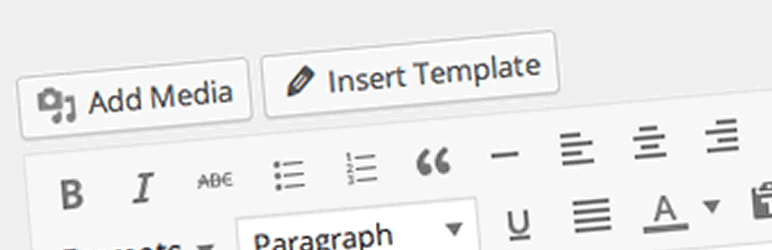
TinyMCE Template 外掛可在 WordPress 視覺化編輯器上使用 HTML 範本。
官網
GitHub
部份功能:
加入「插入範本」按鈕至視覺化編輯器。
你可在 WordPress 管理後台編輯範本。
自頁面及文章複製至範本。
你可將範本以短代碼形式插入。
翻譯者:
日語(ja) - Takayuki Miyauchi
義大利語(it_IT) - Andrea Bersi
瑞典語(sv_SE) - Tobias Bergius
德語(de_DE) - nebojsa-simic, Martin Lettner
西班牙語(es_ES) - David Bravo
荷蘭語(nl_NL) - Frank Groeneveld
法語(fr_FR) - HAROUY Jean-Michel
巴西葡萄牙語(pt_BR) - Rafael Funchal
菲律賓語(fil_PH) - Morten Elm
俄語(ru_RU) - ihtimir
斯洛伐克語(sk_SK) - Branco
希伯來語(he_IL) - Ahrale
繁體中文(zh_CN) - Riant
匈牙利語(hu_HU) - Sch-Tomi
你可將你的語言包寄給我。
注意
如何在 ACF 的所視即所得編輯器上顯示「插入範本」按鈕。
add_filter( 'tinymce_templates_enable_media_buttons', function(){
return true; // 在所有視覺化編輯器上顯示「插入範本」按鈕
} );
感謝
此外掛雖非保證,使用 WordPress 的使用者不論任何目的均可免費使用此外掛。
作者必須預先瞭解在此外掛使用中的操作保證及支援並不存在。
聯絡方式
http://wpist.me/
Twitter @wpist_me
特別感謝
Twitter 上的 @kernfel
外掛標籤
開發者團隊
📦 歷史版本下載
原文外掛簡介
TinyMCE Template plugin will enable to use HTML template on WordPress Visual Editor.
Website
GitHub
Some features:
Add “Insert Template” button to Visual Editor.
You can edit template on WordPress admin.
Copy to template from posts & pages.
You can insert templates as shortcode.
Translators:
Japanese(ja) – Takayuki Miyauchi
Italian(it_IT) – Andrea Bersi
Swedish(sv_SE) – Tobias Bergius
German(de_DE) – nebojsa-simic, Martin Lettner
Spanish(es_ES) – David Bravo
Dutch(nl_NL) – Frank Groeneveld
French(fr_FR) – HAROUY Jean-Michel
Brazilian Portuguese(pt_BR) – Rafael Funchal
Filipino(fil_PH) – Morten Elm
Russian(ru_RU) – ihtimir
Slovak(sk_SK) – Branco
Hebrew(he_IL) – Ahrale
Chinese(zh_CN) – Riant
Hungarian(hu_HU) – Sch-Tomi
You can send your own language pack to me.
Note
How to display insert template button on wysiwyg editor of the ACF.
add_filter( ‘tinymce_templates_enable_media_buttons’, function(){
return true; // Displays insert template button on all visual editors
} );
Credits
This plug-in is not guaranteed though the user of WordPress can freely use this plug-in free of charge regardless of the purpose.
The author must acknowledge the thing that the operation guarantee and the support in this plug-in use are not done at all beforehand.
Contact
http://wpist.me/
twitter @wpist_me
Special Thanks
@kernfel on Twitter