內容簡介
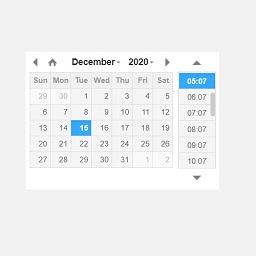
啟用 Timeline Express - Date - Time WordPress 外掛後,將隱藏預設的公告日期欄位,並生成一個可供使用的日期和時間欄位。
多個公告有相同的日期和時間時,將退回使用發佈日期來指示時間軸上的順序。
開發人員
篩選器:
timeline_express_date_time_formats - 在公告中加入自訂日期格式。
範例:
/**
* 為公告分配自訂日期格式。
*
* @param array $date_formats 原始日期格式陣列。
*/
function timeline_express_demo_custom_date_format( $date_formats ) {
$date_formats['custom'] = 'Y-m-d'; //例如:2018-10-02
}
add_filter( 'timeline_express_date_time_formats', 'timeline_express_demo_custom_date_format' );
timeline_express_date_time_query_args - 篩選運行於日期時間外掛上的查詢。
Example:
/**
* 篩選公告日期時間外掛查詢。
* 當公告包含相同的日期時間值時,回退到使用文章標題而不是發佈日期。
*
* @param array $query_args 原始日期時間外掛查詢參數。
*/
function timeline_express_demo_filter_query_args( $query_args ) {
unset( $query_args['orderby'] );
$query_args['orderby'] = 'meta_value_num title';
return $query_args;
}
add_filter( 'timeline_express_date_time_query_args', 'timeline_express_demo_filter_query_args' );
外掛標籤
開發者團隊
② 後台搜尋「Timeline Express – Date – Time Add-On」→ 直接安裝(推薦)
原文外掛簡介
When active, the Timeline Express – Date – Time Add-On will hide the default announcement date field, and generate a date and time field for you to use.
Multiple announcements that have the same date & time will fallback to use the published date to dictate order on the timeline.
Developers
Filters:
timeline_express_date_time_formats – Add your own date formats to the announcement.
Example:
/**
* Assign a custom date format to the announcements.
*
* @param array $date_formats The original date formats array.
*/
function timeline_express_demo_custom_date_format( $date_formats ) {
$date_formats['custom'] = 'Y-m-d'; // eg: 2018-10-02
}
add_filter( 'timeline_express_date_time_formats', 'timeline_express_demo_custom_date_format' );
timeline_express_date_time_query_args – Filter the query run for the date time add-on.
Example:
/**
* Filter the announcement date time add-on query.
* Fall back to post titles instead of published date when announcements contain the same date-time values.
*
* @param array $query_args The original date time add-on query arguments.
*/
function timeline_express_demo_filter_query_args( $query_args ) {
unset( $query_args['orderby'] );
$query_args['orderby'] = 'meta_value_num title';
return $query_args;
}
add_filter( 'timeline_express_date_time_query_args', 'timeline_express_demo_filter_query_args' );