內容簡介
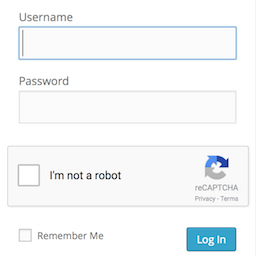
ThinkCaptcha 是一款為 WordPress 和 WooCommerce 表單添加簡單有效的驗證碼的外掛,旨在防止垃圾註冊、暴力登入嘗試和無效提交,提升網站安全性。
【主要功能】
• 在 WordPress 登入表單上添加驗證碼
• 在 WooCommerce 登入和註冊表單上添加驗證碼
• 支援 Google reCAPTCHA v2 的簡單開關設置
• 僅在需要的頁面加載,減少性能影響
• ThinkCaptcha Pro 擴展至結帳和聯絡表單
外掛標籤
開發者團隊
② 後台搜尋「ThinkCaptcha – Captcha for Login, Register and WooCommerce」→ 直接安裝(推薦)
原文外掛簡介
ThinkCaptcha adds a simple, effective captcha to the WordPress and WooCommerce forms that get attacked the most, so you can stop spam registrations, brute-force login attempts, and junk submissions.
It uses Google’s familiar “I’m not a robot” checkbox (reCAPTCHA v2) and turns it on with a single toggle — no coding needed. The captcha only loads on the pages that actually use it, so it stays light on performance.
Free features
Captcha on the WordPress login form to slow down brute-force attacks.
Captcha on the WordPress registration and password-reset forms.
Captcha on the WooCommerce login, registration, and password-reset forms.
Loads asynchronously and only where it’s needed.
ThinkCaptcha Pro
Want to protect the rest of your site? ThinkCaptcha Pro extends the same captcha to:
The WooCommerce checkout, to help prevent fraudulent and spam orders.
Contact Form 7 and WPForms submissions.
The default WordPress registration form.
Third-Party Service Disclosure
This plugin connects to the Google reCAPTCHA service to tell humans and bots apart.
Service used: Google reCAPTCHA (provided by Google LLC).
What is sent: to verify a visitor is human, the service collects and sends device and application data, along with the visitor’s IP address, to Google.
When it is sent: whenever a protected form is displayed and submitted.
Policies: use of Google reCAPTCHA is subject to Google’s Privacy Policy and Terms of Service.