
內容簡介
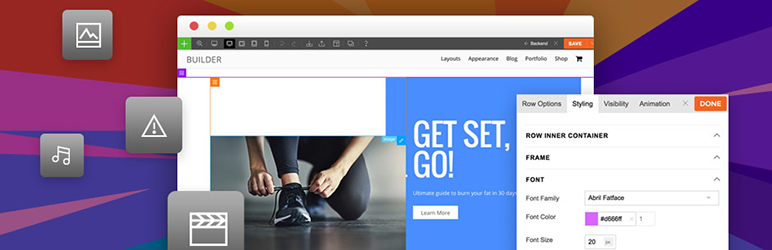
Themify Builder 是一款功能強大且易於使用的 WordPress 頁面設計與建構工具。透過其拖放介面,使用者可以輕鬆設計出任何想要的佈局,並即時預覽效果,無需編碼即可創建美觀的頁面。
【主要功能】
• 前端即時預覽編輯
• 支援多種模組(文字、影片、相簿等)
• 自訂樣式(字型、背景色、邊距等)
• 無限版本的佈局修訂
• 60+ 預設佈局與動畫效果
• 可重複使用的佈局部件
外掛標籤
開發者團隊
📦 歷史版本下載
原文外掛簡介
The Themify Builder is the most powerful and easy to use page designer and builder for WordPress. Design any layout that you can imagine with its drag and drop interface, and with live preview, you can see everything come together right in front of your eyes. Simply select, drag and drop, and you’ve built beautiful pages – without any coding!
The Builder is modular in design and is optimized for better performance resources. It’s also SEO friendly, translatable, and supports multi-site networks. In addition, it comes with its own cache system that reduces the server resources and process processes pages faster. Works on any post type, support HTML input, and play well with all major plugins such as WooCommerce, SEO Yoast, Disqus, MailChimp, Jetpack, WPML, and Contact Form 7.
Themify Builder – Overview
Builder Features:
Responsive across all resolutions.
Frontend live preview editing.
Compact backend Builder editing.
Includes all modules (Text, Video, Accordion, Gallery, Post, Widgetized, Widget, Menu, Button, Slider, Map, Icon, Feature, etc.)
Custom styling – Google fonts, background color, padding, margin, and border.
Undo/Redo Builder modifications as you edit.
Copy/Paste modules, rows, and columns.
Import/Export specific modules, rows, and columns from one computer to another.
Easily duplicate any module or row.
Row and column layout pre-set grids. Rows and columns can be nested in sub rows or columns.
Draggable column widths.
60+ predesigned Builder layouts.
60+ animation effects.
Responsive Styling.
Background – slider, video, parallax scrolling, and gradient.
Revisions – allows you to save your Builder layout with unlimited versions.
Visibility control where you can set whether a module or row is visible on a specific device.
Layout parts – re-usable parts that can be included in the Builder.
Custom CSS














