外掛標籤
開發者團隊
原文外掛簡介
Advanced WooCommerce Product Gallery Plugin with image slider, variation gallery, video support, zoom, lightbox, and 360° product view.
📋 Description
All-in-One WooCommerce Product Gallery Plugin to Display Images & Videos Beautifully, Improve Shopping Experience, and Increase Sales Effortlessly. Want to improve your product page design and increase sales? Do you have multiple images to showcase your product? No problem! WooCommerce Product Gallery helps you turn the default WooCommerce product gallery into a beautiful and interactive image slider. Display your product and variation images in a clean, modern gallery layout that grabs customer attention and creates a better shopping experience.
Live Demo | Docs | Get Pro | Get Support
Why Use WooCommerce Product Gallery?:
Enable Additional Variation Images Gallery Slider
Fully responsive and mobile-friendly design.
Customizable gallery layout.
Easy navigation with image zoom and lightbox support.
Compatible with most WooCommerce themes.
Lightweight and optimized for performance.
Add Engaging Product Video Galleries
Powerful Image Zoom for Better Product Detail View
Smooth Lightbox Popup for Product Images
Image 360 Degree view
WooCommerce Product Gallery simplifies the process of enhancing your product pages with an engaging image gallery. Highlight product details with an interactive experience to boost customer confidence and sales.
✔ Product Variation Images Gallery:
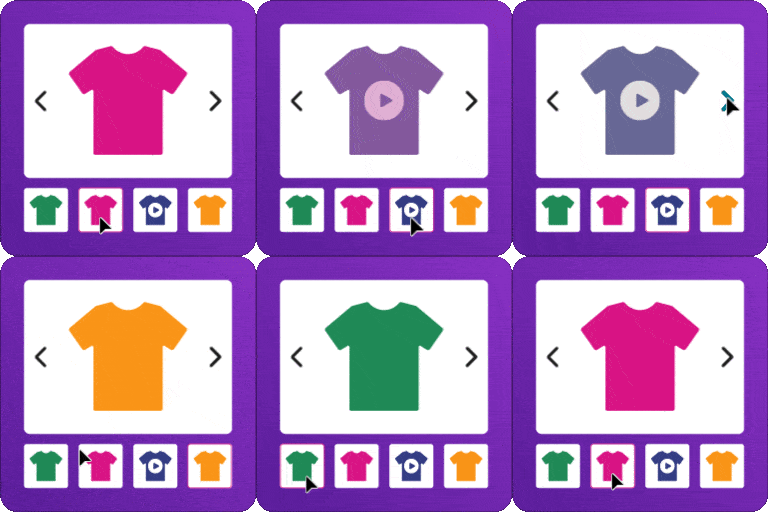
With WooCommerce Product Gallery, you can add multiple images for each product variation. This allows customers to view different image sets whenever they switch between variations.
By default, WooCommerce only lets you assign a single image to each variation. This can be limiting when you want to display more product details or show different angles of a variation. Easy Product Gallery removes this limitation by allowing you to upload unlimited images for every variation. As customers select options like Color, Size, or Style, the gallery updates automatically to display the relevant images for that specific variation, creating a more informative and engaging shopping experience.
✔ Product Video Gallery:
Show product videos directly inside your product image gallery to create a more engaging shopping experience. Videos help customers understand your product better and can increase the chances of conversion.
Easy Product Gallery supports multiple video sources, including YouTube, Vimeo (Pro), Dailymotion (Pro), Facebook (Pro), and self-hosted videos (Pro). All supported video types can be smoothly embedded and played within the gallery alongside your product images.
✔ Product Image Zoom:
Want to help customers see your products more clearly before making a purchase? Easy Product Gallery includes powerful image zoom functionality that allows shoppers to explore product details with ease.
With flexible zoom settings, you can control how the zoom appears and behaves on product images. Customers can hover over an image to view a magnified version, making it easier to inspect textures, colors, and fine product details.
The plugin provides multiple zoom styles such as the standard zoom view, zoom window display, and inner zoom effect. You can also customize the zoom lens appearance by adjusting its shape, color, border, and transparency.
Additionally, you can configure the zoom window size, background color, border style, and the distance between the zoom window and the main product image. Overlay opacity settings are also available to control the transparency of both the lens and zoom area, allowing you to create the perfect zoom experience for your store.
✔ Product Image Lightbox:
Allow customers to view product images in a larger, distraction-free view for a better shopping experience. With the built-in lightbox feature, shoppers can open product images in a full-screen modal and examine every detail with ease.
When users click on a product image, it smoothly expands into a popup gallery where they can navigate through images and explore the product more closely. This enhanced viewing experience helps customers understand the product better and can lead to higher engagement and improved conversions.
👉 Key Features
Modern Product Gallery Layouts
Select from a variety of stylish gallery layouts to display your product images in an attractive and organized way.
Flexible Thumbnail Positions
Display thumbnails in different positions to match your store design:
Thumbnails Left Live Demo
Thumbnails Bottom Live Demo
Thumbnails Top Live Demo
Thumbnails Right Live Demo
Thumbnail carousel two column Live Demo
Thumbnail Vertical Scroll Live Demo
Thumbnail 360 degree view Live Demo
Single product zoom view style Live Demo
Thumbnail different hosted video support Live Demo
🎬 Multiple Hosted Video Support
Showcase your products with video directly inside the gallery. Supports YouTube, Vimeo ,Dailymotion , and self-hosted video formats .
🔍 4 Zoom View Styles
Let customers explore your products in detail with four distinct zoom interaction styles — inner zoom, lens zoom, window zoom, and more.
🔄 Interactive Product Image Slider
Replace the default WooCommerce gallery with a smooth and responsive slider for better product viewing on all screen sizes.
📚 Live Preview & Helpful Documentation
Check live demos and follow detailed step-by-step guides to easily configure and customize your product gallery.
🛒 Product Gallery Slider – Complete Feature Overview
Product Video Gallery for WooCommerce
Attach unlimited videos to both simple and variable products directly inside the WooCommerce product gallery. Support for YouTube, Vimeo , Dailymotion , Facebook, and self-hosted videos helps customers explore every product detail through engaging video content — boosting buyer confidence and driving higher conversions.
Two Video Playback Modes
Choose between inline playback for quick in-page viewing or popup mode for an immersive fullscreen video experience. Customize the play icon size, color, background, autoplay, and looping settings to match your store design perfectly.
Responsive Product Image Thumbnail Slider
Replace the default WooCommerce product gallery with an advanced thumbnail slider. Customers can scroll through product images and variation images smoothly, with autoplay, infinite loop, and fully adjustable slide-per-view settings for a seamless shopping experience on all devices.
Product Image Slider with Navigation Controls
Give customers intuitive control over browsing product images and variations. Configure autoplay interval, slider speed, horizontal or vertical sliding direction, and mouse wheel navigation to create a smooth, interactive product browsing experience.
Multiple Image Transition Effects
Enhance your WooCommerce product image slider with eye-catching transition effects. Choose from Slide and Fade effects in the free version, with additional Flip, Cube, Coverflow , and Creative effects available.
Slide — Smooth horizontal or vertical sliding transition between product images
Fade — Elegant fade-in and fade-out transition for a clean image switch
Cube — 3D cube rotation effect for a dynamic product image transition
Flip — 3D card-flip animation between product gallery images
Creative — Unique creative transition animation for a standout gallery experience
Main Product & Thumbnail Slider Settings
Set slider image size, height, and width for product images
Choose slider transition effects (Slide, Fade)
Enable autoplay and infinite loop for continuous image sliding
Full RTL (Right-to-Left) language support
Free mode scrolling without snap for natural browsing
Adjust slider speed in milliseconds for precise control
Enable mouse wheel control for desktop users
Set overall slider size, padding, and margin
Enable main product image navigation arrows
Control thumbnail navigation visibility, color, hover color, and background
Set navigation icon size for optimal UX
Configure slides per view and slides gap
Enable slider pagination with Dot and Fraction styles
Customize pagination visibility, background, active background, and position
Video Placement Options in Product Gallery
Control exactly where product videos appear within the WooCommerce gallery slider. Position videos strategically to maximize customer engagement:
Top — Display videos above product images
Left — Show videos on the left side of the gallery
Bottom — Place videos below product images
Default — Use the standard gallery order
Product Video Gallery Features
Choose video play mode: Inline or Popup
Set play icon size, color, and hover color
Customize play icon background and hover background
Enable or disable video autoplay
Enable or disable video looping
Enable video preloader before playback starts
WooCommerce Product Image Zoom
Help customers inspect every product detail before purchasing with powerful image zoom functionality. Zoom builds buyer confidence, reduces return rates, and increases conversions — especially for products where texture, color accuracy, and fine details matter.
Enable or disable image zoom on WooCommerce product images
Standard zoom style included in free version
Product Image Lightbox with Fullscreen View
Let customers open product images in a distraction-free fullscreen lightbox popup. Navigate through the entire product image gallery smoothly for a premium viewing experience that keeps shoppers engaged.
Choose lightbox transition effect (e.g., Slide)
Set lightbox icon positions (Top Right, Top Left, Bottom Right, Bottom Left, Middle)
Enable or disable lightbox image captions
Show or hide image counter in the lightbox
Customize close icon color, hover color, background, and hover background
360 Degree Product View for WooCommerce
Allow customers to explore products from every angle with an interactive 360 degree image view popup. This immersive feature increases product engagement and purchase confidence by giving shoppers a complete visual understanding of the product.
Enable or disable the 360 degree product view popup
Set popup button position (Bottom Left)
Adjust bottom and left offset percentages for the popup button
Choose 360 degree gallery layout style
Configure navigation controls display in the popup
Set popup content width and height
🚀 PRO Features – Unlock the Full Power of WooCommerce Product Gallery
Upgrade to WooCommerce Product Gallery Pro to unlock advanced gallery layouts, premium slider effects, enhanced zoom controls, 360 degree drag interaction, and more. Take your WooCommerce product pages to the next level with professional-grade features designed to maximize sales and customer engagement.
5 Premium Product Gallery Layouts (Pro)
Go beyond the standard gallery slider with five stunning grid and carousel layouts designed to showcase your WooCommerce products beautifully:
Modern Grid One [PRO] — Live Demo
Modern Grid Two [PRO] — Live Demo
Modern Grid Three [PRO] — Live Demo
Modern Grid Four [PRO] — Live Demo
Layout Vertical Scroll [PRO] — Live Demo
Advanced Slider Transition Effects (Pro)
Make your product image slider stand out with premium transition effects that create a polished, professional presentation:
Flip [PRO] — 3D card-flip transition between product images
Coverflow [PRO] — Elegant coverflow-style sliding effect
Creative [PRO] — Unique creative transition animation
Premium Pagination Styles (Pro)
Enhance gallery navigation with advanced pagination designs for a better user experience:
Number Style [PRO] — Display numbered pagination for product images
Progressbar Style [PRO] — Show a visual progress bar as customers browse images
Dynamic Bullet [PRO] — Animated bullet pagination for modern gallery navigation
Advanced Product Image Zoom Controls (Pro)
Unlock three additional zoom styles and full customization over the zoom experience on your WooCommerce product pages:
Zoom Window [PRO] — Display a separate magnified window beside the product image
Zoom Lens [PRO] — Magnify through a movable lens directly on the image
Zoom Window Two [PRO] — Alternative zoom window layout for different store designs
Choose lens shape [PRO]: Round or Square [PRO]
Customize lens color, border width, border style (Solid, Dashed, Dotted, Double), and border color [PRO]
Adjust lens overlay opacity for perfect transparency [PRO]
Set zoom window size (height and width) [PRO]
Set zoom window background color and overlay opacity [PRO]
Adjust zoom window left distance from the main product image [PRO]
Customize zoom window border: width, style, and color [PRO]
Advanced 360 Degree Product View (Pro)
Take the 360 degree product view experience further with drag-to-rotate interaction, autoplay controls, and full customization for a truly immersive shopping experience:
Enable Drag to Rotate [PRO] — Let customers click and drag to spin the product
Adjustable drag speed and sensitivity[PRO]
360 Degree AutoPlay [PRO] — Automatically rotate the product view
Configurable autoplay speed in milliseconds [PRO]
Additional button positions [PRO]: Bottom Right, Top Left, Top Right
Customize navigation icon color and hover color [PRO]
Set navigation background and hover background colors [PRO]
Advanced Product Video Controls (Pro)
Get full control over how product videos appear and behave in your WooCommerce gallery. The free version supports YouTube videos, while Pro unlocks support for multiple video platforms:
Dailymotion Video Support [PRO] — Embed Dailymotion product videos directly in your gallery
Self-Hosted Video Support [PRO] — Upload and play your own MP4/WebM videos within the gallery
Facebook Video Support [PRO] — Display Facebook-hosted product videos seamlessly
Vimeo Video Support [PRO] — Integrate Vimeo product videos for high-quality playback
Custom Video Aspect Ratio [PRO] — Set precise ratios like 16:9, 4:3, or any custom value
Video Player Controls [PRO] — Show or hide play, pause, volume, and progress controls
Mobile Video Playback [PRO] — Enable or disable video playback on mobile devices
Video Play Icon Position [PRO] — Place the play icon at Top Right, Top Left, Bottom Right, or Bottom Left
👉 Upgrade to Premium
👋 WHAT’S NEXT?
If you like WooCommerce Product Gallery, then consider checking our other WordPress Plugins:
💱 Easy Currency – Display and switch WooCommerce prices in multiple currencies with auto-updated rates and seamless checkout.
🎨 Easy Elements – A lightweight Elementor addon packed with beautifully crafted widgets and extensions for creative, animated websites.
🏨 Easy Hotel Booking – A simple yet powerful hotel booking solution for WordPress with room management, availability calendar, and online reservations.
📋 RT Mega Menu – Build stunning, fully customizable mega menus for WordPress with drag-and-drop ease and responsive layouts.
💚 Satisfied with WooCommerce Product Gallery?
⭐ Rate us on WordPress — Your Review, Our Inspiration!
⚙️ Installation
Upload the themewant-product-gallery folder to the /wp-content/plugins/ directory, or install the plugin via the WordPress Plugins menu.
Activate the plugin through the ‘Plugins’ menu in WordPress.
Navigate to the WooCommerce product page to see the enhanced image gallery.
❓ Frequently Asked Questions
Is WooCommerce Product Gallery compatible with my theme?
Yes, WooCommerce Product Gallery is designed to work with most WooCommerce-compatible themes.
What does WooCommerce Product Gallery do?
Product Gallery slider replaces the default WooCommerce product gallery with a modern, responsive image slider that supports images, videos, zoom, lightbox, and variation image galleries to create a better shopping experience.
Can I add multiple images for each product variation?
Yes. Product Gallery Slider allows you to add unlimited images for each product variation such as color, size, or style. When customers switch variations, the gallery automatically updates to show the relevant images.
Which video sources are supported in the product gallery?
The plugin supports multiple video sources including YouTube, Vimeo (Pro), Dailymotion (Pro), Facebook (Pro), and self-hosted videos (Pro). Videos can be displayed alongside product images within the gallery.
Can I choose where product videos appear in the gallery?
Yes. You can control the position of product videos in the gallery slider. Supported positions …