內容簡介
**主題 Ruby 多作者** 是一個能夠指派多個作者給文章和自訂文章類型的外掛程式。非常適合協作式部落格、編輯團隊和新聞網站使用。特別為新聞網站、雜誌、代理機構和內容團隊設計,提供靈活的作者歸屬,且零性能影響。此外,這外掛也為 SEO 進行了最佳化,配備簡單易用的編輯面板。
**為何選擇主題 Ruby 多作者?**
- 強大功能
- 無限作者:每篇文章可指派多位作者。
- 作者頁面:自動篩選顯示所有多作者文章。
- 自訂文章類型:可為任何文章類型啟用多作者功能。
- 預先製作的快捷碼:使用靈活的快捷碼在任何地方顯示作者。
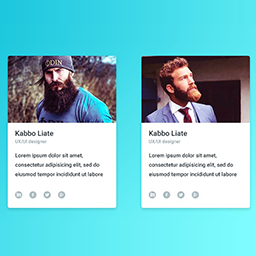
- 作者資料框:在單篇文章中美觀的作者簡介方塊。
**SEO 最佳化和快速效能**
- 廣受歡迎的 SEO 外掛:與主要 SEO 外掛模式系統完全相容。
- 優化查詢:有效率的資料庫查詢。
- 內建快取:智能快取減少負載。
**開發者友好**
- 乾淨的公共 API:簡單的功能:tmauthors_get_post_authors()、tmauthors_the_authors()。
- WP_Query 相容:與作者、author_name、author__in 參數無縫配合。
**多作者管理**
- 每篇文章無限合作者。
- 從所有網站使用者中搜尋並選擇。
- 適用於自訂文章類型。
- 作者檔案將顯示所有文章(主要 + 合著者)。
- 符合 GDPR。
**顯示和快捷碼**
- [tmauthors] - 顯示帶有連結的作者姓名。
- [tmauthors_box] - 具備頭像和簡介的完整作者框。
- [tmauthors_count] - 顯示作者數量。
- [tmauthors_list] - 帶格式的作者列表。
- [tmauthors_avatars] - 僅顯示作者頭像。
**開發者友好**
- 乾淨的 API:tmauthors_get_post_authors()、tmauthors_the_authors()。
- 與 WP_Query 相容:author、author__in、author_name 參數。
- 大量的鈎子和篩選器。
**對開發者**
這個外掛提供完整的開發人員工具包。更多細節,請參閱說明文件。
**文件**
*快捷碼使用*
在任何地方使用靈活的快捷碼顯示作者:
- 基本用法:
[tmauthors]
- 自定義分隔符:
[tmauthors separator=" & "] before="By "]
- 作者框:
[tmauthors_box show_avatar="true" avatar_size="120"]
- 所有選項:
[tmauthors post_id="123" separator=", " link="true" before="By " after=""]
[tmauthors_box post_id="123" show_avatar="true" show_bio="true" avatar_size="120"]
可用的快捷碼:[tmauthors]、[tmauthors_box]、[tmauthors_count]、[tmauthors_list]、[tmauthors_avatars]。
**有用連結**
- [說明文件](link_here)
- [主題 Ruby 網站](link_here)
- [支援論壇](link_here)
外掛標籤
開發者團隊
② 後台搜尋「ThemeRuby Multi Authors – Assign Multiple Writers to Posts」→ 直接安裝(推薦)
原文外掛簡介
ThemeRuby Multi Authors is a plugin that enables assigning multiple writers to posts and custom post types. Perfect for collaborative blogging, editorial teams, and news websites.
It is specifically designed for news sites, magazines, agencies, and content teams who need flexible author attribution with zero performance impact. SEO-optimized and featuring an easy-to-use editor panel.
🎯 Why Choose ThemeRuby Multi Authors?
Powerful Features
* Unlimited Authors: Assign as many writers as needed per post.
* Author Page: Automatically filters to show all multi-author posts.
* Custom Post Types: Enable multi-authors for any post type.
* Ready Shortcodes: Display authors anywhere with flexible shortcodes.
* Author Box: Beautiful author bio boxes in single post.
SEO Optimized & Fast Performance
* Popular SEO Plugins: Full compatibility with major SEO plugin schema systems.
* Optimized Queries: Efficient database lookups.
* Built-in Caching: Smart caching reduces load.
Developer Friendly
* Clean Public API: Simple functions: tmauthors_get_post_authors(), tmauthors_the_authors().
* WP_Query Compatible: Works seamlessly with author, author_name, author__in parameters.
Key Features
Multi-Author Management
* Unlimited co-authors per post.
* Search and select from all site users.
* Works with custom post types.
* Author archives show all posts (primary + co-authored).
* GDPR compliant.
Display & Shortcodes
* [tmauthors] – Display author names with links.
* [tmauthors_box] – Full author box with avatars and bios.
* [tmauthors_count] – Show number of authors.
* [tmauthors_list] – Authors as formatted list.
* [tmauthors_avatars] – Author avatars only.
Developer Friendly
* Clean API: tmauthors_get_post_authors(), tmauthors_the_authors().
* WP_Query compatible: author, author__in, author_name parameters.
* Extensive hooks and filters.
For Developers
The plugin provides a complete developer toolkit. For further details, please refer to the documentation.
Documentation
Shortcode Usage
Display authors anywhere using flexible shortcodes:
Basic usage:
[tmauthors]
With custom separator:
[tmauthors separator=” & ” before=”By “]
Author box:
[tmauthors_box show_avatar=”true” avatar_size=”120″]
All options:
[tmauthors post_id=”123″ separator=”, ” link=”true” before=”By ” after=””]
[tmauthors_box post_id=”123″ show_avatar=”true” show_bio=”true” avatar_size=”120″]
Available shortcodes: [tmauthors], [tmauthors_box], [tmauthors_count], [tmauthors_list], [tmauthors_avatars].
🔗 Useful Links
Documentation.
ThemeRuby Website.
Support Forum.