內容簡介
TG SMS WP Notify 可以產生簡訊給經理的手機號碼和/或客戶的手機號碼。
若啟用的話,以下事件將會產生簡訊給經理的手機號碼:
新文章發布
新 WooCommerce 產品添加
WooCommerce 產品定價更改
WooCommerce 產品特價更改
每當 WooCommerce 產品數量達到預定閾值時,或每當產品缺貨時。
若啟用的話,以下事件將會產生簡訊給客戶的手機號碼:
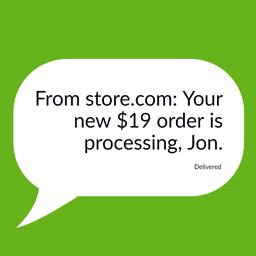
訂單狀態變更為處理中
訂單狀態變更為已完成
目前,TG SMS WP Notify 可以透過 Twilio 發送簡訊。
請在 Twilio 上創建自己的帳戶。他們可以發送全球的簡訊並提供一些免費的簡訊發送次數。我相信這對於一家小店來說已經足夠。
我們計劃推出更多功能,包括添加更多供應商,如 Twilio。如果你有任何特定的供應商需要整合,請通過電子郵件聯繫我們:[email protected]。
設置
前往「設定」>「TG SMS WP Notify 設定」
填寫以下 Twilio 詳細資料(這些資訊對於發送簡訊至少一個號碼是必要的)
* Twilio 帳戶 SId
* Twilio 授權令牌
* Twilio 來源號碼
* 輸入收件箱經理人的號碼
* 客戶模組將需要有效的入站簡訊啟用號碼(如果您全球派送訂單並希望簡訊也能送達,請檢查您的 Twilio 帳戶儀表板以查看啟用和價格)。
所有其他欄位都是可選的。這些已啟用(選中)的欄位將產生簡訊:
發佈新文章時發送簡訊
添加新產品時發送簡訊
產品價格更改時發送簡訊
當品質警報時發送簡訊
訂單處理時通知客戶
訂單完成後通知客戶
除了關於品質警報的訊息之外,所有其他訊息都可以在此處進行自訂。
外掛標籤
開發者團隊
② 後台搜尋「TG Send SMS Notifications for WordPress and WooCommerce Twilio」→ 直接安裝(推薦)
原文外掛簡介
TG SMS WP Notify will generate SMS for the Manager’s mobile number and/or Customer’s mobile number.
If enabled, the SMS are generated for the Manager’s number on the following actions:-
New post publish
New WooCommerce product addition
WooCommerce product Regular price change
WooCommerce product Sale price change
Whenever a WooCommerce product quality reaches a predefined threshold or whenever it goes out of stock.
If enabled, the SMS are generated for the Customer’s number on the following actions:-
Order status changed to Processing
Order status changed to Completed
Currently, TG SMS Notify provides for sending with Twilio.
Please create an account for yourself on Twilio. They can send SMS all over the world and give out a few hundred SMS for free. I believe that would be more than you’d require for a small store.
We plan to release more features including adding more providers such as Twilio. If you have any particular provider that you’d prefer be integrated, drop us an email at [email protected]
Settings
Navigate to Settings > TG SMS Notify Settings
Fill the following Twilio details (these are essential for delivery)
* Twilio Account SId
* Twilio Auth Token
* Twilio From number
* Enter the Recipient Manager Number.
* The customer modules would want a valid incoming SMS-enabled numbers (Check your Twilio account dashboard for delivery enablement and pricing if you deliver orders worldwide and want the SMS to too).
All other fields are optional. The SMS would be generated for those enabled (checked). These are:-
Send SMS for New Post
Send SMS for New Product
Send SMS for Product Price Change
Send SMS for Quantity Alert
Notify Customer on Ouder Processing
Notify Customer on Ouder Completed
Except for the message related to Quantity Alert, all other messages could be customized here.