
內容簡介
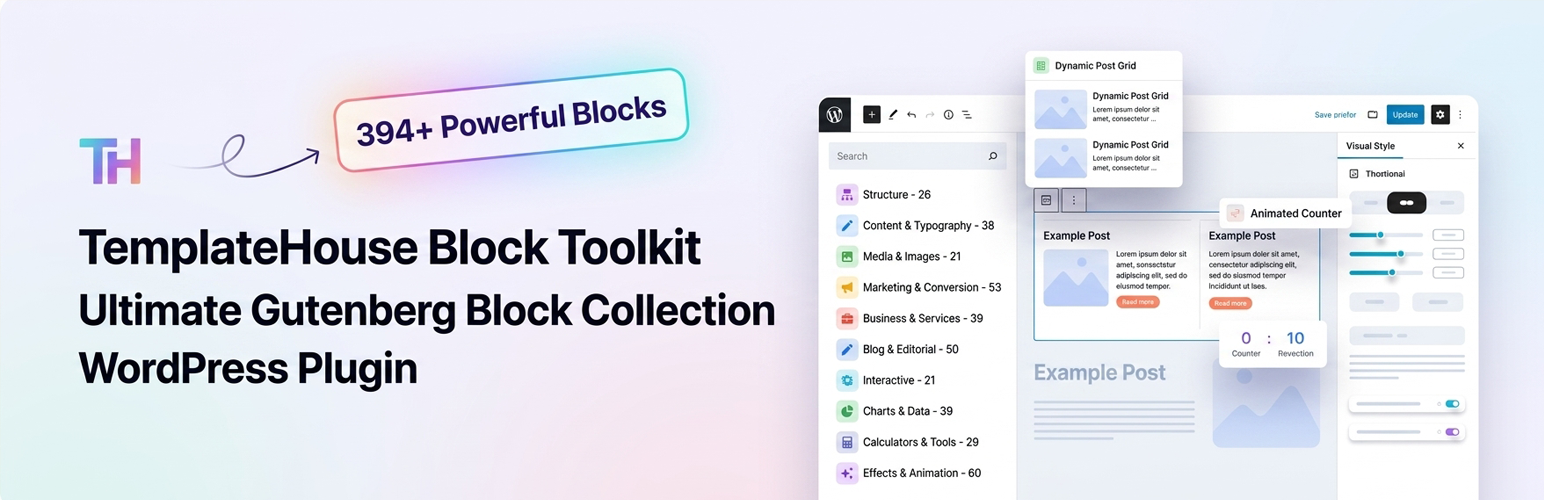
TemplateHouse Block Toolkit 是一款強大的 WordPress 外掛,提供超過 376 種 Gutenberg 區塊,幫助使用者在 WordPress 區塊編輯器中輕鬆建立現代化網站、著陸頁、部落格及商業網站,無需依賴其他頁面建構器。
【主要功能】
• 超過 376 種 Gutenberg 區塊
• 10 大實用類別組織
• 支援靈活的頁面佈局設計
• 提供多樣化的內容與排版選項
• 增強的媒體與影像展示功能
• 專業的行銷與轉換元件
外掛標籤
開發者團隊
② 後台搜尋「Gutenberg Block Toolkit – Page Builder for Gutenberg Blocks & Patterns」→ 直接安裝(推薦)
原文外掛簡介
TemplateHouse Block Toolkit is a powerful WordPress block library with 376+ Gutenberg blocks for building modern websites, landing pages, blogs, business websites, online stores, marketing pages, documentation, comparison pages, interactive tools, and more — directly inside the WordPress block editor.
Create professional WordPress websites without relying on Elementor, Divi, or other page builders. TemplateHouse Block Toolkit extends the native WordPress block editor with a large collection of flexible, customizable, and performance-focused blocks designed for real-world website projects.
Whether you are a blogger, marketer, business owner, freelancer, designer, developer, or agency, you can use TemplateHouse Block Toolkit to build complete page layouts and add advanced content and interactive features without writing custom code.
🔗 Live Demo
376+ Powerful WordPress Blocks
TemplateHouse Block Toolkit includes 376+ Gutenberg blocks organized into 10 practical categories:
Structure – 26 Blocks
Build flexible page layouts with sections, columns, containers, headers, navigation, content layouts, and other structural elements.
Content & Typography – 38 Blocks
Improve your content with advanced headings, text styles, lists, quotes, accordions, tabs, timelines, reading tools, and editorial components.
Media & Images – 21 Blocks
Create engaging visual experiences with image galleries, sliders, video blocks, popups, media cards, before-and-after layouts, and other media-focused elements.
Marketing & Conversion – 53 Blocks
Create high-converting landing pages with call-to-action sections, pricing elements, countdowns, promotional banners, offer cards, social proof, lead-generation layouts, and conversion-focused components.
Business & Services – 39 Blocks
Build professional business websites with service sections, team members, testimonials, contact information, business hours, process sections, company information, and more.
Blog & Editorial – 50 Blocks
Enhance WordPress blogs and editorial websites with article headers, reading lists, reading time, FAQs, sources and references, expert roundups, research content, tutorials, related content, and other publishing-focused blocks.
Interactive – 21 Blocks
Add engaging experiences with quizzes, polls, flashcards, interactive steps, tabs, reveal effects, interactive cards, drawing tools, and other interactive elements.
Charts & Data – 39 Blocks
Present information visually using charts, graphs, tables, progress indicators, statistics, data visualizations, comparison tables, and other data-focused blocks.
Calculators & Tools – 29 Blocks
Add useful tools to your website with calculators and utilities such as ROI calculators, price calculators, discount calculators, loan calculators, compound interest calculators, date calculators, time zone converters, and more.
Effects & Animation – 60 Blocks
Create modern and engaging designs with animated text, hover effects, scroll animations, parallax effects, marquees, particle effects, gradient effects, glassmorphism, cursor effects, and other visual interactions.
Build More with the WordPress Block Editor
TemplateHouse Block Toolkit is designed around the native Gutenberg block editor, giving you more control without adding another page builder to your WordPress website.
Use individual blocks to create:
WordPress landing pages
Business and corporate websites
Agency websites
SaaS and startup websites
Portfolio websites
Blog and magazine websites
Affiliate and review websites
Marketing and sales pages
Product comparison pages
Documentation and knowledge bases
Online course and educational websites
Service-based business websites
Interactive tools and calculators
Data and statistics pages
Restaurant and local business websites
One Block Toolkit for Complete Websites
Instead of installing multiple WordPress block plugins for different features, TemplateHouse Block Toolkit brings a broad range of website-building components into one toolkit.
Create page structures, publish rich content, display business information, build marketing sections, present data, add interactive tools, and enhance your website with modern visual effects — all from the WordPress block editor.
Powerful and Flexible Block Controls
Each block is designed to give you practical customization options while keeping the editing experience simple.
Depending on the block, you can customize:
Typography
Colors
Backgrounds
Spacing
Borders
Border radius
Shadows
Alignment
Icons
Images
Buttons
Responsive layouts
Animation and hover effects
Desktop, tablet, and mobile settings
This makes it easy to match your blocks with your existing WordPress theme and brand style.
Built for Modern WordPress Websites
TemplateHouse Block Toolkit works with modern WordPress websites and is designed to complement both block themes and classic WordPress themes.
The plugin focuses on a clean editing experience, flexible design controls, responsive layouts, and performance-conscious frontend output.
Useful Blocks for SEO and Content Marketing
Create structured and useful content with blocks such as FAQ, Review Schema, Breadcrumbs, comparison tables, testimonials, article sections, reading tools, sources and references, and other editorial components.
These blocks can help you organize your content clearly and create better experiences for visitors while supporting your overall content marketing and SEO strategy.
Perfect for Freelancers and Agencies
TemplateHouse Block Toolkit is also useful for WordPress freelancers, designers, and agencies who build websites for clients.
With hundreds of reusable blocks available in one plugin, you can create landing pages, business websites, marketing pages, blogs, service websites, and custom content layouts faster without repeatedly developing common UI components from scratch.
Lightweight and Performance-Minded
TemplateHouse Block Toolkit is built with performance in mind. The plugin uses selective assets and focuses on keeping frontend output clean and efficient.
You can also enable or disable individual blocks to keep your WordPress editor focused on the features you actually need.
Key Features
376+ Gutenberg blocks
10 organized block categories
Native WordPress block editor integration
Responsive design controls
Advanced typography and styling options
Marketing and conversion blocks
Business and service blocks
Blog and editorial blocks
Charts and data visualization blocks
Calculators and interactive tools
Modern animation and effects
Image and media blocks
SEO-focused content blocks
Flexible responsive controls
Block manager for enabling or disabling blocks
Theme-friendly design
Suitable for freelancers and agencies
No dependency on Elementor or Divi
Create Without Limits
From a simple blog post to a complete business website, TemplateHouse Block Toolkit gives you the building blocks you need to create modern WordPress pages faster.
Build better pages. Add more functionality. Design with Gutenberg.
Support
Need help with TemplateHouse Block Toolkit?
Visit our support page:
🔗 Visit our support page:
We are happy to help with plugin-related questions, bug reports, and support requests.
External services
This plugin does not phone home to TemplateHouse. It does not collect visitor data on its own. Some optional blocks connect to third-party services so they can show maps, weather, prices, videos, or share links. Those connections happen only when the matching block is on a page (and, where noted, only after a visitor clicks or an admin enters an API key). Each service may receive the visitor’s IP address and browser information as part of a normal HTTPS request.
Google Maps (Google Map block, Location Cards block)
Used to display an embedded map for an address the site editor enters, or to open a Google Maps search when a visitor clicks a location card.
When a Google Map block is shown, the visitor’s browser loads an iframe from Google Maps (maps.google.com or https://www.google.com/maps/embed/v1/place). The request includes the configured address/search query, zoom, map type, and — if the editor saved one — the site’s Google Maps Embed API key. Google may receive the visitor’s IP address, user agent, and similar browser data. Location Cards only send the address to Google when a visitor clicks to open Maps.
This service is provided by Google LLC: Google Maps/Google Earth Additional Terms of Service, Google Maps Platform Terms, Google Privacy Policy.
OpenWeatherMap (Weather Widget block)
Used to show current weather and an optional forecast for a city the editor configures, or for the visitor’s coordinates if “auto location” is enabled and the visitor allows geolocation.
When the weather block is shown and an OpenWeatherMap API key is saved in the block, the visitor’s browser requests https://api.openweathermap.org/data/2.5/weather and optionally /forecast. The request includes the API key, city name or latitude/longitude, units, and language. OpenWeatherMap may receive the visitor’s IP address and browser data. If auto location is off, no geolocation permission is requested.
This service is provided by OpenWeather Ltd.: Terms of use, Privacy policy.
CoinGecko (Stock Ticker block)
Used to display cryptocurrency market prices for coin IDs the editor configures (for example bitcoin, ethereum).
When the stock ticker block is shown, the visitor’s browser requests https://api.coingecko.com/api/v3/coins/markets with the selected coin IDs and currency. No visitor account data is sent. CoinGecko may receive the visitor’s IP address and browser data. Requests repeat on the refresh interval set in the block.
This service is provided by Gecko Labs Pte. Ltd. (CoinGecko): API Terms of Service, Privacy Policy.
WhatsApp (Social Share block, Phone Button block)
Used so a visitor can share the current page in WhatsApp, or start a WhatsApp chat with a number the editor configured.
No request is made to WhatsApp until the visitor clicks the share or chat button. The click opens https://api.whatsapp.com/send or https://wa.me/ with the page URL and optional pre-filled text, or the configured phone number. WhatsApp may then receive that content plus the visitor’s IP address and device data according to WhatsApp’s policies.
This service is provided by WhatsApp LLC: Terms of Service, Privacy Policy.
YouTube (video blocks: Video Popup, Playlist, Grid, Hero, Sticky Video, Video Testimonial, and similar)
Used only when an editor pastes a YouTube URL into a video block. The visitor’s browser then loads YouTube’s embed player and may load a thumbnail from https://img.youtube.com/. YouTube/Google may receive the video ID, the visitor’s IP address, cookies, and browser data.
This service is provided by Google LLC / YouTube: YouTube Terms of Service, Google Privacy Policy.
Vimeo (same video blocks, when a Vimeo URL is used)
Used only when an editor pastes a Vimeo URL. The visitor’s browser loads Vimeo’s embed player (https://player.vimeo.com/). Vimeo may receive the video ID, the visitor’s IP address, cookies, and browser data.
This service is provided by Vimeo.com, Inc.: Terms of Service, Privacy Policy.
Social share networks (Social Share block)
Share buttons open the selected network only after a visitor clicks. The click sends the current page URL and optional title/text as query parameters. No share request is made on page load.
X (Twitter): Terms, Privacy
Facebook: Terms, Privacy
LinkedIn: User Agreement, Privacy
Pinterest: Terms, Privacy
Telegram: Terms, Privacy
Reddit: User Agreement, Privacy
Google Fonts (optional, off by default)
Used only if a site administrator enables “Google Fonts” in Block Toolkit settings. Selected fonts are then requested from https://fonts.googleapis.com/ (and font files from https://fonts.gstatic.com/). That request may send the visitor’s IP address and browser data to Google. Leave the setting off to avoid any Google Fonts request.
This service is provided by Google LLC: Google Fonts Terms, Google Privacy Policy.
Chart.js (bundled)
Chart and loan-calculator blocks use Chart.js 4.4.3, MIT-licensed and bundled in assets/vendor/chart.js/. No CDN request is made. Upstream source: https://github.com/chartjs/Chart.js/tree/v4.4.3. License: https://github.com/chartjs/Chart.js/blob/v4.4.3/LICENSE.md
Natural Earth (World Map block)
Country outlines are bundled inside the plugin (public domain). No visitor request is sent to Natural Earth at runtime. Source: https://www.naturalearthdata.com/
Privacy
This plugin does not collect, store, or share personal data by default. It does not send usage analytics to TemplateHouse.
When you use an optional block that talks to a third party (maps, weather, prices, video embeds, share buttons, or Google Fonts), the visitor’s browser may send IP address and browser data to that provider. See External services above for what is sent, when, and links to each provider’s terms and privacy policy. Disclose those services in your own site privacy policy and obtain consent where required.
Third-Party Libraries
This plugin bundles Chart.js 4.4.3 (MIT) in assets/vendor/chart.js/ for chart and loan-calculator blocks. It does not include amCharts or other GPL-incompatible mapping libraries. The World Map block renders an SVG map with original JavaScript and locally bundled Natural Earth geography data (public domain).
Source Code
This plugin ships original, human-readable PHP, JavaScript, and CSS. It does not use npm, webpack, Babel, or another build step to generate block assets.
The files in /blocks (including each block’s index.js and frontend.js) and /assets are the source. They are not compiled, minified, or obfuscated. There is no separate src/ directory or generated bundle.
Chart.js 4.4.3 is a third-party MIT library bundled in assets/vendor/chart.js/ (UMD build plus LICENSE). Upstream source: https://github.com/chartjs/Chart.js/tree/v4.4.3
No build tools are required to review, modify, or fork the plugin. Edit the files in place.














