內容簡介
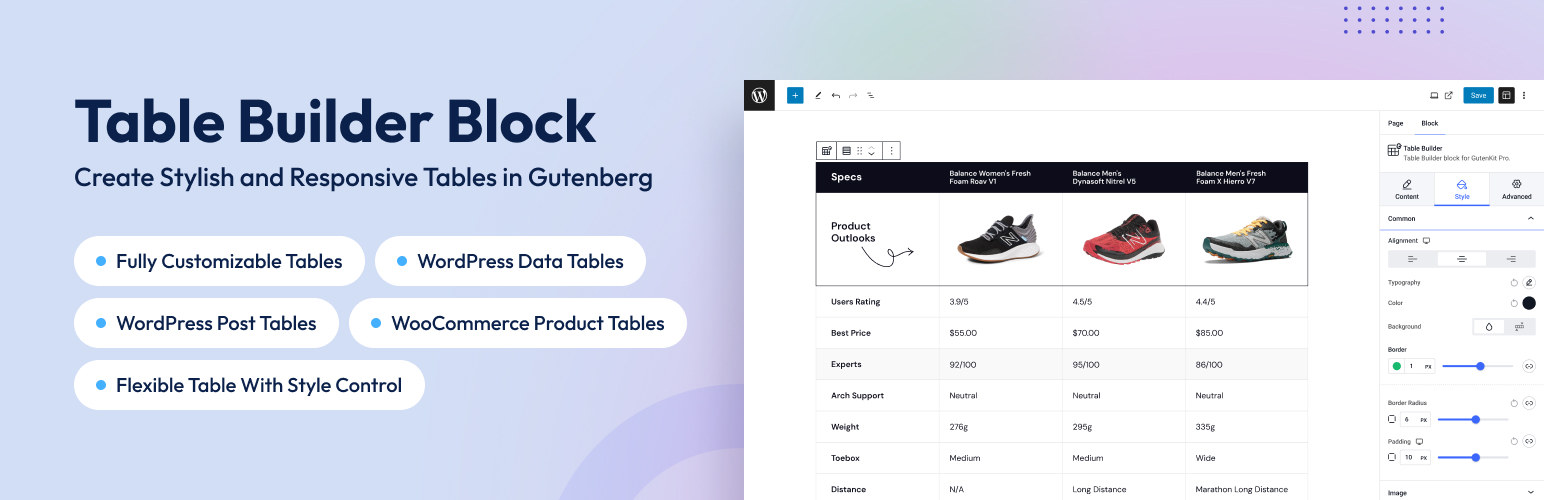
TableKit 是一款功能強大的 WordPress 表格建構外掛,適用於建立資料表、WooCommerce 產品表及文章表。它提供完整的自訂選項,並支援即時資料同步,讓使用者能輕鬆創建美觀且功能豐富的表格。
【主要功能】
• 完全自訂的 WooCommerce 產品表
• 支援 Google Sheets、CSV、JSON 和 REST API 的即時同步
• 在表格單元格中使用 Gutenberg 區塊
• 冻結欄位和標題列以便於瀏覽
• 包含多種動畫效果增強表格外觀
外掛標籤
開發者團隊
② 後台搜尋「TableKit – WordPress Table Builder for Data Tables, WooCommerce Product Tables & Post Tables」→ 直接安裝(推薦)
📦 歷史版本下載
原文外掛簡介
Fully Customizable. WooCommerce Product Table. Synch Any Data Files. All Within Block Editor.
TableKit – The WordPress Table Builder Plugin by Wpmet is the most complete table builder solution for WordPress — trusted by 3,000,000+ Wpmet users. Build data tables, WooCommerce product tables, post tables, comparison tables, and pricing tables directly in the block editor or Elementor.
Unlike any other WordPress table plugin, TableKit combines pixel-perfect design control, live data sync from Google Sheets, CSV, JSON and REST APIs, and WooCommerce product table functionality — all in one plugin with zero coding required.
So, A New Era in WordPress Table Building!
Whether you need a simple content table, a live-data-driven data table, a dynamic WordPress post table, or a fully functional WooCommerce product table with Add to Cart, TableKit has you covered.
TableKit is equipped with dozens of global and cell-specific customization settings, allowing you to effortlessly customize every aspect of your table to align with your design vision. Even to extend the elegance of your table looks more, this table builder plugin includes stunning animation effects.
Block Support in Table Cells for Full Gutenberg Freedom
TableKit is the only table plugin that lets you place any Gutenberg block directly inside a table cell. Images, buttons, galleries, videos, custom HTML, headings, paragraphs — if it’s a block, it belongs in your table.
Stop being constrained by plain text cells. With TableKit’s rich cell content support, your tables become full-featured layout canvases. Style every individual cell independently with its own alignment, typography, color, background, border, and padding — all from the block editor sidebar.
Freeze Columns and Header Rows
Keep your readers oriented no matter how large your table grows. TableKit lets you freeze any column and lock your header row in place while the rest of the table scrolls freely — horizontally and vertically.
This is essential for wide data tables, pricing comparison tables, and product catalogs where users need to reference column headers or row labels while scrolling through dozens of entries.
Merge & Split Cells
Build complex, professional table layouts with full merge and split cell support. Combine multiple cells across rows or columns to create grouped headers, spanning sections, or summary rows — just like you would in a spreadsheet. Need to undo it? Split any merged cell back with a single click.
Conditional Formatting
Make your data speak for itself. TableKit’s conditional formatting engine lets you automatically style cells based on their values — highlight low stock in red, flag top-rated products in green, or call out overdue dates in bold. Set your rules once and let TableKit do the rest, keeping your tables dynamic and informative without manual effort.
Duplicate Full Columns and Rows
Speed up your table building workflow dramatically. TableKit lets you duplicate entire columns and rows in one click — preserving all content, styling, and configuration. Perfect for building comparison tables, pricing grids, or any repeating structure where consistency matters.
Display anywhere
Another fun part of TableKit is its flexibility—it can be inserted anywhere on your webpage, allowing you to place it where it will most impact the content flow.
TableKit Elementor Widget
Build tables once and display them inside Elementor using the TableKit widget — same design, same formatting, no manual rebuilding required.
Zero Efforts for Responsiveness
Making responsive table designs shouldn’t be a challenge for WordPress users! And, that’s what the TableKit team believes, offering multiple pre-defined responsive breakpoints for different screens. You can set a custom width for each breakpoint ensuring the table looks great on any device.
You Should Use TableKit if You Want to Create…
🔶 WordPress Data Table: Connect to Google Sheets, CSV, JSON, or REST APIs and display live-syncing data tables — no coding, no manual updates.
🔶 WooCommerce Product Table: Show all product details — title, SKU, price, stock, ratings — with Add to Cart directly in the table row.
🔶 WordPress Post Table: Display posts, pages, and custom post types in a searchable, filterable, sortable table with ACF field support.
🔶 Comparison Table: Show feature differences side by side with conditional formatting — highlight winners automatically in green, gaps in red.
🔶 Pricing Table: Build clear, structured pricing tables with highlighted recommended plans and one-click column duplication.
🔶 Inventory Table: Track stock levels with conditional formatting that flags low inventory automatically.
🔶 Image Gallery Table: Embed images, videos, and media directly inside table cells using native block support.
🔶 Financial Report Table: Display financial data with row grouping, column sorting, and export to CSV, Excel, or PDF.
🔶 Team Member Table: Showcase team profiles with photos, roles, and contact links in a clean, responsive table layout.
🔶 Property Listing Table: List properties with images, prices, locations, and availability — filterable and sortable by any column.
🔶 Pros & Cons Table: Easily highlight the pros and cons of your products or services.
📚 TABLEKIT TEMPLATE LIBRARY
Skip the blank canvas. Start with ready-made table templates and customize only what matters:
Available Template Types:
– Pricing Tables – Professional pricing grids with highlight columns
– Comparison Tables – Side-by-side feature comparisons
– Product Tables – WooCommerce product showcases
– Data Tables – Structured data displays
– Post Tables – Blog post listings and directories
One-Click Import: Browse templates directly in the block editor and import with a single click. All templates are fully customizable.
View Template Library
The possibilities for creating diverse website table formats with TableKit are endless…
WooCommerce Product Table — Build a Searchable Product Catalog
Turn your WooCommerce store into a high-converting product catalog. TableKit’s WooCommerce Product Table displays your products in a clean, filterable, searchable table layout — giving customers everything they need to make a purchase decision at a glance.
✅ Every product detail, in every column: Display product data like title, description, short description, SKU, price, regular price, sale price, tax status, stock status, stock quantity, and every other details.
✅ Direct Add to Cart from the table: Customers can add products to their cart directly from the table without opening product pages. It includes quantity controls and stock status, reducing friction and speeding up purchases.
✅ Query Filtering: Filter products by categories, tags, or custom taxonomies with flexible sorting options. Control display order, direction, and even skip items using offset for smarter queries.
✅ Search, Filter, Paginate, and Export: Enable live search, column filtering, pagination, and customizable row limits for a smooth browsing experience. Export table data anytime in CSV, Excel, or PDF formats.
WordPress Post Table — Display Posts, Pages & Custom Post Types
Display any WordPress content type in a beautiful, queryable table. TableKit’s Post Table is a powerful way to present posts, pages, media files, custom post types, and templates — searchable, filterable, and paginated.
Show any content type:
– WordPress Posts and Pages
– WordPress Media Files
– Custom post types and Templates
– ACF (Advanced Custom Fields) data
WordPress Data Table
Connect your tables to live external data sources and build truly dynamic tables — no coding required. TableKit’s Data Table module bridges the gap between spreadsheets, APIs, and your WordPress site.
Supported data sources:
– CSV files
– Google Sheets (with live updates)
– JSON and Nested JSON
– REST APIs (JSON)
✅ Live data and caching: Connect to a Google Sheet and your table updates automatically whenever the sheet changes. For performance, TableKit includes data caching so your pages stay fast. Use the Nested JSON Path Selector to target exactly the data you need from complex API responses.
✅ Export, search, and filter: Every data table comes with built-in search, individual column filtering, pagination, rows-per-page control, total result count, and export to CSV, Excel, and PDF.
✨ Core Table Features (Free, For All Tables)
Every TableKit table — regardless of type — includes:
Advanced Column Sorting — Sort any column ascending or descending
Row & Column Styling — Full control over every row and column’s appearance
Table Caption Support — Add and style accessible table captions
Customizable Header and Footer — Independent control over alignment, typography, color, background, border, and padding for header and footer rows
Custom Row Styling — Highlight alternating rows, hover states, or specific rows
Customizable Controls — Adjust vertical and horizontal cell spacing independently when border collapse is disabled
Full Customization — Alignment, typography, color, background, border, and padding for header cells, footer cells, caption, and common cells
🧿 Backed By a Trusted Team
TableKit is brought to you by Wpmet, a name trusted by 3 million+ satisfied users worldwide.
👨💻 DOCUMENTATION AND SUPPORT
🟢 Check Documentation
✅ Contact Our Support
🌐 Join Our Facebook Community
💹 Browse Changelogs
💝 Love TableKit?
🧲 Stay Updated with our Youtube Channel
⭐️ Rate us on WordPress
☂️ Our Other Plugins
If you like using PopupKit plugin by Wpmet, then consider checking out our other plugins:
ElementsKit – All-in-one Addons for Elementor featuring 85+ widgets.
MetForm – The most flexible and easy-to-use form builder.
ShopEngine – The most complete WooCommerce solution for Elementor.
GutenKit – Build websites 10x Faster with ZERO coding in the Gutenberg Block Editor.
EmailKit – The most complete no-code Email Template designer for WordPress.
Wp Social – Leverage Wp Social to add Social Login, Social Counter, and Social Login to your website.
Rox Appointment Booking – Multipurpose appointment & booking solution plugin for WordPress.
Wp Ultimate Review – Manage customer reviews with the Wp Ultimate Review plugin.
PopupKit – Build exceptional popup for diverse needs within the WordPress block editor.
Visit Wpmet to learn more about how to get the best of WordPress with Tutorials, Tips & Tricks!