內容簡介
此 WordPress 外掛可在 WooCommerce 商店中增加結帳步驟,為更好的購物體驗提供協助。
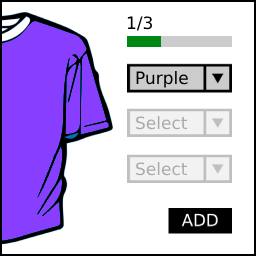
從使用者加入商品至購物車的那一刻起,一個四步驟進度條會顯示在主題標題下方,
它會引導使用者完成整個購物過程。
步驟分為:選擇產品 – 購物車 – 結帳 – 完成
每個步驟都有相對應的圖示以作說明。對於手機或小螢幕,僅會顯示圖示。
每個步驟都同時連結到其對應的購物步驟頁面。
支援的語言版本:英文、西班牙文和法文。
如果您喜歡這個外掛,希望有更好的功能和其他外掛,請捐款支持作者。時間寶貴,不能免費提供服務!
(右側欄位,作者,“捐贈此外掛”)—>
外掛標籤
開發者團隊
② 後台搜尋「SYW Woocommerce Simple Checkout Steps」→ 直接安裝(推薦)
原文外掛簡介
Add checkout steps at your Woocommerce shop for a better shopping experience.
From the moment the user add something to the cart, a 4-steps bar appears bellow the theme header,
witch will guide the user throwght all the shopping process.
The steps are: Choose products – Cart – Checkout – Done
Each step comes with an icon to ilustrate it. For mobile or small resolutions, only the icons will be showed.
Each step are at the same time link to each shopping step process.
Languages avaliables: English, Spanish and French
If you like the plugin and you want better features and other plugins, please make a donation, time is gold, I can´t waste it for free!
( right sidebar, Author, “Donate to this plugin” ) —>