
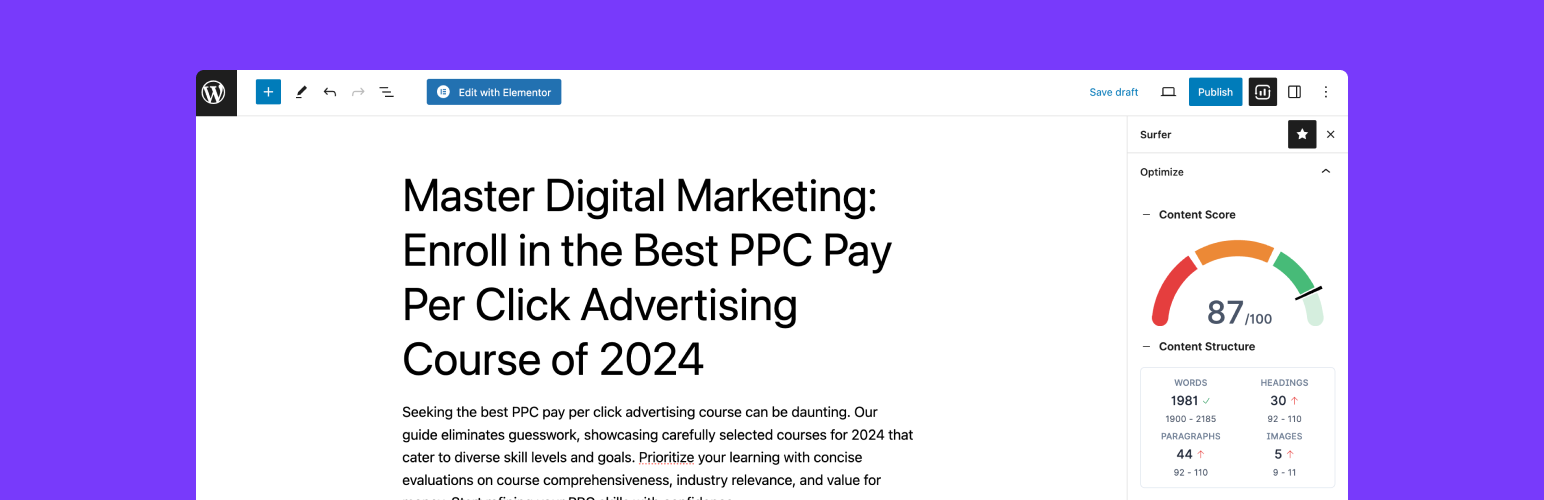
內容簡介
Surfer 是一款連接 WordPress 的內容編輯器外掛,旨在簡化內容撰寫、關鍵字發掘及 SEO 優化的過程。透過此外掛,使用者能夠快速撰寫並發佈高排名的內容,提升網站的搜尋引擎能見度。
【主要功能】
• 直接在 WordPress 中使用 Surfer 的內容編輯器
• 研究並發掘新的關鍵字想法
• 無縫轉移格式,避免排版問題
• 定期更新現有文章以提升競爭力
• 追蹤文章的點擊率與曝光率
外掛標籤
開發者團隊
② 後台搜尋「Surfer – WordPress Plugin」→ 直接安裝(推薦)
📦 歷史版本下載
原文外掛簡介
Connect Surfer’s Content Editor to WordPress and make writing content, discovering keywords, and optimizing your work for SEO a breeze.
SURFER’S OFFICIAL WORDPRESS PLUGIN
Surfer’s free WordPress plugin that connects your WordPress page to Surfer’s Content Editor. Surfer’s WP plugin just saved you a step (or 2!). Write, publish and start ranking.
EASY SETUP AND FAST INTEGRATION
It takes just a few minutes to download and install the plugin, and even less to publish your content!
Install the free WordPress plugin
Write highly rankable content using Surfer’s trusted guidelines
Research and find new keyword ideas
Work in WordPress using Surfer’s Content Editor without any hassle
Create a Content Editor directly in WordPress, or export it to Surfer
Track how many clicks and impressions your posts generated directly in WordPress
AVOID FORMATTING ISSUES AND INCONSISTENCIES
CTRL + A, CTRL + C, CTRL + V, in two clicks! What you write in Surfer’s Content Editor is what you’ll get (and see) when you publish on WordPress.
Headings, images and text are converted block by block and transferred seamlessly from Surfer’s interface to your WordPress site.
Images are downloaded and stored on WordPress and are accessible in your media library versus an external link which improves performance and SEO!
Surfer’s Plugin currently supports the two most widely used WordPress text editors: Gutenberg and Classic Editor (and can distinguish between the two!).
V.1, V.2 V.3? With Surfer plugin you always publish the current and correct version of your article without the copy-paste confusion.
OPTIMIZE AND IMPROVE EXISTING ARTICLES
Keep your content relevant and competitive with periodic updates to keep climbing the SERPs!
Use Surfer’s Content Editor to refresh your article and optimize its keywords for an even better performance.
Finally, once you’re satisfied with the improvements, publish the updated piece on WP. You can also easily access all your WordPress articles in the Content Editor!
SURFER RESOURCES AND SUPPORT
Get your questions answered whenever you need help. Simply go to our website and reach out to us via chat, or drop us an email at [email protected].
You can also sign up for Surfer Academy and learn how to take advantage of Surfer with unlimited tips and tricks packaged into training videos and live sessions. For free!
READ MORE
Want more information about Search Engine Optimization and Surfer?
Join our Facebook Group
Find us on LinkedIn and YouTube
Check our Knowledge Base






