
內容簡介
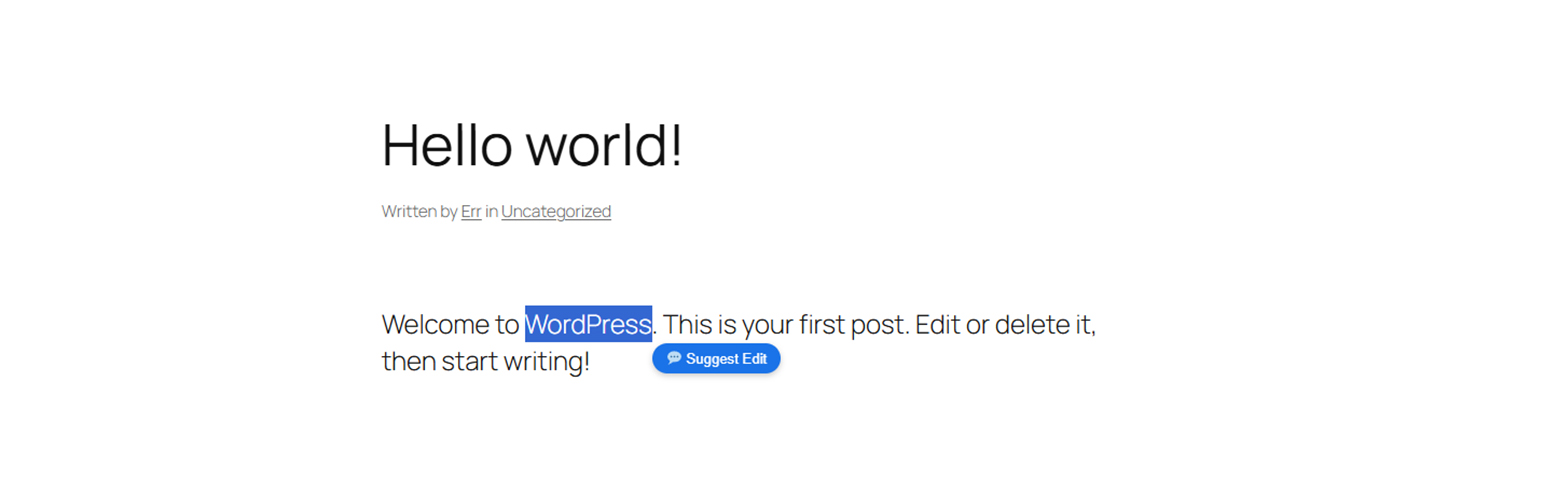
Suggest Edits and Comments 外掛提供專業的內嵌評論和互動體驗。讀者可以高亮任何文章中的文字片段,觸發工具提示按鈕,留下具體的建議或編輯意見,促進更精確的討論。
【主要功能】
• 高亮建議:選擇文字觸發「建議編輯」工具提示
• 精確文本定位:自動生成指向高亮文本的 URL
• 顯示控制:選擇功能活躍的文章類型
• 彈性權限:輕鬆排除特定用戶角色
• 強大的安全性:內建 Google reCAPTCHA v3 整合
• 實時小工具:AJAX 驅動的最新建議編輯列表
外掛標籤
開發者團隊
原文外掛簡介
Suggest Edits and Comments provides a professional inline commenting and interactive experience. Readers can highlight any text snippet within a post to trigger a tooltip button, allowing them to leave contextual suggestions, suggest edits, or discuss specific terms accurately.
Key features include:
* Highlight to Suggest: Select text to trigger a “Suggest Edit” tooltip.
* Accurate Text Fragments Positioning: Automatically generates URLs pointing exactly to the highlighted text. The contextual extraction algorithm ensures that the target location is never missed, even in long articles with duplicate content.
* Display Control: Choose exactly where the feature is active by selecting allowed post types (Posts, Pages, Custom Post Types) and defining custom CSS target selectors to match any theme structure perfectly.
* Flexible Permissions: Easily exclude specific user roles (or Guests) from highlighting text and submitting suggested edits.
* Robust Security & Anti-Spam:
– Built-in Google reCAPTCHA v3 (invisible) integration.
– 30-second cooldown limit between submissions.
– Maximum daily suggested edits limit for each account (or IP address for guests).
* Visual Interface Customization: Easily change background colors, border colors, hover colors, and button text directly in the Settings page.
* Optimized User Experience (UX): Uses a modern, smooth Toast Message notification.
* Real-time Widget: Provides an AJAX-powered Widget to display a list of the latest suggested edits without reloading the page, complete with friendly time-ago formats (e.g., “Just now”, “5 mins ago”).
* Compatibility: Perfectly integrates the quote box display with the default WordPress commenting system and wpDiscuz.
* Clean Uninstall: Provides options to securely wipe all data (comments, metadata, settings) when uninstalling the plugin, helping to optimize your Database.
External Services
This plugin utilizes a third-party service, Google reCAPTCHA v3, to protect the suggestion form from spam and bot abuse.
If enabled by the website administrator in the plugin settings, this plugin will load the Google reCAPTCHA JavaScript API (https://www.google.com/recaptcha/api.js) and send verification requests to Google (https://www.google.com/recaptcha/api/siteverify) whenever a user submits a suggested edit.
What data is sent and when: When a user submits the form, hardware and software information, such as device and application data, IP address, and the results of integrity checks are sent to Google to determine whether the user is a human or a bot.
Service Provider: Google LLC.
Google Privacy Policy: https://policies.google.com/privacy
Google Terms of Service: https://policies.google.com/terms
Support
If you have any issues or suggestions, please use the plugin’s support forum on WordPress.org or contact the author via their Author URI.
Donations
If you find this plugin useful and would like to support its development, please consider making a donation. Thank you!